

An audit can be complete while every problem it found is still open.
The district manager photographs an outdated promotion, flags a display that misses the brand standard, and sends the store its report. Days later, someone still has to ask who owns the fixes and whether they are finished. Across 10 stores, that creates unnecessary follow-up. Across 500, it becomes a daily management burden.
Retail audit software helps teams inspect stores, record evidence, compare results, and manage corrective actions. The buying decision comes down to what happens after a failed check: how work reaches the store team, how they prove it is done, and how managers verify the result.
This guide compares five tools for different operating models, from managing your own store network to sending merchandising reps into retail accounts.
To see where audit tools fit alongside POS, inventory, and store operations platforms, use our retail software category guide.

Retail audit software comparison at a glance
| Platform | Corrective actions | Evidence & review | Primary fit |
|---|---|---|---|
|
01.
Bitreport
Store operations & execution
|
Automatic assigned tasks from failed audit items | Required photo/video proof with HQ review | Multi-store retail execution |
|
02.
GoAudits
Digital checklists
|
Assigned actions, reminders and escalations | Photos and annotations; report approval workflows | Digital inspections and reporting |
|
03.
Repsly
Field merchandising
|
Account-specific tasks for field reps | Shelf photos and field reports | CPG brands and merchandising teams |
|
04.
Crunchtime Ops Execution
Formerly Zenput • Restaurant ops
|
Automated follow-up tasks and resolution tracking | Photos and mobile audit reports | Enterprise QSR and foodservice operations |
|
05.
YOOBIC
Comms & frontline learning
|
Visit action plans and configurable follow-up | Visit photos and action tracking | Retail teams combining execution, communication and learning |
The sections below explain these fit judgments and link to the supporting product documentation.
1. Bitreport: Best for closed-loop execution across stores
Bitreport is a mobile-first operations and audit app for teams responsible for getting work completed across their own store network. Its strongest fit is the handoff between a district manager finding an issue, the store team fixing it, and HQ verifying completion.
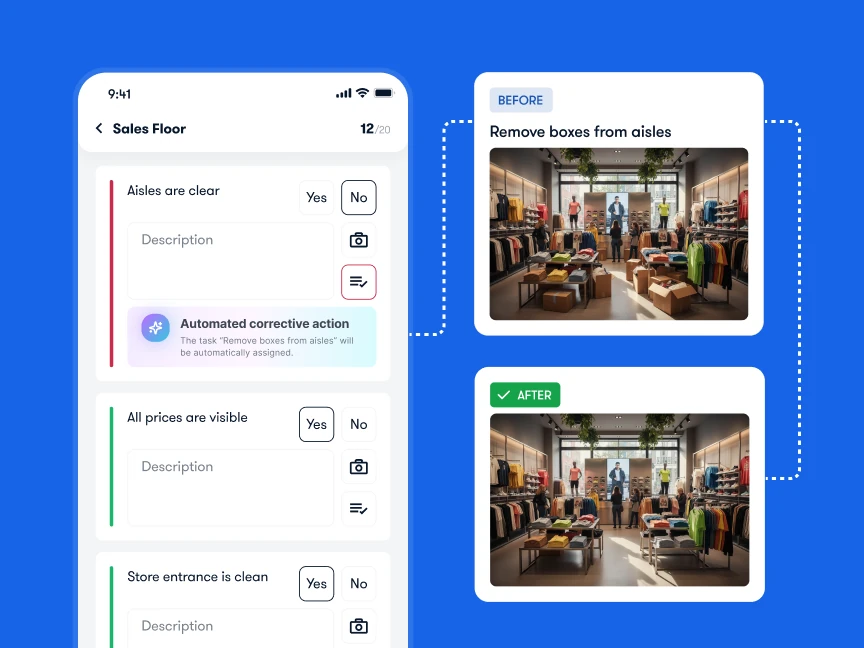
Image source: Bitreport – Retail Execution Platform
Standout capabilities
Automatic corrective tasks: Configure failed audit items to create assigned tasks with deadlines and instructions, so managers can track each finding through resolution. See audits and automatic corrective measures.
Proof before sign-off: Require the store team to submit photo or video evidence of the fix for HQ review.
Shared visibility: Manage recurring work and follow-up across locations, with completion status and reporting by store or region. See Bitreport task management.
Consider a promotional display check. A district manager marks the display as non-compliant. The configured rule creates a task for the responsible store team, with instructions and a deadline. The team corrects the display and submits the required evidence. HQ reviews the result before signing off.
That is the closed loop: the finding has an owner, the owner provides proof, and the reviewer checks the fix.
For a related retail example, Under Armour CEE uses Bitreport for weekly visual merchandising across 22 stores. Its published case study describes centralized photo review, feedback, approval, and reopening items that need adjustment. Read the Under Armour CEE case study.
Limitations and ideal fit
Bitreport needs an agreed operating process. Someone must define what triggers a task, who receives it, and who reviews the evidence. Automating an unclear handoff will leave the responsibility unclear.
It is a strong shortlist choice for grocery, fashion, and specialty retail chains where district managers spend too much time chasing corrections. Teams focused primarily on field sales or a company-wide learning program should also evaluate the specialist options below.
See how Bitreport takes an audit finding through to a verified fix.
Ready to see how automated retail audits work in practice?
2. GoAudits: Best for checklist digitization and fast reports
GoAudits suits teams whose immediate priority is getting existing inspections onto mobile devices and producing consistent reports. Its retail offering covers store checks, photo documentation, offline inspections, and visibility across locations. GoAudits retail audit software.
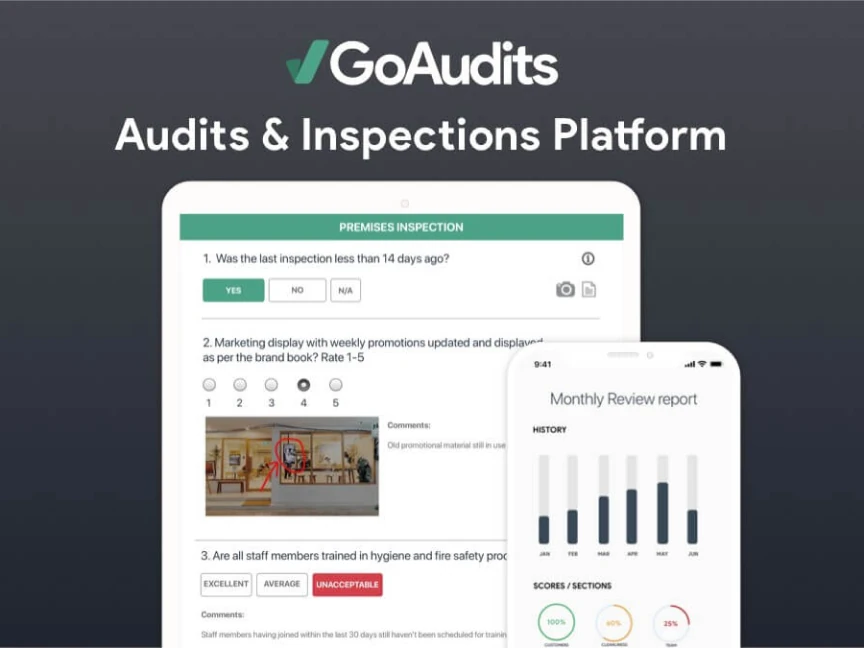
Image source: GoAudits
Standout capabilities
-
Mobile inspections: Complete checklists with photos, annotations, and comments, including offline use.
-
Fast reporting: Generate and distribute inspection reports containing scores, evidence, and assigned actions. GoAudits reporting.
-
Corrective-action management: Assign owners, priorities, and due dates; track overdue work; and configure notifications and escalation workflows. GoAudits corrective actions.
Limitations and ideal fit
The plan boundary matters for growing chains. At the time of review, Starter lists 25 locations and 10 checklist templates. Roles and permissions, audit scheduling, and advanced reporting sit in Enterprise. Evaluate the plan your full operation needs. GoAudits plan comparison.
GoAudits is a credible option for inspection-led teams that want a straightforward route from checklists to reports and follow-up. For broader daily store execution, include campaign tasks and regional oversight in the demo so you can assess the fit beyond the audit itself.
3. Repsly: Best for CPG field sales and merchandising teams
Repsly fits an operating model where representatives visit retail accounts to improve a brand’s execution at the shelf. Its account visits, field team coordination, and sales workflows are especially relevant to CPG brands and merchandising service providers. Repsly platform overview.
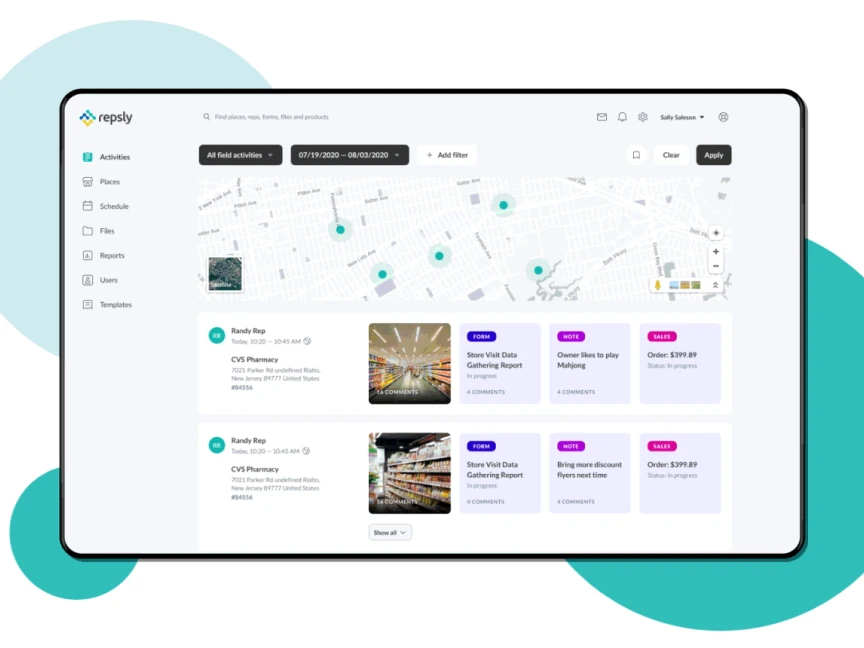
Image source: Repsly
Standout capabilities
-
Visit and route planning: Organize store calls around account priorities and territory coverage. Repsly in-store execution.
-
Field data collection: Use forms to capture stock levels, promotional compliance, and competitive activity.
-
Rep coordination and sales: Assign account-specific tasks with deadlines and support mobile order entry. Repsly field team management.
Limitations and ideal fit
The main trade-off is the operating model. A brand’s rep can inspect a third-party store and report a shelf issue, but the retailer controls its own staff and many of the decisions needed to fix it. Software alone cannot resolve that ownership boundary.
Shortlist Repsly when account coverage, merchandising visits, and field sales belong in the same workflow. If you operate the stores yourself, test how its account and rep structure would support your store teams and regional management.
4. Zenput / Crunchtime Ops Execution: Best for enterprise QSR and food operations
Zenput is now named Crunchtime Ops Execution. It focuses on consistent operational execution across restaurant locations, making it particularly relevant to QSR chains and multi-unit foodservice groups. Crunchtime’s product naming announcement.
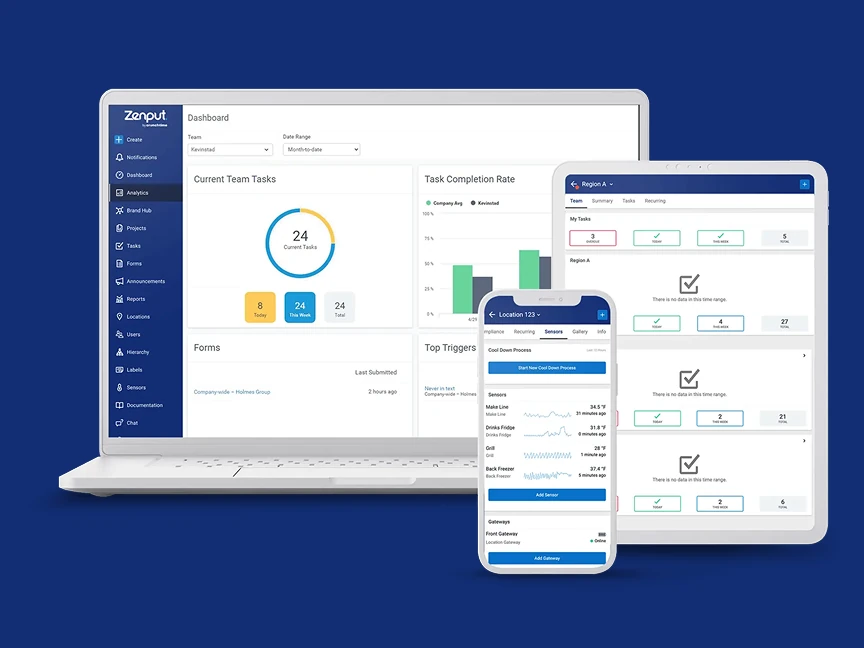
Image source: Zenput
Standout capabilities
-
Daily operational control: Coordinate tasks and audits across locations, with visibility into completion and follow-up. Crunchtime operations suite.
-
Food safety workflows: Bring digital checks and temperature recording into daily store routines. Crunchtime food safety workflows.
-
Automated temperature monitoring: The temperature-monitoring offering uses sensors to record equipment temperatures and trigger alerts and follow-up when readings move outside configured ranges. Crunchtime temperature-monitoring product brief.
Limitations and ideal fit
Automated temperature capture requires compatible hardware and deployment at the location. Confirm devices, installation, support, and software scope in the proposal.
This is a strong option when food safety checks and restaurant routines drive the purchase. For a fashion or specialty retailer, assess whether the foodservice capabilities address a real requirement and how the audit workflow fits your stores.
5. YOOBIC: Best for connecting audits with communication and learning
YOOBIC brings store execution, employee communications, and mobile learning into one platform. It is relevant when an audit exposes a training or communication problem that the retailer wants to address in the same app. YOOBIC platform overview.
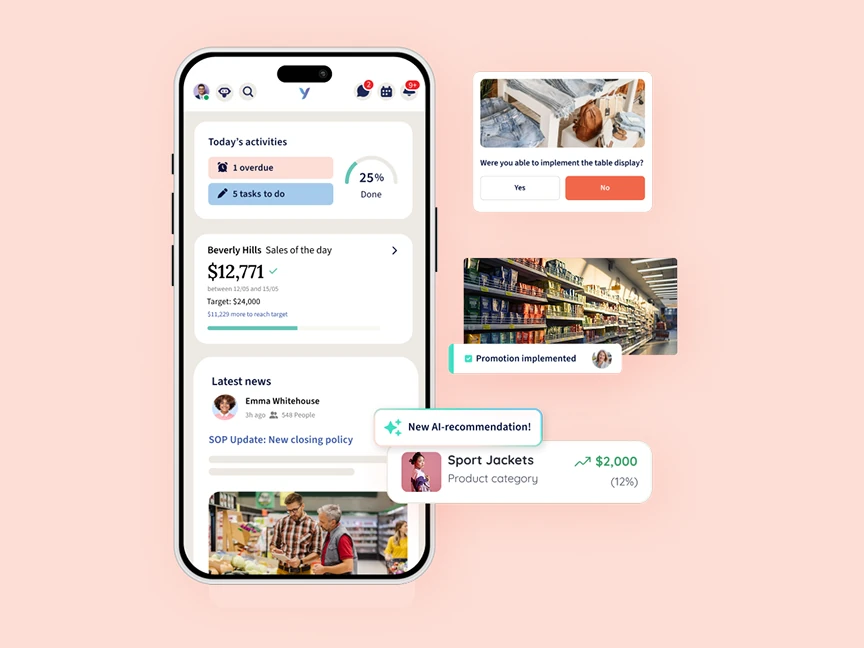
Image source: YOOBIC
Standout capabilities
-
Structured store visits: Use configurable checklists, capture photos, and generate visit reports.
-
Follow-up from findings: Assign action plans from the visit and track progress across stores and regions. YOOBIC store visits and audits.
-
Learning alongside execution: Deliver short mobile training, role-based learning paths, and completion tracking alongside operational work. YOOBIC learning.
Limitations and ideal fit
The broader scope brings a rollout decision: who will maintain the communications and learning content, and how will those teams coordinate with operations? Establish those responsibilities before adopting all three areas.
YOOBIC is a strong candidate when retail operations, internal communications, and learning teams want a shared frontline platform. If the immediate problem is audit follow-up, ask for a focused demonstration of that workflow and clarify which capabilities are included in the proposed package.

Buyer’s checklist: What to test before choosing retail audit software
Bring one real checklist and one recurring store problem to each demo. Ask every vendor to run the same scenario from the failed answer to the manager’s review.
1. Offline work that survives a store visit
Test on the devices your team will use. Disconnect the internet, open the required checklist, add findings and photos, close and reopen the app, then reconnect.
Check what must be downloaded beforehand, what remains available offline, and when evidence and corrective tasks become visible to other users. A completed form, uploaded photos, and a delivered task are separate things to verify.
2. Corrective actions with clear responsibility
Fail an item and watch what happens next. Can the system create the task automatically, route it to the correct store or role, and apply a deadline? What happens when that owner is absent or the work becomes overdue?
Test a second failed item with a different priority. A missing shelf label and an urgent operational issue should follow the rules your team actually uses.
3. Evidence and review before closure
Ask the store user to submit the correction without the required proof. Then submit an unclear photo and ask the reviewer to return it for another attempt.
Check that the original finding, corrective action, evidence, and review decision remain connected. Photo submission supports verification; the reviewer still needs to judge whether the work meets the standard.
4. An app frontline staff can use during a shift
Let a store colleague complete a short audit after a brief introduction. Watch where they hesitate: finding today’s work, understanding the instruction, attaching evidence, or reporting a blocker.
Include shared devices, staff turnover, and the languages your stores need in the evaluation. Ease of adoption should be demonstrated by the people doing the work.
5. Regional visibility without hiding local problems
Ask a district manager to find overdue corrections across their stores, then open the supporting evidence. Ask HQ to identify the same failed check across several regions.
Evaluate audit completion and issue resolution separately. A strong average audit score can still sit alongside unresolved work that needs attention.
6. A rollout and cost model that fits the chain
Compare costs using the same numbers of locations, auditors, store users, and reviewers. Include the features you need, setup, training, and any required integrations or devices.
Run a pilot across different store formats and connectivity conditions. Measure audit time, time spent chasing updates, overdue actions, and recurring failures. Set success criteria before the pilot begins.
If you are still defining what stores should check, start with our retail audit guide.
Choose the tool that helps your stores finish the work
The right shortlist follows your operating model. GoAudits fits inspection and reporting priorities. Repsly fits field sales and merchandising visits. Crunchtime Ops Execution fits restaurant and food safety routines. YOOBIC connects operational work with communication and learning.
For retail chains that need to turn audit findings into assigned work with evidence and HQ review, Bitreport is built around that workflow.
Bring a checklist and an issue your district managers keep chasing. In a 30-minute demo, see how a failed check becomes a corrective task, how the store submits photo or video proof, and how HQ reviews the result.