

A store manager needs to know whether the opening checks are complete. A merchandiser needs to know which stores have installed the new display. Finance needs a reliable record of sales and stock. All three might ask for retail store management software, but they are describing different jobs.
Retail store management software is an umbrella term for tools that support selling, inventory, daily operations, audits, execution, reporting, and staffing. Some platforms combine several of these functions. Others specialize in one workflow and work alongside your existing systems.
The useful starting point is the problem you need to solve. If checkout and stock records are working but regional managers spend their afternoons chasing photos, replacing the POS may leave the main problem untouched.
This guide compares seven software categories, explains where familiar platforms fit, and provides a practical way to build your shortlist. For the broader processes these tools support, see our guide to retail operations.
Published by Bitreport, a retail operations software provider. Product examples were checked against official vendor pages in September 2026. This is a category guide, not a hands-on ranking; availability and configuration vary by product, market, and plan.
Retail software categories at a glance
Use this table to identify the workflow that deserves a closer look. The categories overlap: an operations platform may also handle audits, while a POS may include inventory and sales reporting. A category match helps you ask better questions; it does not mean you need seven separate subscriptions.
| Category | Primary job | Examples to explore | Start here when… |
|---|---|---|---|
| Store operations | Assign recurring work and follow up across locations | Bitreport, Zipline | Managers chase updates on routines, tasks, and unresolved issues |
| POS and payments | Process sales and connect transactions with products and customers | Shopify POS, Lightspeed Retail, Square | Checkout, returns, or online and store sales need a common workflow |
| Inventory and ERP | Maintain stock records, purchasing, order flows, and business records | Cin7, Oracle NetSuite | Stock movements and purchasing have outgrown the current setup |
| Audits and compliance checks | Assess standards, document findings, and track corrections | Bitreport, GoAudits | Inspections produce reports but findings keep returning |
| Retail execution | Coordinate campaigns, displays, and field activity | Bitreport for store execution; Repsly and GoSpotCheck for relevant field workflows | You need evidence of execution across your stores or retail accounts |
| Store analytics | Combine and interpret performance data | RetailNext; reporting in existing POS and operations tools | Teams see outcomes but cannot identify where to investigate |
| Workforce scheduling | Plan coverage and manage working time | Deputy, Connecteam | Shift coverage, availability, and timesheets need better coordination |
The order is not a ranking. A single-store merchant and a regional operations director can use this same table and arrive at different shortlists.
1. Store operations software: make daily work visible
Store operations software organizes what people need to do: opening routines, cleaning checks, promotional tasks, maintenance follow-up, and instructions from head office. Its value depends on whether a store team can see the right priorities and a manager can follow up without reconstructing the story from messages.
Imagine an area manager responsible for twelve stores. Every Friday, they ask each manager whether the weekend setup is ready. Replies arrive in different chats, some without photos, and two stores need a reminder. The operational requirement is a repeatable assignment with a deadline, evidence, and visible status across locations.
Bitreport’s task management tools support assigned and recurring work, with location-level follow-up. Zipline is another relevant example, connecting retail communications and tasks. Their presence in the same category gives you a useful comparison starting point, rather than a claim that their full feature sets are identical.
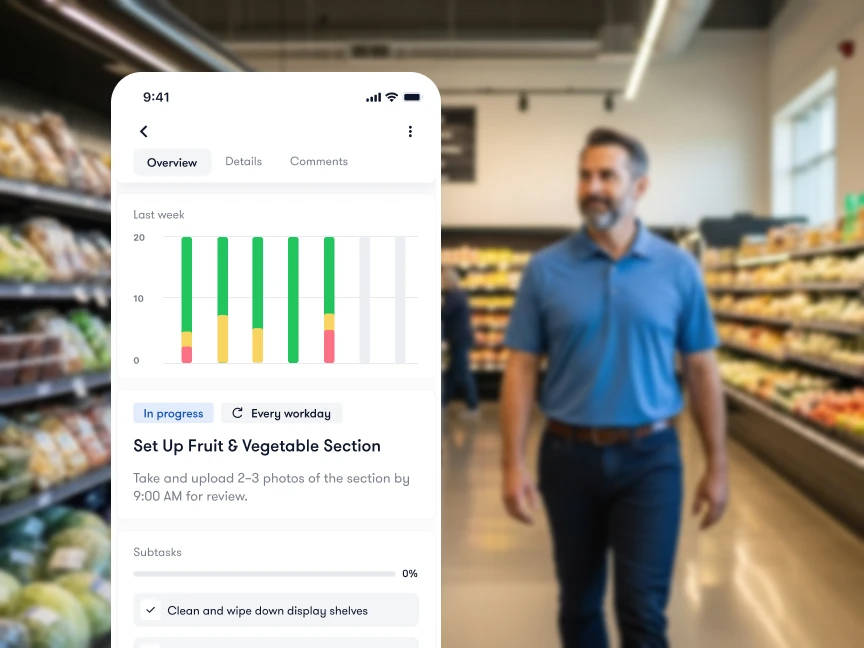
A useful demo starts with an exception: one store misses the deadline, another submits an unclear photo, and a third reports that it cannot complete the task. Watch how the manager finds those exceptions and what the store employee sees next. A dashboard full of green completion markers tells you little if the follow-up happens elsewhere.
Look for assignment by location or role, recurring schedules, clear instructions, attachments, and a review process appropriate to the work. Also ask what happens when an employee changes stores or leaves: tasks and location history should remain understandable to the next person responsible.
This category is a strong starting point when the missing information is about work being done. If the missing information is the accounting value of your stock, investigate inventory or ERP instead. Compare the specialist options in our retail operations software guide.
2. POS software: connect checkout, sales, and inventory
A retail point-of-sale system records sales and supports the transaction at the counter or on a mobile device. Modern POS platforms can also provide product catalogs, stock information, customer records, returns, and connections between online and physical stores. The exact breadth depends on the system and configuration.
Shopify POS is relevant when online and in-person selling need to run through Shopify. Lightspeed Retail brings together retail transactions, inventory, suppliers, and reporting. Square offers retail checkout and inventory workflows within its wider business platform. These are examples to assess against your requirements, not a universal first, second, and third place.
Bring realistic transactions to the evaluation. Can a customer return an online purchase in a store? What happens to inventory when the item is damaged rather than resellable? Can an employee find another size at a different location? Demonstrate the actual route through each case, including permissions and the final record.
Separate the software decision from assumptions about the hardware. A compatible tablet, scanner, receipt printer, and payment terminal all form part of the checkout workflow. Ask about supported devices and payment options in the country where you operate. A capability advertised on a US page may have different availability elsewhere.
The boundary matters: sales reporting describes purchases, but it does not establish whether staff installed the correct window display. Your POS may include useful employee and task features, so test the workflow before adding another platform. When the requirement goes beyond what those features handle, a dedicated operations tool can sit alongside the selling system.
Use our retail POS software comparison for a closer look at Shopify POS, Lightspeed, and Square, including the scenarios to test before switching.
3. Inventory software and ERP: control the movement of stock
Inventory management software maintains the record of products and their movement: what was purchased, received, sold, transferred, returned, or adjusted. ERP has a broader business scope and can connect inventory and orders with financial and other business processes.
A growing catalog alone does not tell you which category you need. The more useful questions concern complexity. Do you buy from several suppliers? Hold stock in a warehouse as well as stores? Sell the same items through multiple channels? Need to reconcile transfers, bundles, or different product variants? Those requirements determine whether the inventory tools already included in your POS are sufficient.
Cin7 is an inventory-focused example connecting stock and order workflows. Oracle NetSuite’s retail offering illustrates the broader ERP approach, bringing retail inventory and order management into a wider business system. They represent different scopes to investigate; an ERP project should not enter the shortlist merely because it has the longest feature list.
Consider a transfer of ten units between stores. The system should help the people involved distinguish the stock leaving the first location, the quantity in transit, and the quantity received. In the demo, introduce a discrepancy: only nine units arrive. Ask who can record the difference, what history is retained, and which downstream records change.
Keep the distinction between a stock record and a physical check. An inventory system may report that a store holds twenty units. A store check might establish that none are available on the shelf because the delivery remains in the stockroom. Both observations matter, but collecting a shelf photo does not replace the inventory ledger.
Before considering a separate inventory platform, document the limitations of your present POS and the data that finance needs. Agree which system will own product identifiers and quantities. Otherwise, a second tool can create two competing versions of the same stock record.
4. Audit software: turn findings into corrections
Retail audit software helps teams evaluate stores against a defined standard. This can include brand presentation, housekeeping, equipment condition, and operational procedures. The important distinction from a task list is the structured assessment: what was checked, what passed, what failed, and what evidence supports the result.
Bitreport’s audit and checklist tools connect failed items with corrective tasks. GoAudits is another specialist option for retail inspections, reports, and follow-up. Evaluate both the inspection experience and the work that follows it.
An audit can look successful on paper while leaving a material problem unresolved. For example, a store may score well overall but still have a damaged fixture that needs attention. Your evaluation should make that specific finding visible, with responsibility and a due date, instead of relying only on the total score.
Test whether different store formats can use appropriate templates without losing comparability. Ask how an auditor records an item that genuinely does not apply. If the scoring method changes, establish how managers will interpret older results. An apparent improvement may come from a revised checklist rather than better execution.
For the correction, ask the vendor to demonstrate assignment, evidence submission, and the review or reopening process relevant to your team. Avoid judging the product solely by how quickly someone completes the form. A fast inspection followed by several days of chasing may leave the expensive part of the process untouched.
Software can support consistent checks and documentation. The standard being checked, the people responsible, and the response to a failure still need to be defined by your organization. For platform-level comparisons, use the retail audit software guide.
5. Retail execution software: verify campaigns and field work
Retail execution covers work that turns a commercial plan into something visible in a store: installing a campaign, arranging a display, checking shelf conditions, or visiting a retail account. Two buying situations sit under this label, and they should be distinguished before comparing vendors.
A retailer operating its own stores needs to communicate instructions, assign work, collect evidence, and review execution across the network. A consumer-goods brand visiting other retailers may also need account records, field-visit workflows, merchandising data, and visibility into activity across its territory.
Bitreport is relevant to store-team execution, including visual merchandising checks and task follow-up. Repsly and GoSpotCheck by FORM are examples to explore for retail field and consumer-goods execution. The right choice depends on who performs the work, where it happens, and what information needs to return to head office.
Use a campaign with a clear acceptance standard in the demo. Give stores a reference image, a deadline, and an instruction to submit a photo. Then introduce a wrong placement. Can the reviewer identify the problem, send useful feedback, and see that the corrected submission replaced or followed the original? Ask how the process handles exceptions such as unavailable fixtures or stock.
A relevant customer example is Under Armour CEE’s visual merchandising workflow, which used Bitreport to structure photo submission and review across 22 stores in four countries. The case reports around 45 minutes saved per store each week on VM work. That is a reported result from this regional implementation, not a general savings promise.
Our retail execution software comparison covers both store-team and field-team requirements in more detail. Use the distinction to choose the relevant part of the shortlist.
6. Store analytics: connect the question to the right data
Retail store analytics helps explain performance using data such as sales, traffic, stock, working hours, and operational findings. It can come from reports inside existing software or a dedicated analytics platform. Begin with the question a manager needs to answer, then identify the data required.
For example, lower sales can reflect fewer visitors, a smaller share of visitors buying, or lower spending per transaction. A sales report alone cannot distinguish all three. Similarly, a good sales week does not tell you whether audits are complete or corrective tasks are overdue.
RetailNext is an example of a platform focused on physical-store traffic and shopper analytics. POS reporting covers transactions and sales patterns. Operations and audit reporting covers work, findings, and follow-up. These perspectives can complement one another, but the data does not become interchangeable because it appears in a dashboard.
Before choosing a new analytics tool, agree how the team defines each measure. Does sales revenue include returns? Are you comparing stores over the same trading hours? Is a completed task accepted by a reviewer or simply submitted by an employee? Those definitions determine whether a comparison is useful.
Demonstrate an investigation rather than a chart gallery. Pick a store with falling conversion, inspect the time period and underlying data, and identify an action the manager could take. The system should help the team move from a signal to a decision; it should not encourage them to treat correlation as an explanation.
You may find that existing reports answer the question once the inputs and definitions are consistent. If a data source is missing, such as store traffic, adding another sales dashboard will not create it. Our retail store analytics guide explains the data sources, metrics, and a worked example you can use in your own review.
7. Workforce scheduling: match people to store coverage
Workforce scheduling software helps plan who works, where they work, and when. Related tools can handle availability, time tracking, shift changes, and connections to payroll. The operational question is whether the store has appropriate coverage, with a process that employees and managers can follow.
Deputy’s retail offering and Connecteam’s retail app are examples to explore. Compare the actual scheduling and time-management workflows rather than assuming every employee app covers the same requirements.
Start with a realistic change: an employee becomes unavailable for Saturday, another employee works across two locations, and the store needs someone qualified for a particular role. Ask the vendor to show how the manager identifies a replacement, communicates the change, and avoids conflicting assignments.
Then follow the information into the timesheet and the payroll process your business uses. Who approves adjustments? Which system holds the authoritative employee record? How does a manager identify a discrepancy before it becomes a recurring administrative problem?
Keep staffing and task completion distinct. A schedule can show that three people were assigned to the opening shift. It does not by itself establish that they completed the opening checks. Some workforce platforms include task features, so test whether those features cover your store requirements before buying overlapping functionality.
The aim is a clear handover between coverage and work: the right team is available, the priorities are visible, and managers can see what still needs attention. Choose a specialist scheduling tool when that staffing process is the gap you need to close.
One store or many: how your shortlist changes
The number of locations matters, but process complexity matters too. A single specialist retailer with a warehouse and online shop can have a more demanding inventory workflow than several small stores with a simple range.
| Buying situation | Sensible starting point | Requirement to demonstrate |
|---|---|---|
| One shop with straightforward stock | A POS with suitable inventory and sales reporting | A complete sale, return, stock receipt, and end-of-day review |
| Physical stores plus ecommerce | A commerce setup with defined inventory and order ownership | Online order, store pickup, and a return that updates the correct records |
| Growing store network | Existing selling systems plus a review of operations and workforce needs | Location-specific assignments, exceptions, manager visibility, and access changes |
| Stores plus complex purchasing or warehousing | Inventory or ERP assessment alongside store workflows | Receiving, transfers, discrepancies, and reconciliation with finance |
| A brand visiting third-party retailers | Field-execution assessment | Account visits, shelf evidence, follow-up, and reporting by territory |
For a small shop, start by testing the capabilities already included in the core selling system. Add a specialist tool when a recurring requirement is not adequately covered. For a chain, examine what changes when head office needs consistency without reviewing every routine action personally.
Avoid using store count as a shortcut for buying the largest suite. A platform needs to fit the work your team performs now and the next changes you can reasonably describe. An undefined promise to “support growth” is less useful than demonstrating the opening of another location with the right templates, permissions, and reporting.
How to choose retail store management software
1. Describe the problem as a workflow
Write down a recent example, including the people involved, the information they needed, and where the process broke. “We need better visibility” is difficult to evaluate. “The area manager cannot identify overdue fixture repairs without calling each store” leads to a specific demonstration.
Separate what you know from what you suspect. If managers say a process is slow, observe a few examples and record the time spent on the relevant steps. That gives the pilot a baseline and helps avoid selecting software for a problem that actually needs a clearer standard or owner.
2. Map the systems you already have
Record where sales, products, stock, employee records, and operational evidence currently live. Name the owner of each record. Then identify the information that needs to move between systems, who uses it, and how quickly it must arrive.
“Integrates with our stack” is too broad to accept as an answer. Ask whether the specific connection is a standard feature, an available connector, a file exchange, or a scoped project. Confirm the records, direction of transfer, update frequency, and responsibility when something fails. A logo on an integrations page is only the beginning of that conversation.
3. Shortlist within the relevant category
Choose a manageable set of vendors that address the priority workflow. Use the category table to find the right comparison guide, then check the required market, devices, data access, and rollout support.
Mark requirements as essential, useful, or outside the current project. This prevents an attractive secondary feature from outweighing a failure in the core workflow. Also identify what you would retire or stop doing if the new software succeeds; otherwise the pilot may simply add another reporting obligation.
4. Run the same scenario with every vendor
Give each vendor the same sample instructions, anonymized records, and exceptions. Ask a store user to perform the work as well as watching a sales demonstration. Evaluate the manager’s review process and the handover between shifts or locations.
Test a routine case and an exception, such as a missed deadline, damaged return, or shift handover. Work with the proposed permissions; do not demonstrate under admin access.
Check what each role can see and change, including access when staff move between stores.
Demonstrate how records can be exported and how an error is corrected.
Confirm what is included in the proposed implementation, what requires configuration, and what remains your team’s responsibility.
These checks make differences visible without relying on generic claims about ease of use. A polished demo is useful only if the demonstrated process matches the one your stores will actually run.
5. Define a pilot decision before rollout
Choose representative stores and a specific workflow. Establish the observation period, the people responsible for training and support, and the evidence that will determine whether to proceed.
For operations software, you might measure overdue work and the time a manager spends following it up. For POS, test transaction accuracy, returns, reconciliation, and staff performance during realistic shifts. For inventory, track unresolved discrepancies through the full receiving or transfer process.
Use both usage and outcome measures. A team logging in regularly is useful evidence of adoption, but it does not prove that the original problem improved. Review results with store employees and managers, including exceptions and workarounds, before expanding the rollout.
Frequently asked questions
What is the best retail store management software?
The best fit depends on the job you need to improve. Start with POS for selling, inventory software for stock control, operations software for assigned work, audit software for structured checks, analytics for performance questions, or workforce software for scheduling. Compare products against the same real workflow rather than treating different categories as a single ranking.
Is a retail management system the same as a POS?
Not always. POS describes the selling and transaction workflow. A retail management system can combine POS with inventory, customer records, reporting, and other functions. The term is used broadly, so confirm the actual workflows included in the proposed product.
Do I need separate software for every category?
No. Several categories can be covered by one platform, and your existing tools may already meet some requirements. Add a specialist product when you can identify a recurring gap, assign responsibility for the data, and demonstrate how the new workflow will operate.
Can I keep my POS and add store operations software?
Yes, the two categories can support different responsibilities: the POS records selling activity, while operations software organizes checks, tasks, and follow-up. Confirm any required exchange of data with the vendors. A compatible workflow does not automatically mean a ready-made integration exists.
Where Bitreport fits in your retail software setup
Bitreport is relevant when the missing process concerns audits, assigned work, photo evidence, and follow-up across locations. A practical demonstration can start with one failed store check, continue through a corrective task, and end with the manager reviewing the result.
It does not replace your POS, inventory ledger, ERP, or full workforce scheduling system. Keep those responsibilities explicit when discussing the wider setup and any integration requirements.
If daily execution is the gap you identified, book a Bitreport demo and bring a real checklist or store task. Use it to evaluate the complete workflow with the people who will run it.