

Retail operations are the daily activities and processes that keep a retail business running: receiving stock, replenishing shelves, preparing the store, serving customers, fulfilling orders and completing required checks. They connect the retailer’s standards and plans with the work employees carry out each shift.
For a store manager, that means knowing what needs to happen today and who is responsible. For a regional manager, it also means seeing which locations need help and whether reported issues have been resolved.
This guide covers the main functions of retail operations, daily and recurring routines, useful KPIs, and a practical way to manage follow-up across stores.

What are retail operations?
Retail operations are the daily activities and processes that keep a retail business running: receiving stock, replenishing shelves, preparing the store, serving customers, fulfilling orders and completing required checks. They connect the retailer’s standards and plans with the work employees carry out each shift.
For a store manager, that means knowing what needs to happen today and who is responsible. For a regional manager, it also means seeing which locations need help and whether reported issues have been resolved.
This guide covers the main functions of retail operations, daily and recurring routines, useful KPIs, and a practical way to manage follow-up across stores.
Retail operations vs. retail management
The terms overlap. Retail management includes setting priorities, allocating resources, developing people and reviewing business performance. Retail operations focuses on the processes that put those decisions into practice.
For example, management decides which promotion to run and how to staff it. Operations covers receiving the stock, preparing the display, checking the labels, briefing the shift and dealing with missing items.
The core functions of retail operations
The details differ between a grocery store, a fashion retailer and a home-and-garden chain. The core responsibilities are similar:
| Function | What the store team does | Example of an issue to catch |
|---|---|---|
| Inventory and replenishment | Receive deliveries, record discrepancies, locate stock and refill shelves | An item is available in the stockroom but missing from the sales floor |
| Store readiness and merchandising | Prepare displays, maintain the layout and keep customer areas ready | A campaign display still follows last week’s instructions |
| Staffing and training | Allocate work, brief shifts and confirm employees can perform assigned duties | A new team member is assigned a process they have not practiced |
| Customer service and checkout | Help customers, manage queues, process transactions and handle returns | A recurring checkout issue is slowing service during busy periods |
| Promotions and price execution | Apply approved campaign instructions and check displayed prices against the system | A shelf label has not been updated after an approved change |
| Order fulfillment | Pick, prepare and hand over pickup or delivery orders | An order is marked ready before all its items have been located |
| Standards, maintenance and follow-up | Complete checks, report defects, assign corrections and review the result | A fault is repeatedly reported but has no responsible owner |

These functions depend on each other. A stock discrepancy can become a failed pickup order. An unclear handover can leave a repair unresolved. Review the handoffs between teams as carefully as the individual tasks.
Who is responsible for retail operations?
Define responsibility at each level, then name an owner for the actual work:
Operations leaders set common standards, decide what needs reporting and remove problems that affect several stores.
Regional or district managers compare locations, review exceptions, coach managers and follow up on work that needs support beyond one store.
Store managers and shift leads plan the day, allocate responsibilities and review incomplete or failed checks.
Store employees carry out assigned work, record the required evidence and report anything that prevents completion.
A shared task list needs a clear rule for who takes responsibility. “The morning team” may describe the audience, but it does not identify who should act when a task is overdue.

Daily, weekly and monthly retail operations routines
Use a recurring schedule to make expectations visible. Each routine should specify the work, an owner, when it is due and what happens if the check fails.
The table below is a starting framework. Adjust the frequency, roles and deadlines to your store format and operating requirements.
| Routine and timing | Suggested owner | Record of completion | Follow-up when something is wrong |
|---|---|---|---|
| Opening readiness, before trading | Opening shift lead | Completed checks and details of any exceptions | Resolve readiness issues or involve the store manager before the affected activity begins |
| Delivery checks, at receipt | Receiving employee | Quantities checked and discrepancy notes | Assign investigation of missing, excess or damaged items |
| Replenishment, at planned points during the day | Department lead | Priority gaps checked and replenishment status | Separate stockroom availability from a genuine supply shortage |
| Promotion setup, before launch | Store manager or merchandising lead | Photos against the approved campaign brief | Assign corrections and review the updated display |
| Shift handover and closing, every shift/day | Outgoing shift lead | Open work, current owner and next deadline | Confirm the incoming lead knows what still needs action |
| Store standards review, weekly or as scheduled | Store or regional manager | Findings linked to specific locations and checks | Give each unresolved finding an owner and a review date |
| Cycle counts, according to the count plan | Inventory lead | Physical counts compared with system records | Investigate discrepancies using the stock-adjustment procedure |
| Recurring-issue review, monthly | Operations lead with regional managers | Repeated failures, overdue work and agreed changes | Update the process, resources or training behind the pattern |
Keep routine checks short enough to complete during the workday. Use a separate, more detailed review for areas that require closer investigation. A daily checklist should help a shift run, while a manager audit should test whether the process is working.
A short opening-checklist example
For each item, record Pass, Fail or Not applicable, the employee, the time and any required evidence. Record a reason for Not applicable so skipped work remains visible.
Customer areas and the entrance are ready for trading.
Priority products and promotional displays match the day’s instructions.
Sampled shelf labels match the approved prices in the system.
Checkout equipment is ready, with any faults reported.
Pickup orders due early in the day have an assigned owner.
Unresolved work from the previous shift has been reviewed and reassigned where needed.
Add checks required for your particular store and products. Use the retail store checklist guide for a fuller structure; this short example shows how a routine fits into the operating day.
How to turn an operational issue into completed work
A report is useful only if the people responsible can act on it. Define the full path from finding an issue to verifying the correction.
Consider this illustrative example: a regional manager finds that a store’s campaign display does not match the approved layout.
- Record the finding. Identify the store, display and instruction that was missed. Attach a photo showing the issue.
- Assign the correction. Name the employee responsible and describe the required change. Include the approved reference image.
- Set a deadline and escalation route. Agree when the correction is due and who should be notified if the employee cannot complete it.
- Collect completion evidence. The employee submits an updated photo and notes any remaining blocker.
- Review the result. The designated reviewer confirms that the display meets the instruction or explains what still needs adjusting.
- Address repetition. If several stores misunderstand the same instruction, revise the campaign brief or training rather than sending the same correction repeatedly.
A useful record might read: Store 12; front display; assigned to the shift lead; due before tomorrow’s campaign launch; updated photo required; store manager reviews; regional manager receives unresolved exceptions. This is an example of a defined process, not a customer result or a universal deadline.
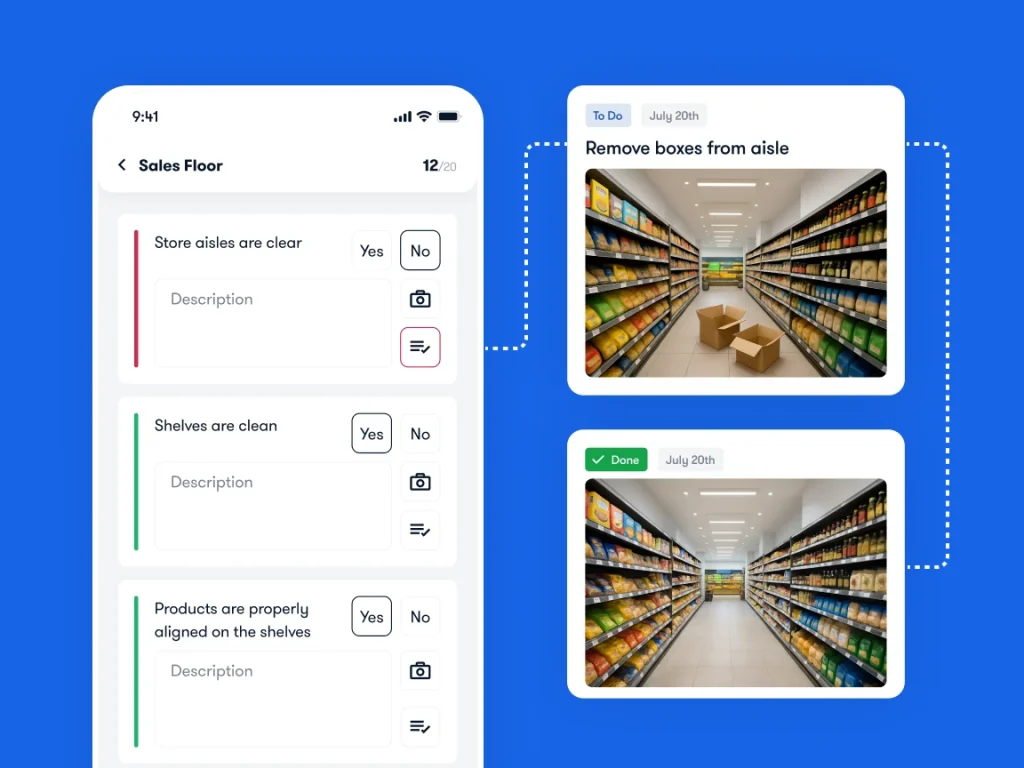
This is also the workflow to test when evaluating store audits and checklists. Ask to see the failed check, assigned correction and supporting evidence together.
A real example: Under Armour CEE’s weekly merchandising routine
In Bitreport’s published Under Armour CEE case study, a 22-location regional operation uses a structured weekly photo-submission and review process. The visual merchandising team can mark issues, approve layouts and reopen items needing adjustments.

Retail manager Jan Kejha reports around 45 minutes saved per store each week on visual merchandising tasks. The result belongs to that regional workflow; it is not an estimate of what every retailer will save.
The transferable lesson is the process: consistent submissions, a defined reviewer and visible corrections. Request a Bitreport demo to discuss how that approach could fit your own store checks and follow-up.
Retail operations KPIs: measure the work and the outcome
Sales and margin show business results. Operational measures help you investigate what happened on the floor. Start with a small set that managers can act on.
| KPI | How to calculate or define it | What to investigate |
|---|---|---|
| On-time task completion | Tasks due in the period that were completed by their deadline ÷ all tasks due in that period × 100 | Missed assignments, unrealistic workload or unclear instructions |
| Overdue corrective actions | Count of unresolved corrections whose deadlines have passed, measured at a stated time | Who owns the work, what is blocking it and how long it has remained open |
| Median correction time | Median elapsed time from an issue being recorded to its correction being verified, for issues closed in the period | Slow handoffs or bottlenecks; review still-open issues separately |
| On-shelf availability | Expected product/shelf positions with sellable stock available ÷ expected positions checked × 100 | Empty shelves despite stockroom inventory, delayed replenishment or supply shortages |
| Price accuracy in checks | Sampled labels that match the approved system price ÷ all labels checked × 100 | Delayed updates, unclear ownership or campaign setup errors |
| In-store conversion | Purchase transactions ÷ eligible store visits in the same period × 100 | Availability, service and traffic mix; apply a consistent visitor-counting method |
| Average transaction value | Net sales ÷ sales transactions for the same period | Changes in basket mix, discounts and product availability |
Document the counting rules before comparing stores. Keep the task deadline history and define how cancellations are handled. Use the same sampling method for shelf and price checks, and the same treatment of returns and visits for sales measures. If there are no eligible observations, mark the metric unavailable rather than assigning a perfect score.
For example, if 90 of 100 tasks due this week were completed on time, the on-time rate is 90%. Ten overdue high-priority corrections still deserve attention even if hundreds of easy tasks were completed. Pair completion rates with the age and importance of unresolved work.
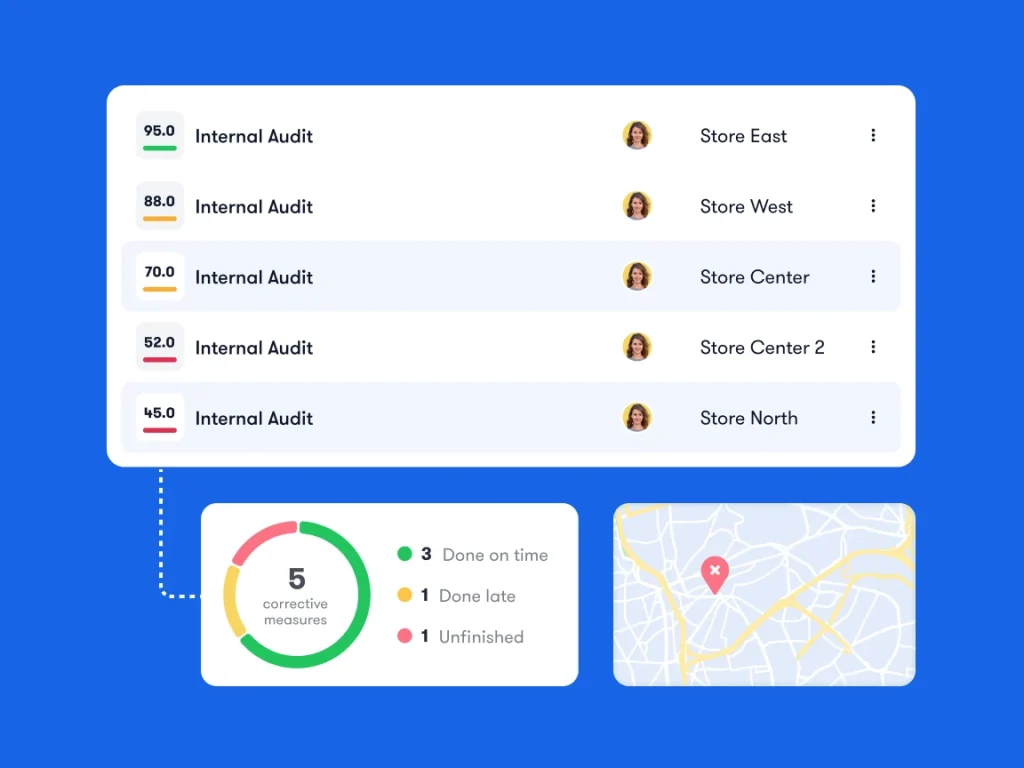
There is no useful universal target for every store format. Establish a baseline, agree on priorities and compare similar locations. For inventory turnover, margin and other financial measures, see the retail management KPI guide.
Use 5S to make store routines easier to maintain
5S is a workplace-organization method: Sort, Set in order, Shine, Standardize and Sustain. A retail stockroom is a practical place to apply it:
Sort: Identify unneeded materials and handle them through the appropriate removal or disposal process.
Set in order: Give replenishment equipment, packaging and returns clearly marked places.
Shine: Clean the area and record damage or faults found during the check.
Standardize: Document the expected setup with a short routine and reference photos.
Sustain: Assign regular checks and correct the conditions that cause the same problems to return.
The goal is a setup the next shift can understand and maintain. Review whether staff can find what they need and return it to the right place during normal trading conditions.
Retail operations priorities for 2026
Technology matters when it improves a specific operating decision or handoff. Three areas deserve attention when reviewing your processes in 2026.
AI forecasting needs a process for exceptions
Walmart’s July 2025 supply-chain update describes predictive systems and inventory rebalancing across international markets. It is a recent operational example relevant to 2026, rather than a technology that began this year.
For a store team, the practical question is what happens when a forecast and local conditions disagree. Assign someone to investigate unexpected demand, incorrect stock records or a promotion that changes replenishment needs. Record the reason for an override so the same exception can be understood later.
Unified commerce depends on store-level handoffs
Unified commerce connects the information and processes behind online and in-store activity. Adyen’s 2026 retail findings highlight click-and-collect and cross-channel returns as relevant customer experiences.
Operationally, that means defining who picks an online order, when it becomes ready for collection and how returned stock becomes available again. A shared inventory record helps, but the physical item still needs to be found, checked and placed in the correct location. Test the whole handoff rather than only the customer-facing order screen.

Shelf technology should support execution
In its March 2026 update on digital shelf labels, Walmart describes centralized price updates and LED guidance that helps employees locate products for replenishment and online order picking.
That is a concrete example of technology supporting work on the floor. When considering a similar investment, identify the task it should improve and measure that task before and after rollout. Faster digital instructions still need a process for missing items, equipment faults and incorrect information.
What software supports retail operations?
Choose tools according to the work they need to handle:
POS and commerce systems support transactions, orders and related customer workflows.
Inventory, warehouse and ERP systems maintain stock and business records within their defined scope.
Workforce tools support schedules, time records and employee coordination.
Operations execution tools support checks, assigned work, evidence and follow-up across locations.
These categories can overlap. Check what your existing systems already support and define any required data exchange before adding another tool.
Bitreport supports audits and checklists, recurring tasks and incident reporting. Its role is to help teams record operational work and follow through on issues across locations. It does not replace a POS, stock ledger, payroll system or full workforce-scheduling suite.
Use your own failed-check scenario in a demo. Confirm who receives the correction, what evidence is required and how a regional manager finds unresolved work. Discuss any connection to existing systems explicitly; using tools alongside each other does not automatically mean they exchange data.
How to improve retail operations across multiple stores
Start with a recurring problem that store teams recognize, such as late promotion setup or unresolved maintenance requests. Map how the work currently moves between people and identify where responsibility becomes unclear.
Define one standard process with an owner, deadline, evidence requirement and review step. Try it in a small group of representative stores, including a location with different staffing or layout constraints. Use employee feedback to remove unclear instructions and unnecessary reporting.
Review completion, outstanding issues and manager follow-up time using the same definitions each period. If the process works, extend it with clear template ownership and a way to manage local exceptions. For more detail on sequencing work through a shift, see the retail store workflow guide.
Choose one routine you want to make easier to manage across locations. Request a Bitreport demo and bring the checklist, a typical failed check and the information your regional managers need to review.