Stores ask. Head office answers.
Nothing gets lost.
Supply orders, help requests and notices from stores shouldn’t live in a group chat or an inbox. With Bitreport, head office designs the forms, stores send them from their phones, each request goes to the right person, and everyone sees its status until it is closed.
Get a demoCase studies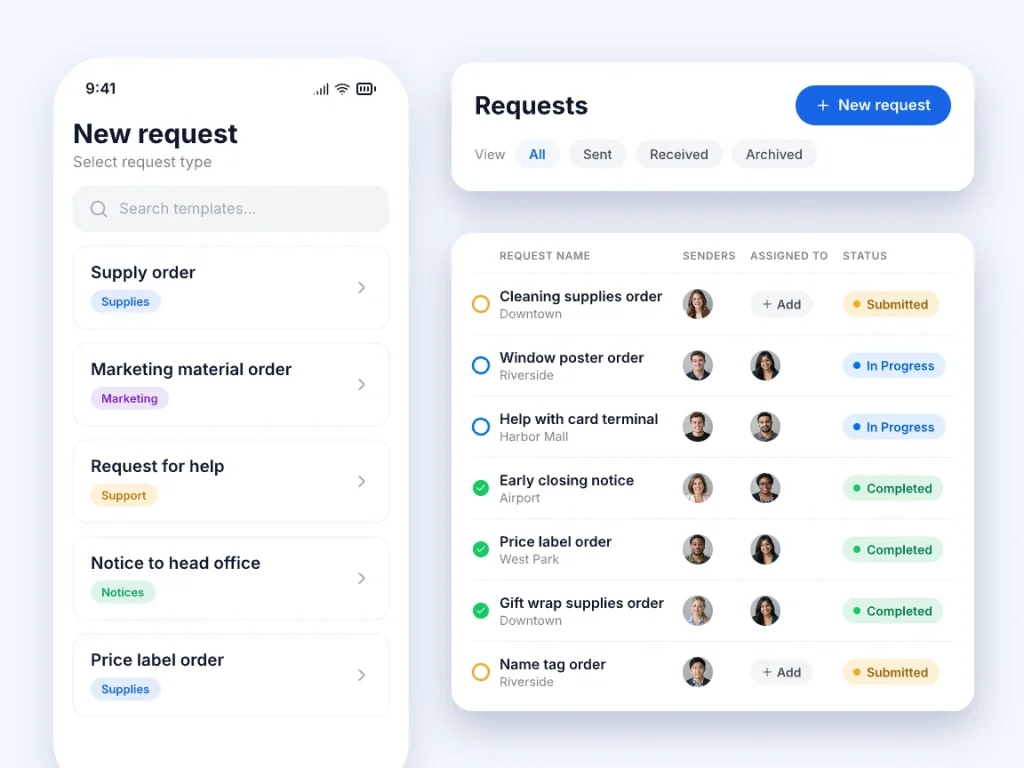











Keep store requests in one place

What goes wrong when stores ask through chat and email
- Stores ask for supplies, help and approvals in group chats, emails and phone calls.
- Nobody can tell who owns a request or whether it was ever answered.
- Requests arrive with missing details, so head office has to ask again.
- Photos and files get buried in chat threads.
- Managers can’t see how many requests are open or which stores send the most.
How Bitreport runs store requests
Head office builds each request type as a form: the fields a store fills in, optional resolution fields for the person handling it, who can send it, who receives it, and the statuses it moves through. A store picks the type on its phone, fills in the form with photos or files, and sends it to the right people. It stays open until it is closed with a final status.
Request types are yours to define, such as a supply order, a marketing material order, a request for help, or a notice to head office. Breakdowns and repairs have their own flow in Incident Reports, and when head office is the one asking, for example for a stock count from every store, see Store Supply Counts.
Set it up once, track every answer
Forms, senders, and receivers you control
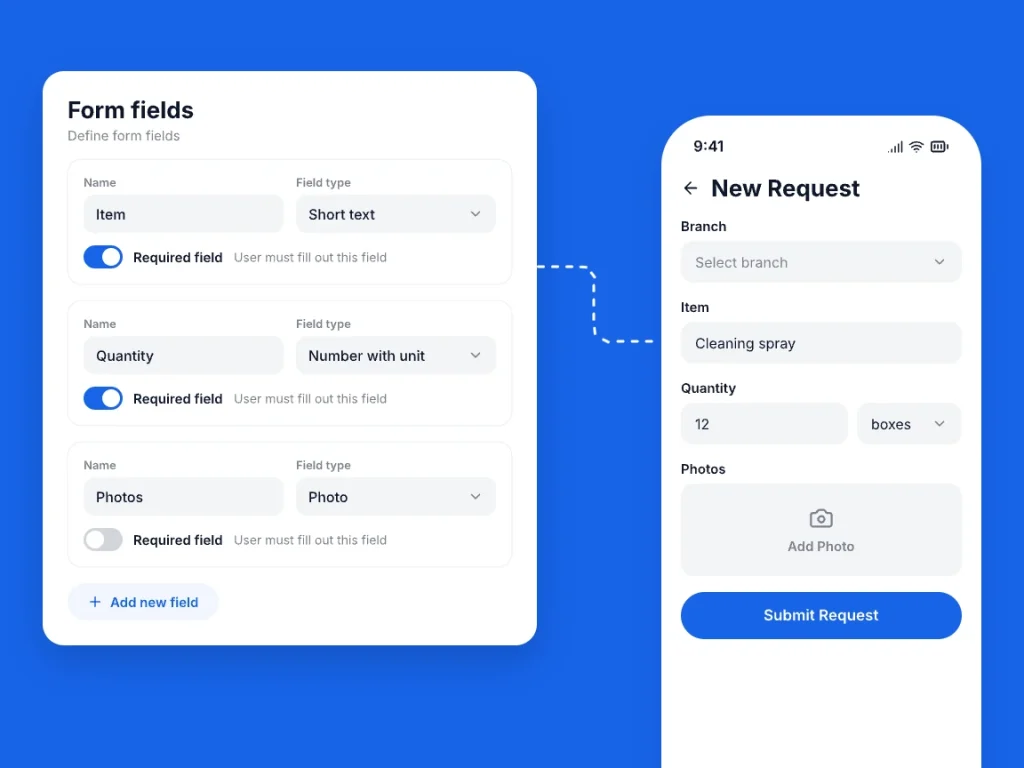
Build both the request form and an optional resolution form from short text, long text, number, number with unit, date, option list (single or multiple answers), photo, and attachment fields, and mark the ones that are required. Give each request type a name, a description, a tag with its own supervisors, and a numbering counter (default yearly numbering or your own global or per-branch sequence).
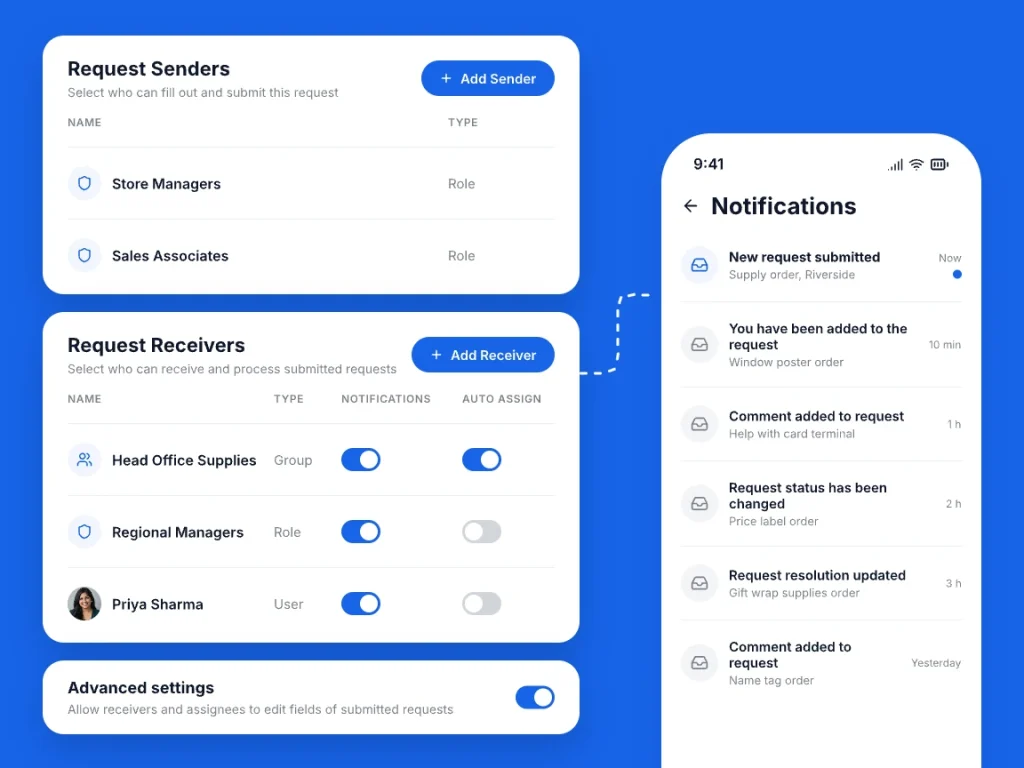
Choose Request Senders and Request Receivers by role, user, or group. For each receiver, turn Notifications and Auto-assign on or off, and optionally allow receivers and assignees to edit submitted form fields if a store made a mistake.
One thread from request to answer
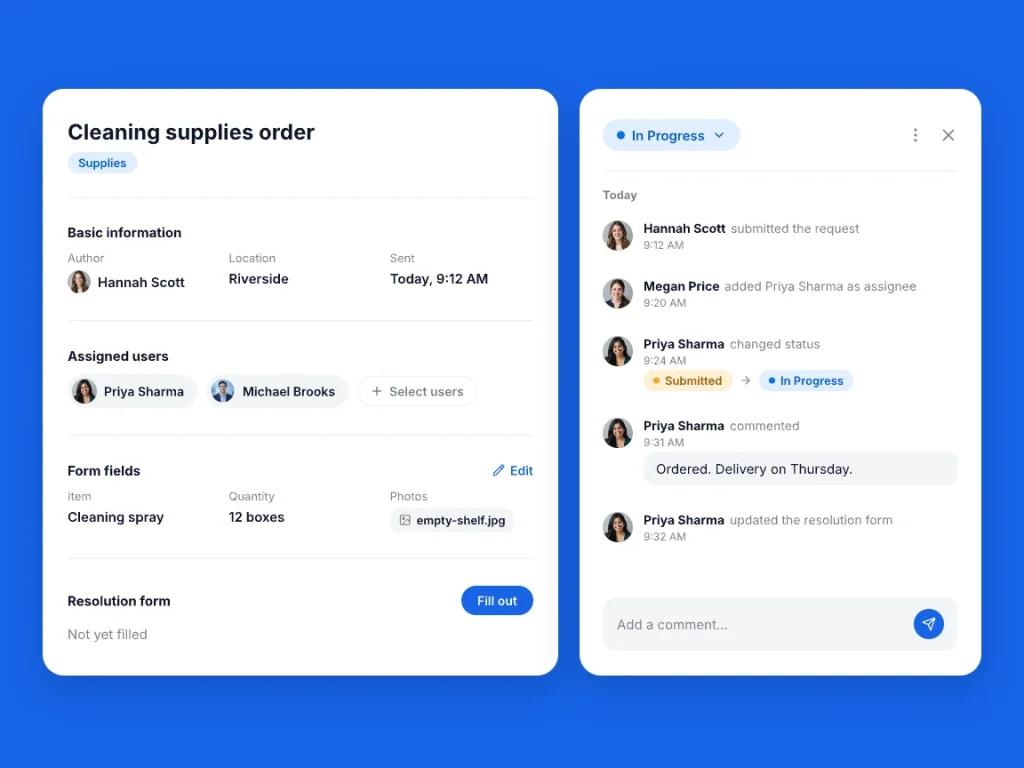
Every request has a status, assignees, comments, and an activity history that shows who submitted the request, who changed the status, who was added or removed as assignee, and when form or resolution fields were updated. Choose statuses such as Submitted, In Progress, Completed, Approved, or Denied, or create your own, with a default for new requests and final statuses that close them.
Any receiver or supervisor can claim an unassigned request with Assign to me or assign it to a colleague. Assignees can move a request through every status and fill in the resolution form, while the sender can also mark their own request as completed. People get a notification when a request is received, assigned, commented on, resolved, or changes status, and each person can choose to get these notifications on WhatsApp too. Any request can be downloaded as a PDF.
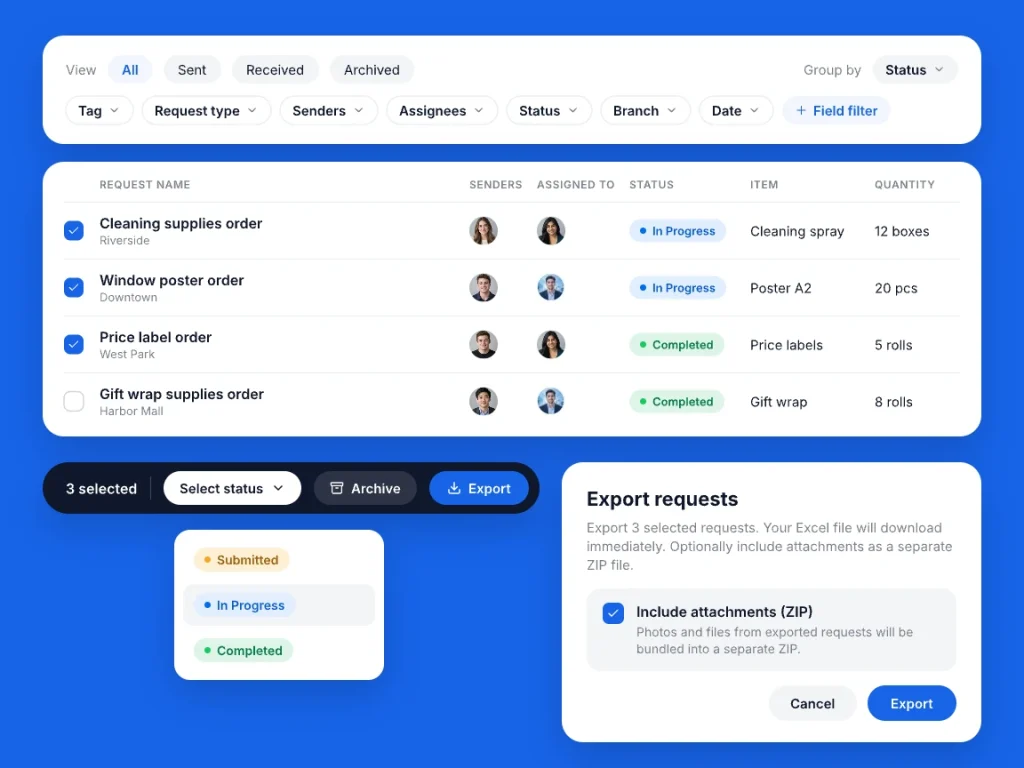
Every request, every store, one list
See all requests in one list, switch between all, sent, received, and archived, and group them by tag, status, date, assignment, or request type. Filter by tag, request type, sender, assignee, status, branch, or date, and by the value of a form field, or show form fields directly as columns in the table.
Change the status of several requests at once, archive them, or export the list to Excel with an option to bundle all photos and files into a ZIP archive. On their phones, stores see the requests they sent, filter by status, and read comments and updates in real time.
Built for multi-store teams that send and answer requests
Request and resolution forms
Build the sender’s form and an optional resolution form with text, number, unit, date, option list, photo, and file fields.
Photos and files
Stores attach photos and files to a request, with a minimum and maximum count you set per field.
Senders and receivers by role or group
Pick which roles, users, or user groups can send a request type and which teams receive it.
Auto-assign or claim
Turn on Auto-assign per receiver, or let receivers and supervisors claim requests with Assign to me and assign colleagues.
Your own statuses
Set the statuses each request type moves through, with a default for new requests and final statuses that close them.
Excel, ZIP, and PDF export
Export requests to Excel with an optional ZIP of attachments, or download a single request as a PDF.







Under Armour CEE
Each store now saves around 45 minutes weekly on VM tasks, and our routines have become much smoother. Stores submit photos quickly, and we can evaluate everything in a clear, consistent way. The time we once spent on coordination now goes directly into improving execution and elevating our brand presentation across the region.
Domino’s
Bitreport brought structure into our daily work. It tells you exactly what to check, when to do it, and makes sure nothing gets skipped. Everything is clear and documented.
Kafeterija
With Bitreport, we have complete confidence that every task is handled promptly and nothing is left unfinished. It’s allowed us to maintain our quality standards seamlessly, even as we continue to grow.
Leggiero
Since adopting Bitreport, we’ve completely transformed how we manage tasks and audits. Everything is organized, tasks are tracked, and we’re seeing results much faster. It’s made a huge difference in the way we operate.
Offertissima
Bitreport helped us do our tasks more efficiently, and our stores are more organised. Everybody is using it, from field workers to board members who are interested in seeing our scores going up. Thanks to Bitreport our customers are having better and more consistent experiences at all our stores.
Galileo
Bitreport has completely changed how we work across our stores. With everything in one place and clear checklists, our teams know exactly what to focus on, and nothing gets missed. It’s taken our quality control to the next level.
Batak
We’re really particular about what meets the quality standard in our restaurants and Bitreport enables us to control it much more effectively. We have more insight into real-time site data for decision-making, while our task management is streamlined. Top-notch food is now backed by top-notch operations at Batak.
Boso
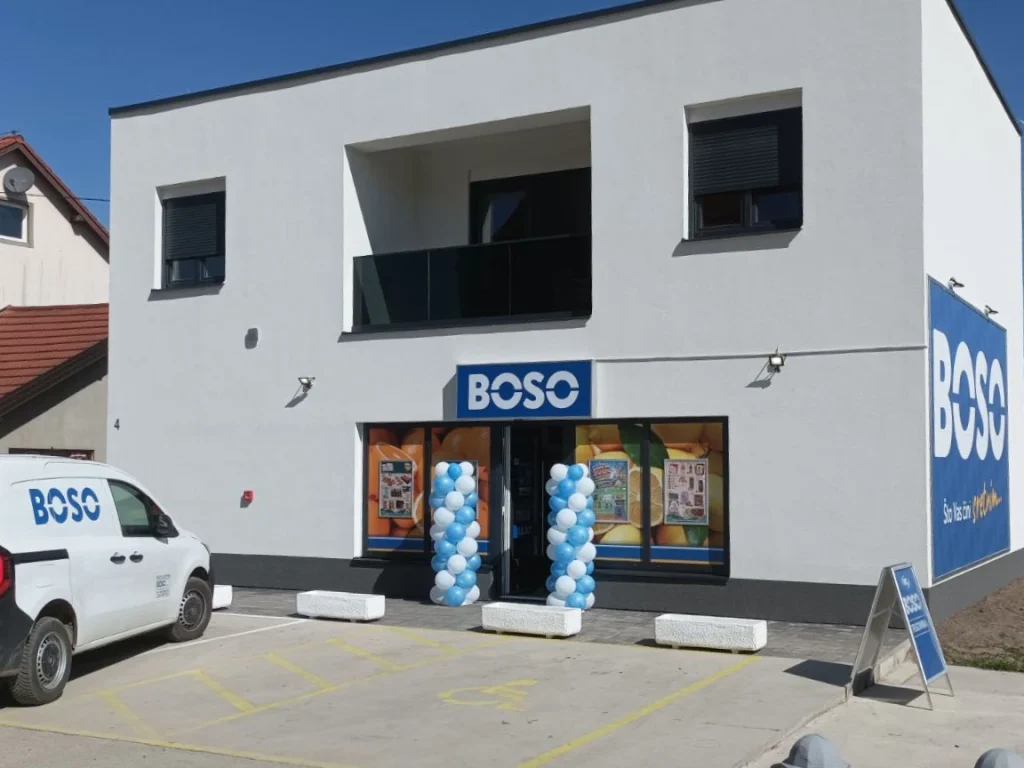
We’ve significantly reduced the time needed for control procedures, improved field team organization, and increased employee accountability. Communication has become faster and more efficient, and with real-time reports, we can make quicker decisions and respond to issues immediately.
Case Studies

How Under Armour CEE Simplified Weekly Visual Merchandising Execution with Bitreport
Discover how Under Armour CEE simplified weekly visual merchandising workflows and strengthens in-store compliance with Bitreport.


How Galileo Achieved 96% Compliance with Bitreport
Galileo reached 96% quality compliance and cut missed tasks by 50% by using Bitreport, streamlining their operations across all stores


How Offertissima Boosted Efficiency with Bitreport
Offertissima, a prominent home decor retailer in Croatia, boasts a network of over 70 physical stores and is poised to expand its brick-and-mortar presence.

Take control of your operations, before chaos takes control of you.
Choose a time for your demo
The booking calendar did not load here, for example because of your cookie settings. Open it on Calendly instead. We will also get in touch with you shortly.
Open the booking calendarOpens calendly.com in a new tab.