

A corrective action report records a problem, the action taken to address it, who owns the work and how the result was checked. A useful report also explains the cause, so the same issue is less likely to return after the immediate fix.
In retail, the starting point might be a failed audit item, a recurring service complaint or an operating routine that keeps being missed. The report connects that finding to the people responsible for resolving it.
Use the corrective action report template below to structure your own record. It includes a field list, a filled retail example and a practical way to review the result before closing the report.
A corrective action report template
Use these fields for your own report. One report covers one clearly defined problem; add a separate action entry for each person or deadline involved. Adapt the fields to your operating procedures and approval rules.
| Report field | What to record |
|---|---|
| Report ID and location | Unique reference; store name or number; affected area |
| Date raised and reporter | When the issue was identified; who recorded it |
| Source and expected standard | Audit item, visit, complaint or other source; the instruction or standard being checked |
| Finding and initial evidence | What happened, where and when; observations, photos or related records |
| Priority and immediate response | Operational impact; any immediate action; person responsible and completion time |
| Cause investigation | What was checked; evidence for the cause; unresolved questions |
| Agreed corrective action | What will change to address the cause and reduce recurrence |
| Action owner and support | Named owner for each action; people, materials or approvals needed |
| Due date and progress | Agreed date for each action; current status; blockers and updates |
| Completion evidence | What was done, when and by whom; supporting photos or records |
| Effectiveness check | What will be checked after implementation, when and by whom; acceptance criteria |
| Review and closure | Review result; reviewer; closure date or further work required |
Keep the original finding visible throughout the report. If a due date changes, record the reason and the revised date rather than replacing the history. When a cause is still being investigated, say so; a blank field should not look like a completed investigation.
For an area manager, this report normally sits alongside the broader store visit report. The visit report summarizes the visit; the corrective action record follows a specific problem through to resolution.
Correction, corrective action and the final report
A correction addresses the problem found now. A corrective action addresses its cause to prevent recurrence. The report should make room for both, because the immediate fix and the longer-term change may have different owners and deadlines.
Suppose shelf-edge labels are missing after a range change. Replacing the missing labels corrects today’s shelf. Finding that the changeover routine has no label check, then adding that check with clear ownership, addresses a reason the problem could return.
ASQ’s explanation of root cause analysis emphasizes identifying the causes of a problem and making that analysis part of a wider improvement effort. Naming a cause is only useful when it leads to an appropriate change.
A corrective action plan describes the work you intend to do. The completed report adds what actually happened, the evidence and the review outcome. Keep those stages together so a promised action cannot be mistaken for a finished one.
Filled example: missing shelf-edge labels after a range change
Consider a homewares store where an area manager finds missing shelf-edge labels during a visit. The example below shows how that finding could be recorded and followed up. The names, dates and results are illustrative.
The store’s immediate correction is complete on September 2. The report remains open until the process change and the agreed follow-up checks are complete. Two changeovers are the review period chosen for this example, not a universal requirement.
If the second check finds the same gap, record it and investigate further. The original explanation may be incomplete, or the revised routine may not be working as intended. Keep the new evidence connected to the report rather than starting again with an unconnected message.

How to write a useful corrective action report
Describe the finding so another person can locate it
Write what you observed and the standard you checked. “Poor shelf presentation” could mean several things. “Six product facings in the cleaning accessories aisle had no shelf-edge label after the range change” tells the store where to start.
Attach evidence that belongs to that specific finding. A wide photo can establish the location, while a closer view can show the detail. Record the date and relevant audit or task reference so someone reviewing the report later understands the context.
Our retail audit guide explains how structured checks help make findings consistent across stores. The report then carries the selected finding into follow-up work.
Record the immediate response and investigate the cause
Describe what the team did first, who did it and whether anything remains unresolved. An immediate correction can be necessary while the cause is still under investigation.
If the finding began with a store incident, use our retail incident report template to capture the initial facts, immediate response and evidence before recording the later investigation findings.
Ask the people doing the work to explain the routine. Check the instructions, handover and relevant records before concluding that someone simply forgot. “Human error” gives the next manager little help if nobody has established what made the error possible.
In the label example, the investigation checks whether the approved labels were available, whether the instructions included the check and who was expected to carry it out. If the instructions were clear but the printer was unavailable, changing the checklist would not solve that equipment problem.
For a safety issue, follow the retailer’s safety and escalation procedures immediately. OSHA’s hazard prevention guidance calls for serious hazards to be addressed immediately and interim controls where needed while longer-term solutions are developed. Filling in a report must not delay that response.
Assign actions to people who can carry them out
Write each action as a specific change, with a named owner and an agreed due date. Where several people are involved, separate the actions so each person can see what they are responsible for.
A store manager might update a local handover, while an operations lead approves a change to the standard procedure. A maintenance team may own an equipment repair. Include those dependencies in the record; otherwise the store can appear to be late while it is waiting for someone else’s decision.
Agree what completion will look like before the work begins. A revised instruction, a repaired fixture and a coached employee need different evidence. Avoid assigning “send photo” as the whole action when the work itself has not been defined.
Check implementation and then check effectiveness
Implementation asks whether the agreed action was carried out. Effectiveness asks whether it addressed the problem. A photograph can show the corrected shelf; a later check can show whether the revised changeover routine is being followed.
ASQ’s article on evaluating corrective actions highlights the need to assess whether the action is a real solution, using an appropriate timeframe and measures. Choose a review point that gives the revised process a chance to operate.
For a weekly changeover, a check after the next changeover is useful. Reviewing it an hour after the team replaced the labels only confirms the immediate correction. More serious or complex problems may need specialist assessment and a different review period.
Name the reviewer and acceptance criteria in advance. If the criteria are not met, record the result and the next action. A status change should reflect a decision supported by evidence.
Who owns the report, and when is it closed?
Assign one person to coordinate the report, even when it contains several actions. That person keeps the record current, follows deadlines and ensures the review happens. Each action still needs its own owner.
In retail, the store manager may own the local correction, while the area manager coordinates follow-up and checks the result. The exact split depends on the company’s authority levels. Our area manager responsibilities guide covers that relationship in more detail.
Use clear stages in your report, such as Open, In progress, Pending review and Closed. Treat an overdue deadline as an additional flag, so an action can still be shown as in progress while its delay remains visible. These are suggested report stages to adapt to your process.
Before closing the report, confirm that:
The agreed actions have been implemented and their evidence is attached.
The effectiveness check has been completed against the stated criteria.
Remaining concerns have an explicit decision and follow-up owner.
The reviewer, decision and closure date are recorded.
A reported completion and an accepted result are separate events. If work is rejected or the issue returns, preserve the earlier record, explain what failed and assign the next step.
Common reporting mistakes that leave work unresolved
Closing the report after the immediate fix. Record the correction, then keep the cause-related action and review visible until they are complete.
Using a department as the only owner. “Maintenance” identifies a team but may not identify the person coordinating the work. Name the responsible contact through your normal assignment process.
Changing deadlines without an explanation. A revised date should include the reason, required support and next review point. This helps managers distinguish a genuine dependency from forgotten work.
Recording a cause without evidence. Separate what is known from what is suspected. A plausible explanation still needs checking against the actual process.
Collecting photos in an unrelated chat. Photos can demonstrate what was done. Link them to the report and action so reviewers can follow the correction without reconstructing the conversation across several stores.
From an audit finding to assigned follow-up
A document or spreadsheet can support the report when the team keeps it current. As the number of stores and open actions grows, managers also need a shared view of owners, deadlines, evidence and progress.
Bitreport’s audit and corrective-action workflow connects store checks to assigned follow-up tasks. Teams can record findings with photos and comments, assign corrective work and track its status across locations.
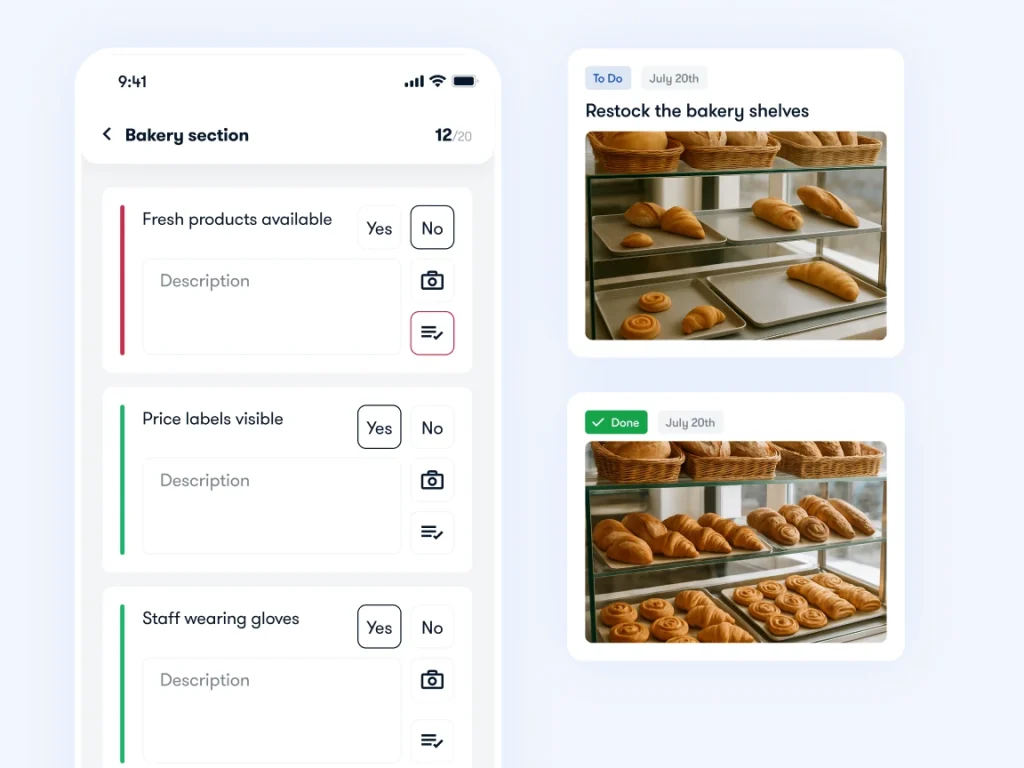
The team still needs to investigate the cause and agree how the result will be reviewed. Tracking the task supports that work; it does not replace the judgment behind the report.
Bring a recent finding to a 30-minute Bitreport demo. We can walk through how to assign the correction, attach evidence and keep the follow-up visible to the store and area manager.