

Retail management solutions help retailers coordinate selling, stock, people and the work that keeps stores running. They include POS and inventory tools, store task management, audits, visual merchandising, training and reporting. The right combination depends on where your operation is losing time or failing to meet its standards.
A store with unreliable stock records needs a different solution from a chain whose area managers spend every Friday chasing display photos. Both may search for retail management software. Buying the same product will not necessarily solve both problems.
Start with the work that breaks down, the person responsible and the evidence that would show it is fixed. This guide maps six common multi-store problems to the capabilities worth evaluating. For named platforms by category, see our retail store management software buyer’s guide. If the term is new, start with our guide to what retail management is.
Match the retail problem to the solution
A useful shortlist begins with a specific symptom. “We need better visibility” is difficult to test. “The area manager cannot tell which stores still need to correct their window display” gives you a workflow to demonstrate.
| Recurring problem | Solution to investigate |
|---|---|
| Routine work is missed or chased in chat | Store task management and recurring workflows |
| The same audit finding appears again | Digital audits with corrective-action follow-up |
| Displays vary and feedback gets lost | Visual merchandising and photo review |
| Staff receive procedures but struggle to apply them | Frontline training and microlearning |
| Shelf availability or prices do not match records | Inventory/POS controls and store verification |
| Store requests disappear into inboxes | Structured request forms and status tracking |
These categories overlap. A retail operations platform may cover several, while your current POS or ERP may already support parts of the process. Check what you own before adding another application.
Customer loyalty, workforce scheduling and financial management may also belong in your wider plan. Give them their own requirements when those are the problems you need to solve; a checklist tool is not a substitute for every retail system.
1. Missed daily work: task management and recurring workflows
An opening checklist is useful only if the right person can find it, complete it and report what prevented completion. A message saying “please check this” leaves room for uncertainty about the location, deadline and owner.
Look for assignments tied to stores and people, recurring schedules, clear instructions and a manager view of outstanding work. Decide which tasks need a photo or another record of completion. Asking for evidence on every minor action can make the process harder to use without improving oversight.
For example, a weekend setup task might ask the store to replenish the entrance display before opening and attach one photo of the finished arrangement. If the required stock has not arrived, the store needs a way to explain the exception and get a decision.
During a demonstration, assign the same task to two locations, complete it in one and leave the other unfinished. Check whether the manager can identify the remaining work without reading a group conversation. Our retail operations software guide compares tools for this kind of daily coordination.
2. Repeated audit findings: inspections with corrective follow-up
A digital audit can replace a paper form and make findings easier to review. That does not automatically solve a recurring problem. If a damaged fixture appears in three consecutive reports, the missing step may be an assigned repair and a check that it was completed.
Evaluate the whole sequence: record the finding, explain the required correction, assign an owner and deadline, collect evidence, then review the result. Keep the original finding available so the reviewer understands why the work was raised.
A useful test is a failed shelf-label check. Ask the vendor to show how the store receives the correction, how an area manager follows overdue work and what happens when the new photo still shows the wrong label. Do not stop the demo at the audit score.
When comparing retail audit software, examine template consistency and follow-up together. An improving score means less if the question set changed or unresolved findings were simply excluded. Keep the scope comparable when reviewing progress across stores.
3. Inconsistent displays: visual merchandising and photo review
Visual merchandising needs more than a place to upload images. The store needs to know which display to photograph, the reviewer needs the correct reference, and both need to see what still requires a change.
Look for a review process organized by store and display, with clear feedback attached to the relevant image. A manager should be able to distinguish submitted, reviewed and corrected work. Those are different points in the process.
In Bitreport’s manual photo-review workflow, a reviewer can mark up a photo and send feedback, and the store can make the adjustment for further review. Approval comes from the reviewer; the photograph is not automatically checked by AI.
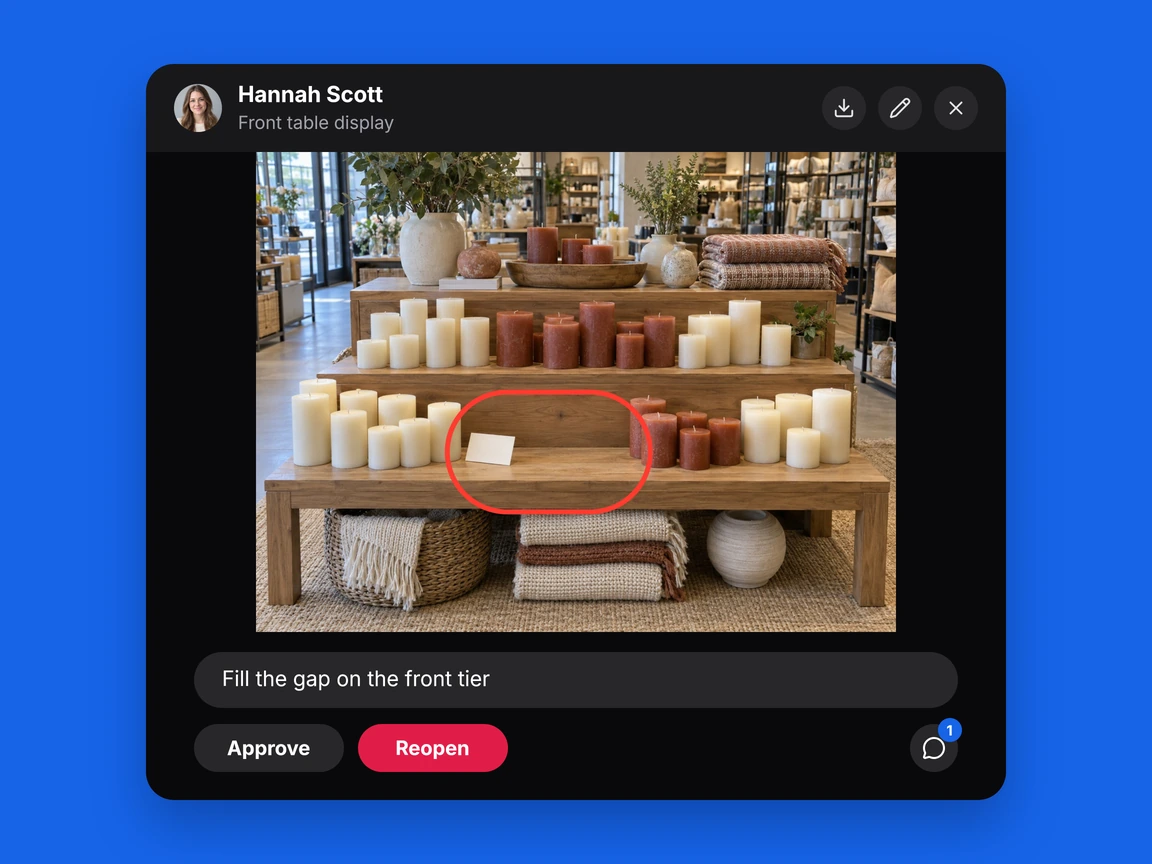
The Under Armour CEE case study shows why this matters. Its regional team already collected store photos, but moving images and feedback between tools created extra coordination. Bitreport brought weekly submissions, review and feedback into one workspace. This is a specific regional visual merchandising example, not a claim about Under Armour’s global operations.
For broader campaigns, evaluate retail execution software against the work from instruction to correction. A completed upload should not be your only measure of a completed campaign.
4. Procedures that do not stick: frontline training and microlearning
Sending an updated procedure does not show whether employees understand it. A new starter may need an explanation, while an experienced colleague may need a reminder about one changed step.
Look for short learning sessions relevant to each role, questions based on your actual procedures and results that help managers identify where people struggle. Keep training content connected to the task employees perform in the store.
Bitreport Microlearning supports daily quizzes and lets teams use AI to draft questions from their Knowledge Base documents. The team reviews the questions before using them. Managers can inspect learning results and identify difficult questions. This makes the product relevant when the gap is understanding a standard, rather than simply distributing another document.
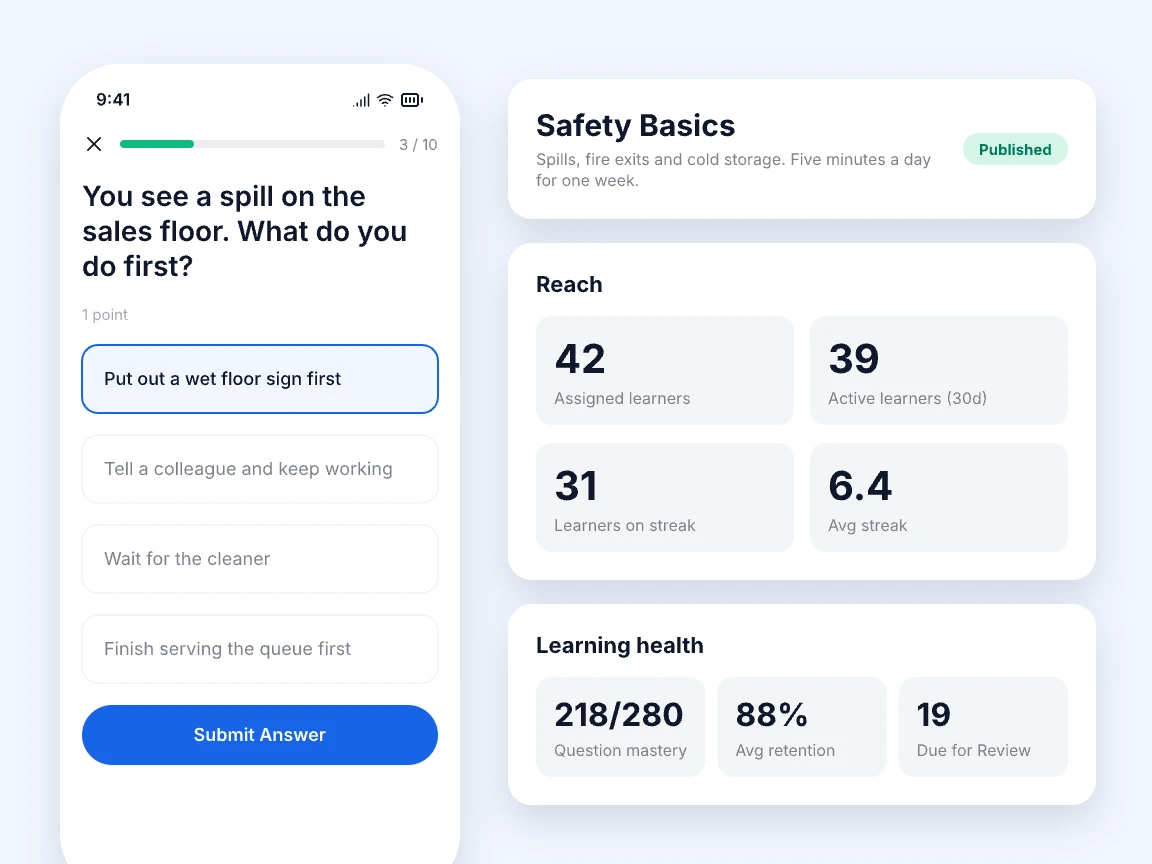
For a pilot, choose one procedure that staff regularly misinterpret. Review the questions with the person who owns that procedure, let employees complete the learning, and then observe the task on the shop floor. Quiz results and observed execution answer different questions; use both when assessing whether training helped.
5. Stock and price mismatches: transactional controls plus store checks
First establish where the error begins. A wrong stock balance may come from receiving, transfers, returns or counting. An empty shelf may instead mean stock is sitting in the backroom. A price mismatch may originate in a central rule or a shelf label that was never replaced. For a stock balance that is wrong on the shelf, our guide to the retail cycle count process shows how to count, recount and trace the cause before the record is changed.
Use inventory and POS capabilities to investigate and correct the records they own. For example, Shopify documents location-specific inventory tracking: sales and restocking update the count for the selected POS location. Assigning the correct location and recording stock movements are part of making those records useful.
Store checks address the physical side: whether a shelf is replenished, a label is present and the displayed offer matches the approved instruction. Give the team a route to report a discrepancy and establish who is authorized to change the underlying price or stock record.
Bitreport can support operational checks and the resulting work. It is not the POS or inventory ledger. When several applications are involved, our retail management systems guide explains record ownership and the connections to verify.
6. Unanswered store requests: forms, ownership and visible status
Some work starts in the store. A manager needs replacement marketing materials, clarification from head office or help with a local problem. If the request arrives through a personal message, the wider team may not know it exists.
A structured request should capture the details needed to act, reach the appropriate people and remain visible until it has an outcome. The sender should be able to see whether it is still being handled or has been closed.
Bitreport Requests lets head office define request types, forms, senders, receivers and statuses. Each request has assignees, comments and an activity history. A supply request or marketing-material request can therefore be followed in context instead of reconstructed from several messages. Breakdowns and repairs have a separate Incident Reports workflow.
Test the exception as well as the successful request: submit one with an unclear detail, have the receiver ask for clarification and check that the sender can find the reply. Also verify what happens when the person normally responsible is away.
How to choose which solution comes first
Choose a problem that is frequent enough to observe, important enough to fix and owned by someone who can change the process. A software project has little chance of resolving a task that nobody agrees should be done.
Use these four decisions to narrow the first purchase or improvement:
Keep the first scope narrow enough that store teams can explain it. “We are fixing the weekly display-review process” is easier to train and evaluate than “we are digitizing operations.”
Build a shortlist around a real store workflow
Give each supplier the same example, instructions and expected outcome. Ask a store employee to complete the task and the manager to review it. A demonstration should reveal the effort required on both sides.
Show how the task or request reaches the correct store and person.
Complete one item correctly and submit another with missing or unsuitable evidence.
Have the manager request a correction, then verify how the store finds the feedback.
Check overdue work, reassignment and the history of changes.
Confirm which capabilities are available now, what needs configuration and what depends on an integration.
For platforms that overlap, compare the relevant workflow rather than treating every product with “retail” in its name as equivalent. If your issue is checkout, evaluate checkout tools. If it is audit follow-up, include tools that let you inspect the correction and review process.
Assess the implementation effort alongside the demonstration: who maintains templates, trains new employees, manages access and owns support. If a connection to an existing system is necessary, confirm the data involved and the implementation requirements. Do not assume two products connect just because they serve the same industry.
Pilot the solution before expanding
Choose stores that represent the working conditions you need to support, including different team sizes and operating routines. Include the people who perform the work, not just the managers who read reports.
For a weekly display-review process, run a complete cycle: issue the instruction, collect photos, review them, request changes and verify the corrections. Then repeat the cycle to see whether the team can use the process without the project lead chasing every action.
Compare results with the baseline using the same definitions. Count a correction as resolved only when it meets the agreed acceptance condition. Track the time spent reviewing as well as the time spent submitting; moving effort from head office to stores is not automatically an improvement.
Before expanding, resolve the problems that prevent normal work and agree who maintains the process. Carry the tested instructions and responsibilities into the next group of stores. Add another workflow when the first one is usable and its owner can support it.
The strongest retail management solution is one your teams can use to complete the right work and show what still needs attention. Let that requirement drive the shortlist, the pilot and the rollout.
Frequently asked questions
Do retail chains need one all-in-one solution?
Not necessarily. A suite can cover several needs, while specialist tools may improve a specific process alongside a working POS or ERP. Compare the complete workflow, the effort to connect systems and who will maintain them.
Can retail operations software replace inventory software?
Operational checks can identify shelf gaps and assign replenishment or investigation. They do not necessarily maintain stock balances, purchasing or order allocation. Bitreport supports store work and verification; it does not replace the inventory ledger.
Does completing training prove that staff follow a procedure?
No. Learning results show how employees answered questions. Store observation, checks and review show whether they apply the procedure. Use both when evaluating a training initiative.
Who should own a retail management software rollout?
The team responsible for the business process should own its requirements and success measures. Store employees and managers need to test the workflow, with IT involved in access, data and integrations. Assign a named owner for ongoing training, templates and support.