

A retail management system brings together the software a retailer uses to sell products, manage stock, fulfill orders and run stores. It may be one suite or several connected applications. For a multi-store business, the important question is whether those applications share the right information and give each team a clear next action.
Consider a promotion that starts on Friday. Head office has approved the price, the stock record shows availability, and the POS has received the discount. The store still needs to install the display, replace the shelf label and check the first transaction. A complete system must support both the records and the work.
This guide explains the main parts of a retail management system, how they connect, and what to test before rolling one out across your stores. For product shortlists by category, use our retail store management software buyer’s guide.
What does a retail management system include?
Retail management systems typically combine transaction processing, inventory, customer information, reporting and store workflows. The exact scope varies: a small retailer may get most functions from its POS platform, while a larger chain may connect several specialist systems.
Map the responsibilities before choosing products. These are functions to cover, not a shopping list of separate subscriptions.
| System area | Main responsibility |
|---|---|
| POS and checkout | Record sales, returns, discounts and payment activity. |
| Inventory and merchandising | Maintain product and stock records; support purchasing, receiving and transfers. |
| Order management | Coordinate order allocation, fulfillment, pickup and cancellation. |
| Customer and loyalty | Manage customer profiles, purchase history and loyalty rules. |
| Finance and ERP | Connect retail activity to purchasing, accounting and financial reporting. |
| Store operations | Assign routines, checks and corrective work; record completion and evidence. |
| Reporting | Combine agreed measures so teams can compare locations and investigate exceptions. |
Supporting tools may cover workforce scheduling, training, documents and equipment maintenance. Include them where they affect the workflows you need to improve, rather than expanding the project to every possible feature.
Retail management system vs. POS vs. ERP
A POS centers on selling and related store transactions. An ERP centers on business records and processes such as finance, purchasing and supply chain. Retail management is the broader requirement: what the business needs across those areas and on the shop floor.
The boundaries overlap. Microsoft’s Commerce architecture documentation describes POS functions that extend to assisted selling, order fulfillment, inventory and reporting. It also distinguishes Commerce from the connected Finance and Supply Chain Management applications. A product label alone will not tell you how much of your workflow is covered.
Use our retail POS software guide when checkout is the main decision. If selling and stock records already work, first check whether the missing capability is store execution, an integration or a process nobody owns.
How retail systems connect across multiple stores
Connecting systems means agreeing which application owns each record, how updates reach other applications, and who acts when something goes wrong. “Integrated” is too broad to use as an acceptance criterion.
Give each record a clear owner
Choose the authoritative system for products, prices, inventory, orders and customer records. Other applications may display or update that information, but define which changes they can make and how conflicts are resolved.
For example, a price correction made at one register should not silently become a permanent chain-wide price change. A store’s report of a missing item should trigger the approved stock investigation, rather than automatically changing the inventory ledger.
Use consistent product, store and order identifiers across systems. “Central store” in a task report and “Location 014” in a sales export must resolve to the same location if you want to compare them reliably.
Match update speed to the decision
An overnight sales summary may suit a weekly management review. It may be too late for an online customer trying to buy the last unit in a store. Specify how fresh each piece of information must be for its intended use.
Shopify’s POS inventory documentation distinguishes available, committed, unavailable and incoming inventory. It also explains that a POS sale or restock updates the count for the selected location. Those distinctions matter when checking what “stock available” means on another screen.
Oracle’s Order Orchestration documentation provides another useful example: it can request availability from online systems, while relying on periodically updated stored information for offline systems. This is a reason to ask about each connection’s behavior, not assume that every shared number updates instantly.
Make failed updates visible
Ask what happens when a price update fails, an order arrives twice or a store loses its connection. The responsible team needs to see the failure, understand its impact and know how to recover without creating duplicate work or transactions.
Offline support needs a separate test. Microsoft’s offline implementation guidance emphasizes configuration and synchronization across headquarters, commerce services and store devices. During evaluation, test the specific actions you need to perform offline and what happens after reconnection. Do not treat “works offline” as a promise that every action remains available.
Example: taking a promotion from head office to the shelf
Imagine a homeware retailer launching a weekend offer across its stores. The following is an illustrative workflow, not a customer result or a claim that any particular software automatically connects all five steps.
The completion view should distinguish a store that is ready from one that submitted a photo but still needs a correction. Equally, a correct display photo cannot prove that the checkout discount works. Use the evidence appropriate to each check.
This is where system design meets promotion execution in retail: the offer, the task and the verification need a shared store and campaign reference, even when they live in different tools.
Where store operations software fits
Store operations software helps teams carry out and verify work across locations. It is useful when the unresolved problem is missed routines, unclear ownership or managers chasing updates, even if the transaction systems already perform well.
Bitreport supports assigned and recurring tasks, audits and checklists, incident reporting and follow-up. Its photo verification process uses a reviewer who can mark up an image, give feedback and ask the store to correct the display, and AI checking can be switched on for eligible clients and industries.
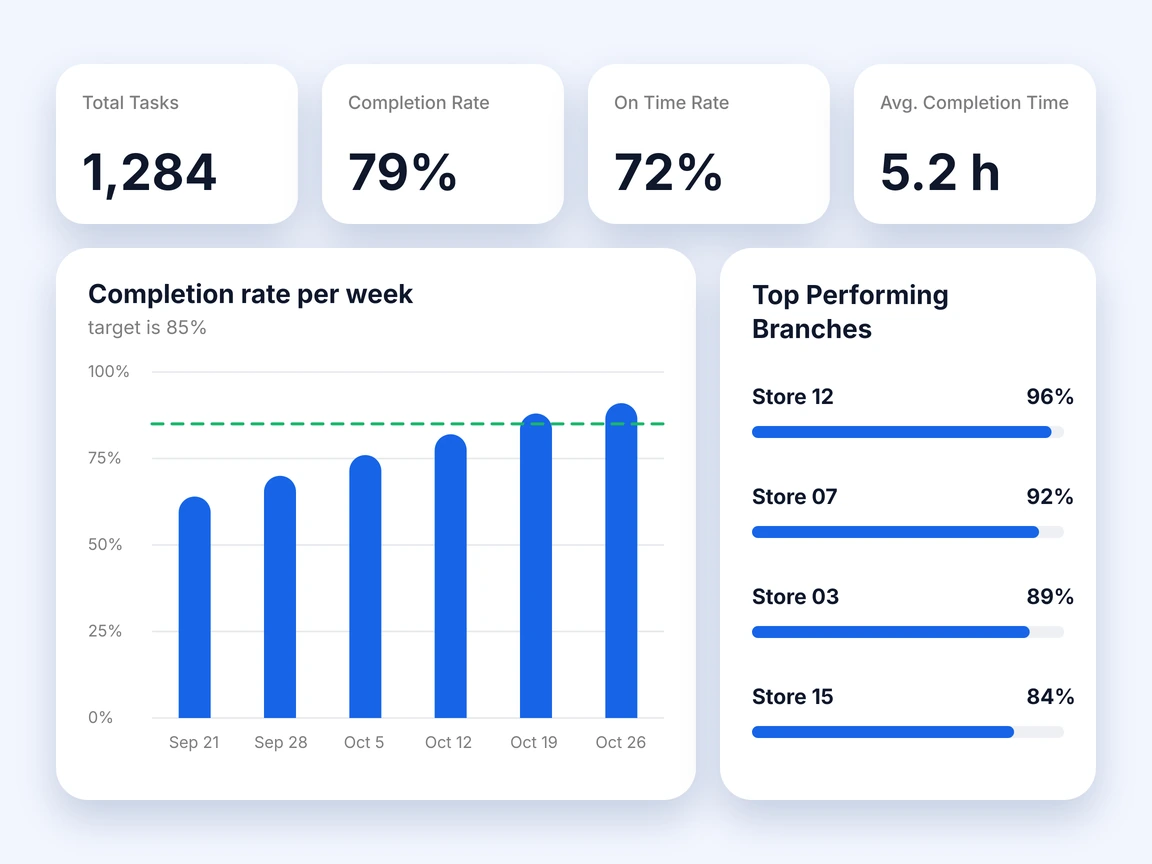
Area managers can also use store visit plans to organize visits and the audit templates attached to them. These workflows support store execution; they do not replace the system that owns sales, stock balances or order allocation.
Before adding another application, test the operations features already included in your current suite. If they meet the team’s assignment, evidence and follow-up requirements, another tool may be unnecessary. If they do not, compare the relevant workflows in our retail operations software guide.
For any proposed Bitreport connection, confirm the exact data, direction, update frequency and implementation requirements with the team. The workflow described here is not a claim of a ready-made connector to Shopify, Microsoft or Oracle.
One retail suite or connected specialist systems?
A broad suite can reduce the number of vendors and interfaces your team manages. It is worth testing when you are replacing several core systems together and the included store workflows fit how people work. Still verify which modules, configuration and implementation work are required.
A connected approach lets you retain a working POS or ERP while improving a specific area. It is worth testing when replacing the core system would add disruption without solving the main problem. The tradeoff is that somebody must own the connections, permissions and support handoffs between suppliers.
A practical way to decide is to compare the same complete workflow in both options. Have a store manager carry out the task and an area manager review the exception. Record what happens inside the product, what needs an integration and what still depends on a manual step.
The better fit is the option your organization can operate and maintain. A long feature list cannot resolve an unclear responsibility between two vendors.
What to ask before selecting a retail management system
Bring operations, store management, IT and finance into the evaluation early. Give vendors examples from your stores and ask them to demonstrate the entire process, including an exception.
Ownership: Which system owns prices, stock, orders and customer records? Who approves changes?
Connections: What exactly passes between systems, in which direction and how often? Which connections are available now, and which require development?
Store access: Can employees see only the locations and actions relevant to their roles? What happens when someone changes store or leaves?
Traceability: Can a manager see who changed a record, completed a task or approved a correction?
Recovery: Who receives a failed-update alert, and who owns the support case when two vendors are involved?
Exit and expansion: Can you export usable records and evidence? What work is required to add a store, a sales channel or another business entity?
Separate a demonstrated capability from a roadmap promise in your notes. For important requirements, agree a measurable pass condition before the pilot begins.
Five scenarios to test in a store pilot
A polished demo usually follows the happy path. A useful pilot shows whether staff can complete the work when the data, connection or physical store is imperfect.
Record the result, the gap, the responsible person and the retest date for each scenario. A successful sale should not hide a failed stock update; a completed task should not hide evidence still waiting for review.
How to roll out the system across stores
Start with the workflows and data you have agreed to test. Clean up duplicate products, inconsistent store identifiers, unused accounts and unclear ownership before moving them into the new setup. Decide which records must migrate and which need to remain accessible as history.
Choose pilot stores that expose different conditions: a busy location, a smaller team, a pickup workflow or a less reliable connection. Train people by role so cashiers, store managers and area managers practice the actions they actually perform. Give each pilot a named support contact and a fallback procedure.
Before expanding, review the test evidence and unresolved gaps with the teams who will own the system. Define the issues that prevent rollout, the ones that can wait and the fallback if the next wave fails. Expand in manageable groups rather than changing the whole network before the first store has completed a normal trading cycle.
Measure the problems the project was meant to solve: delayed price updates, inventory mismatches, unresolved order exceptions, overdue store work or corrections reopened after review. Keep the definitions and review period consistent with the baseline.
Your final selection document should show three things clearly: which system owns each record, how information reaches the people who need it, and how the business knows the store work is complete. That gives both head office and stores a practical basis for choosing and running a retail management system.
Frequently asked questions
What is a retail management system?
A retail management system brings together the software a retailer uses to sell products, manage stock, fulfill orders and run stores. It may be one suite or several connected applications. It typically combines transaction processing, inventory, customer information, reporting and store workflows, and the exact scope varies from retailer to retailer.
What is the difference between a retail management system, a POS and an ERP?
A POS centers on selling and related store transactions. An ERP centers on business records and processes such as finance, purchasing and supply chain. Retail management is the broader requirement: what the business needs across those areas and on the shop floor. The boundaries overlap, so a product label alone will not tell you how much of your workflow is covered.
What should you ask before selecting a retail management system?
Ask which system owns prices, stock, orders and customer records, and who approves changes. Ask what exactly passes between systems, in which direction and how often, and which connections still need development. Check store access by role, how changes are traced, who receives a failed-update alert and whether you can export usable records. Ask vendors to demonstrate the whole process, including an exception.
How do you test a retail management system in a store pilot?
Test the situations a polished demo skips: the last available unit, a late price change, an interrupted connection, a return at another store and an incomplete store task. Agree the expected behavior first, then record the result, the gap, the responsible person and the retest date for each scenario.