

On Monday, a head-office visual merchandiser sends the autumn window brief to 40 stores. By Friday, 28 photos have come back through three chat apps and an inbox. Six show the old window, four are cropped so the hero outfit is missing, and the 12 stores that sent nothing only show up when someone checks every thread. That is the gap visual merchandising software is sold to close.
Visual merchandising software covers three different jobs: planning how displays should look, getting stores to build them, and checking the result. Layout and planogram tools design the display. Store execution tools collect photos of what each store built and check them against the brief. Field merchandising tools help reps audit shelves in stores their company does not own. This guide sorts nine visual merchandising tools into those groups, shows who judges the photo in each, and ends with a four-store pilot you can run before you buy. If visual merchandising is new to your team, start with our fashion retail visual merchandising guide.
For getting stores to build a display and prove it, our pick is Bitreport. We make it, so the reasons, and the cases where it is the wrong pick, are set out below the table. To design layouts and planograms, start with IWD VM Suite and Mockshop, DotActiv or Blue Yonder. To audit shelves in other companies’ stores, start with Repsly ShelfScan or GoSpotCheck.
Three kinds of visual merchandising software
The three groups answer different questions, are bought by different teams, and rarely replace each other.
Layout and planogram tools answer where things should go. Merchandising and space-planning teams use them at head office to design fixtures, shelves and store layouts, and the output is a planogram, a floor plan or a store guideline.
Store execution tools answer whether the stores did it. Retail operations and visual merchandising (VM) teams use them to send the brief, collect photos and track every store’s status.
Field merchandising tools answer what is on the shelf in someone else’s store. Brands and distributors use them with field reps who visit retail accounts.
A chain can run one tool of each kind: a design tool that produces the guideline and an execution tool that shows whether stores followed it. Some vendors cross the line. DotActiv and Blue Yonder add store-side photo checks to their planogram tools, and YOOBIC sends digital planograms to stores. When you compare, ask which job the product was built for first, then test how well it does the second one.
The nine tools at a glance
Bitreport is listed first because it is our product. The tools are grouped by job: store execution first, because it is what this guide is mostly about, then layout and field tools. The column that separates the tools most is who judges the store photo.
| Tool | Who judges the store photo | Pick it when |
|---|---|---|
|
Store execution
|
AI at capture or on submit, or a reviewer who annotates and approves | Stores must build displays and prove them, with AI, a reviewer or both judging the photo |
|
Store execution
|
AI on every submission (Visual Copilot), or a reviewer who annotates and approves | You want AI to check every photo, with or without a human reviewer |
|
Store execution
|
AI, with a compliance score per store | You want scored photos plus audits and training in one app |
|
Store execution
|
AI image recognition (Image IQ) | You want one display photo compared with the store’s plan |
|
Layout and guidelines
|
Not described on the pages we read | You need to design planograms and store guidelines |
|
Layout, with shelf checks
|
Image recognition (TrueView) | You run shelf planograms and want store photos checked against them |
|
Layout, with mobile set-up
|
Users compare a photo with the planogram | You want space planning inside a wider retail planning suite |
|
Field
|
AI image recognition (ShelfScan) | Your reps audit shelves across retail accounts |
|
Field
|
AI image recognition | Your field teams need SKU-level shelf data from photos |
Sources: each vendor’s own product pages, read on Nov 11, 2026 and linked in the sections below. Bitreport is our own product. We have not tested these tools, so ask every vendor to show your own photos.
Our pick for store execution: Bitreport
We make Bitreport, so test these reasons on your own displays instead of taking our word for it. For getting stores to build a display and prove it, we pick it for three reasons.
AI and a reviewer work in one loop. AI compares each photo with the task’s reference photos and instructions, and a reviewer can mark the problem on the picture, write the fix and approve or reopen. The store sees both straight away.
The loop runs until the section passes. The store corrects the display and sends a new photo, and a failed audit item turns into a task with an assignee, a due date and a photo proof request.
It runs in real stores. Under Armour CEE uses the loop every week across 22 stores in four countries, and the retailer says each store saves about 45 minutes a week on VM tasks. That is one deployment, not a benchmark.
Bitreport is the wrong first pick in two cases. It does not design layouts, planograms or floor plans, so start with IWD, DotActiv or Blue Yonder if you need those. And if your reps audit shelves in other companies’ stores, start with Repsly ShelfScan or GoSpotCheck, which are built for that.
Store execution and compliance tools
These tools start where the plan ends. The brief goes to each store as a task, the store sends photos, and a person or software decides whether they match. This group is what most people mean by visual merchandising compliance software: the output is a status for every store and task rather than a plan. For the wider category beyond visual merchandising, see our retail execution software comparison, which covers seven platforms.
Bitreport

Bitreport is our own product, so weigh this section accordingly. It is a store execution tool built around a photo review loop. A store gets a visual merchandising task and uploads photos by section, such as the store window and the wall rack. A reviewer opens the photos, marks the problem directly on the picture, writes the fix and either approves the section or reopens it. The store sees the feedback straight away, corrects the display and sends a new photo, and the loop repeats until everything passes.
AI photo checking compares each photo with the task’s reference photos and instructions. It can run the moment the photo is taken, so staff see the problem areas marked on the phone and fix them before sending, and again when the task is submitted. When the AI is confident, it can pass or reopen the photo itself; otherwise a reviewer gets the photo with the AI’s suggestion to confirm or change. We switch AI checking on for eligible clients and industries. Bitreport does not design layouts, planograms or floor plans, so a chain that needs those keeps a design tool alongside it.
Under Armour CEE runs this loop every week across 22 stores in the Czech Republic, Slovakia, Hungary and Slovenia. Each location earns a weekly VM score with direct feedback, and a weekly PDF digest goes to other departments automatically. The retailer says each store now saves about 45 minutes a week on VM tasks. Our Under Armour CEE case study has the details, and that result comes from one deployment.
Around the photo loop, Bitreport’s audits and checklists turn a failed item into a corrective task with an assignee, a due date and a photo proof request. The visual merchandising compliance page shows the workflow for fashion, sportswear and footwear teams. To see the loop on your own display brief, book a demo.
YOOBIC
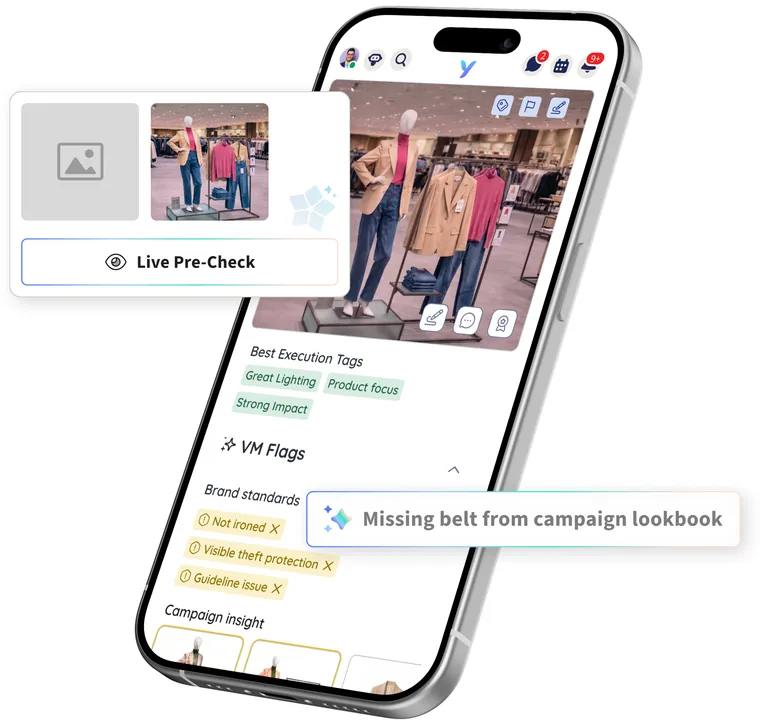
YOOBIC sells retail task management software to store teams. Its visual merchandising use case starts with the brief: digital planograms and VM guidelines go to every store the same way, and photos come back for review. Visual Copilot checks every submission against the campaign and brand standards, flags issues such as mannequin styling, product placement and lighting, and coaches store teams straight away. YOOBIC says the AI was trained with input from more than 200 VM clients, and that no human reviewer is required.
YOOBIC also supports a human loop. Its task management page describes reviewers giving visual feedback by marking up photos and approving the execution. When each new campaign is set up, its looks and reference images are added to YOOBIC.
Pazo
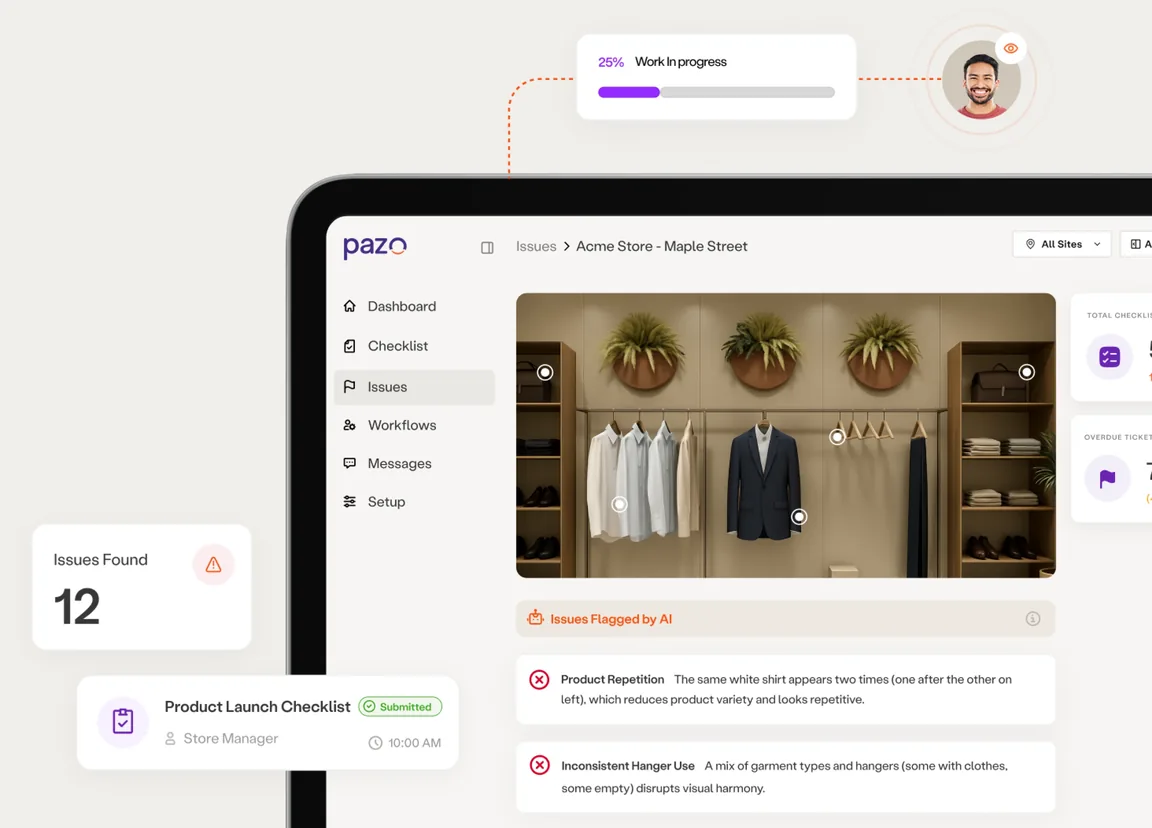
Pazo covers audits, training, visual merchandising, marketing and HR workflows in one platform, and its visual merchandising tool is built around photos. Stores follow visual checklists and upload live photos as proof, and GPS, QR and NFC checks help show the photos are genuine. Pazo says its AI compares store photos with the brand guidelines, gives each store a visual compliance score and lets managers create corrective tasks on the spot. Micro-learning modules and visual guides sit inside the same app.
Amply is another visual merchandising tool in this group. It offers store teams routine VM tasks with in-app guidance and live photos tied to the store location, plus VM audits that are scored from photos.
One Door
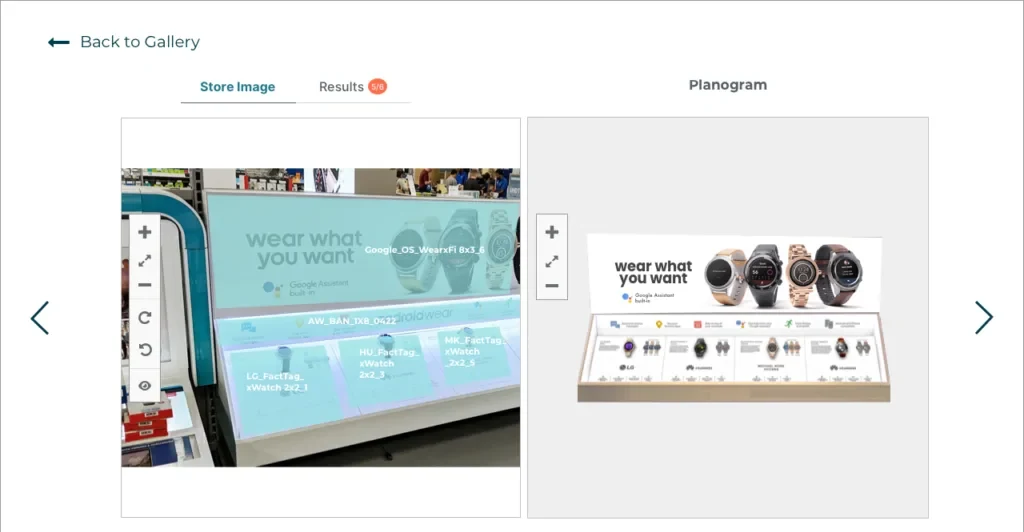
Image IQ is One Door’s store compliance feature. It applies AI and image recognition to planogram execution in stores. One Door says a single photo of a display is enough for Image IQ to spot missing or misplaced products, signage and POP, compare the display with that store’s plan and send recommendations back to the store. Compliance data can be cut by store, region, campaign or planogram, the photos sit in a real-time searchable library, and the page pitches easier reporting to leadership or vendors and the removal of third-party audit costs.
Layout and planogram design tools
These tools produce the plan: where each fixture stands, which products go on which shelf and what the display should look like. For a grocery example of measuring a shelf against its plan, see our grocery planogram compliance guide.
IWD VM Suite and Mockshop
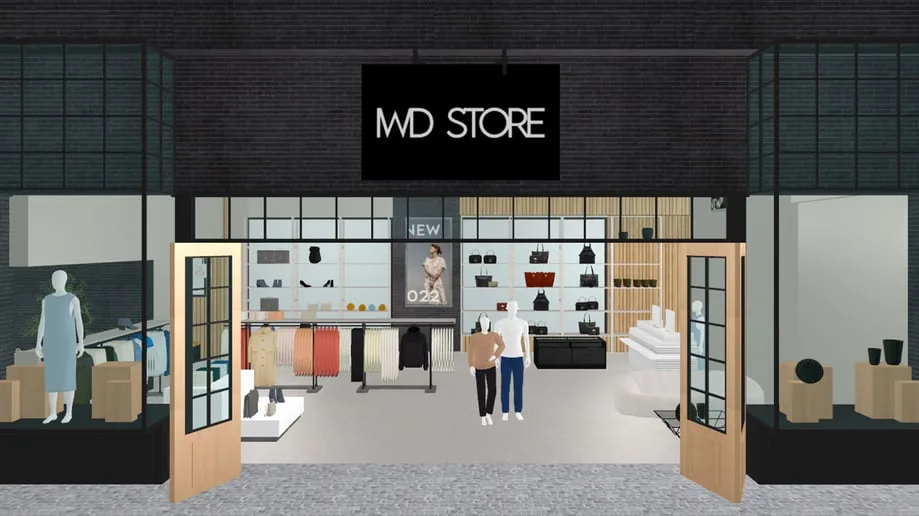
IWD’s VM Suite is a collaborative visual merchandising platform. IWD says it helps brands design better planograms, keep teams aligned, deploy guidelines and analyze in-store performance. Its Mockshop module lets a team build a 3D store from fixtures and products, then export merchandising directives customized by store cluster. IWD lists luxury, accessories, footwear, fashion, and food and beverage among its industries, and its pages show sales data laid over floor plans as heatmaps. The pages we read describe guidelines going out to stores. They do not describe a check of what each store built.
DotActiv
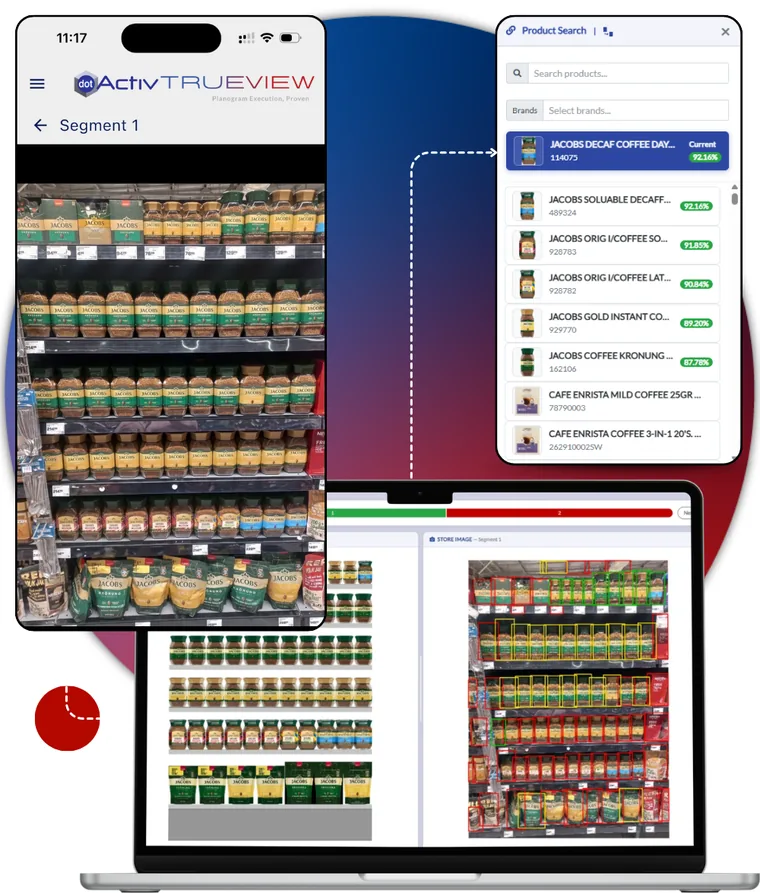
DotActiv’s Nova generates planograms from a strategy typed in plain English and keeps product listings, placements and facings refreshed across a store network based on rules you set. TrueView, the company’s image-recognition and execution platform, covers the next step: stores upload shelf photos, and TrueView checks products, placement and presence against the approved planogram. Results show what is implemented, not implemented and overdue, and can be split by region, store, category or planogram. The example here is a grocery shelf, so ask for a demo on your own fixtures before assuming it fits displays such as windows or wall units.
Blue Yonder
Blue Yonder sells space planning as part of its retail planning solutions. Its page describes planogram and floor-plan creation with AI, edits through natural-language prompts, and a mobile route for stores: step-by-step set-up instructions with animated product moves, after which users check compliance by comparing a photo with the planogram. The page does not say whether the comparison is automatic, so ask.
NielsenIQ’s NIQ Spaceman belongs in this group too. In an October 2026 announcement, NielsenIQ claimed its new AI and automation features speed up store-specific planogram creation by up to 50 times and flag execution and compliance gaps.
Field merchandising tools for brands and distributors
A third buyer sits outside the store chain: a brand or distributor whose reps visit retail accounts. These tools audit shelves the company does not own, so they count facings, find gaps and score shelves by product.
Repsly ShelfScan
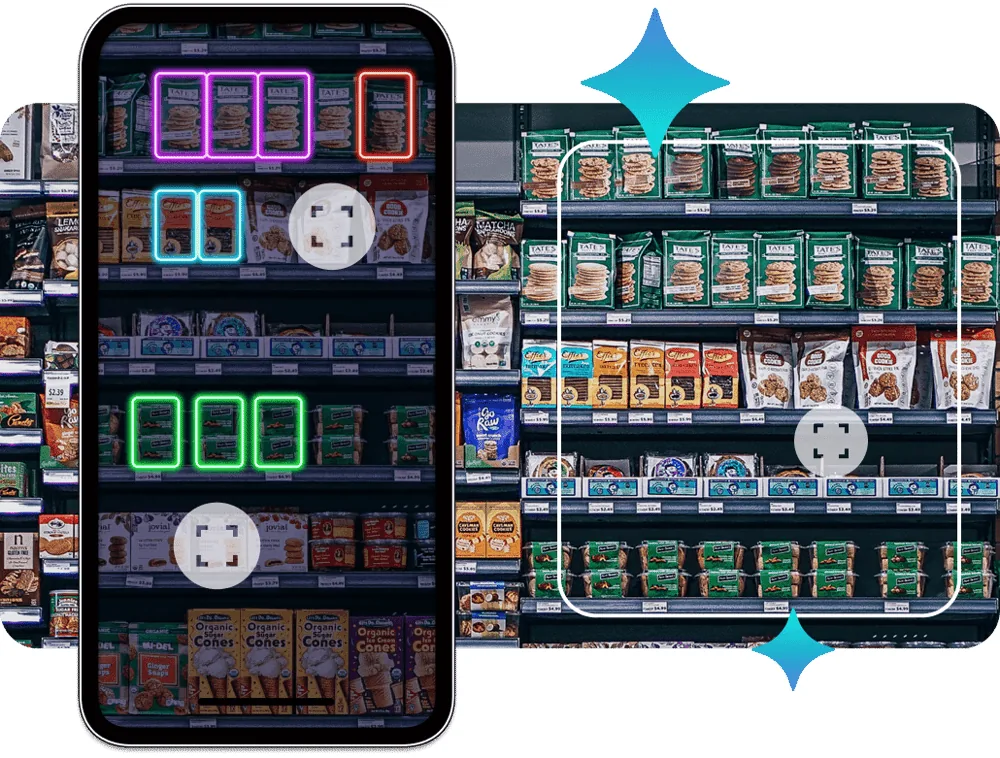
Repsly’s ShelfScan brings AI image recognition into Repsly. Reps stitch several photos together to cover the full width of a shelf, and back-office teams get analytics on product facings, share of shelf and price tag compliance across accounts. ShelfScan comes in three cumulative tiers: analytics within 24 hours, real-time out-of-stock fixes and order creation, and full planogram compliance scoring. Repsly says reps receive objective planogram compliance scores they can use to verify a layout and correct it in the store. The page is written for reps visiting accounts, so a brand or distributor is the natural buyer.
GoSpotCheck by FORM
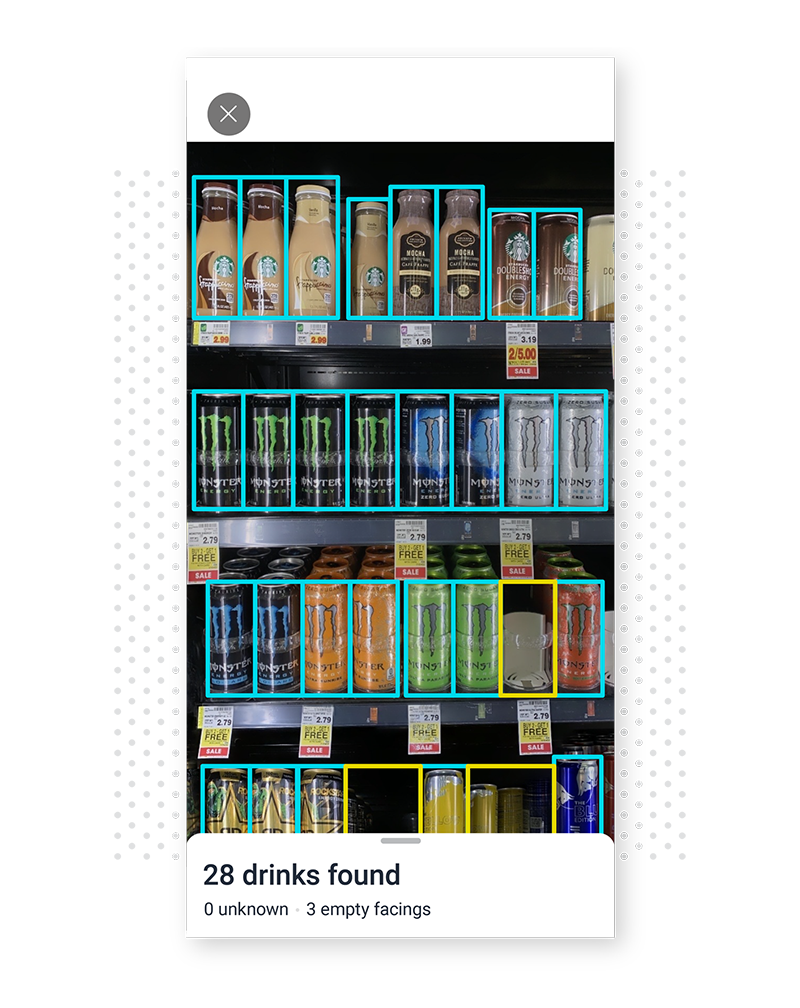
GoSpotCheck by FORM is FORM’s mobile image recognition product for retail, consumer goods and beverage-alcohol field teams. Its AI tags and sorts photos by product, brand, category and SKU count, and FORM says it can turn shelf images into planograms in seconds and run AI-powered audits that measure compliance. FORM describes the platform as a no-code task system for mobile teams with image recognition built in. The pages we read focus on shelves and SKUs, not on windows or mannequins.
AI photo scoring or a human reviewer?
Seven of the nine tools in this guide say software can check the photo: DotActiv, YOOBIC, One Door, Pazo, Repsly, GoSpotCheck and Bitreport. Blue Yonder’s page has users compare a photo with the planogram, and the IWD pages we read do not describe a photo check. At Bitreport, AI can check the photo at capture and on submit, and a reviewer can mark it up and approve it. Which suits you depends on what you check, how often the brief changes and how many photos your team can read.
Software is strongest when the answer can be counted: is the product on the shelf, is it in the right position, is the price tag there. A person is usually stronger when the standard is a look: does the outfit match the lookbook, is the mannequin styled the way the brief says, is the window clean and well lit? YOOBIC says its AI also judges styling and lighting, so the way to settle it is to test every tool on your own photos.
How often the brief changes matters too. With YOOBIC, for example, campaign looks and reference images are added at each campaign setup, so a brief that changes every week means that setup every week. A human reviewer reads the new brief and applies it.
Volume matters most. YOOBIC says VM teams spend hours reviewing submitted photos, yet up to 70% of them go unreviewed. That is a vendor figure, but you can test it: count how many photos your reviewers actually open. A photo nobody reviews checks nothing, so software has real value as a first pass when reviewers cannot keep up.
How to pilot a visual merchandising tool in four stores
Visual merchandising audit software looks similar in demos, so compare tools on your own displays. A four-store pilot is enough to see the differences:
Pick one live brief, such as the next window or wall change, and four stores: two that usually follow briefs closely and two that do not.
Collect 20 recent photos from those stores. Have your VM lead mark each one pass or fail first and write down why. The checks in our visual merchandising audit checklist are a good starting point.
Run the same 20 photos through each tool, or ask the vendor to. For a software check, count how often it agrees with your VM lead and read every disagreement. For a manual review tool, time how long your reviewers take.
Send the live brief through each tool for one week. Count how many photos come back, how many are reopened or flagged, and how many hours the review takes.
Ask what the store sees. A store should know what to fix, and where, without calling anyone.
Name the gap that costs you most: the plan, or the proof that stores followed it. That decides which group of tools to shortlist first.
Frequently asked questions
What is visual merchandising software?
Visual merchandising software covers three different jobs: planning how displays should look, getting stores to build them, and checking the result. Layout and planogram tools design the display. Store execution tools collect photos of what each store built and check them against the brief. Field merchandising tools help reps audit shelves in stores their company does not own.
What is the best visual merchandising software?
It depends on the job. For getting stores to build a display and prove it, our pick is Bitreport; we make it, so test it next to YOOBIC, Pazo or One Door on your own photos before you decide. For designing layouts and planograms, start with IWD VM Suite and Mockshop, DotActiv or Blue Yonder. For reps who audit shelves in other companies’ stores, start with Repsly ShelfScan or GoSpotCheck.
Can AI check visual merchandising photos?
Seven of the nine tools in this guide say software can check the photo: DotActiv, YOOBIC, One Door, Pazo, Repsly, GoSpotCheck and Bitreport. Software is strongest when the answer can be counted: is the product on the shelf, is it in the right position, is the price tag there. A person is usually stronger when the standard is a look: does the outfit match the lookbook, is the mannequin styled the way the brief says, is the window clean and well lit? YOOBIC says its AI also judges styling and lighting, so the way to settle it is to test every tool on your own photos.
Does Bitreport check photos with AI or design planograms?
AI photo checking compares each photo with the task’s reference photos and instructions. It can run the moment the photo is taken, so staff see the problem areas marked on the phone and fix them before sending, and again when the task is submitted. When the AI is confident, it can pass or reopen the photo itself; otherwise a reviewer gets the photo with the AI’s suggestion to confirm or change. We switch AI checking on for eligible clients and industries. Bitreport does not design layouts, planograms or floor plans, so a chain that needs those keeps a design tool alongside it.