

Retail frontline communication is how head office, store managers and store teams share information, coordinate work and report what happens on the shop floor. It includes campaign instructions, shift handovers, questions from stores and feedback on completed work.
A quick conversation can solve a problem. A group chat can help a colleague get an answer. The difficulty comes when an area manager needs to follow several tasks a day across 24 stores: who received the instruction, who owns it, what is finished and which correction still needs attention?
The answer starts with deciding what each message requires. Some updates need to be understood. Others need a named person to act, a deadline and a record of the result. Treating those differently makes communication easier to follow without turning every conversation into paperwork.
This guide explains how to organize those exchanges as part of everyday retail operations, including a practical shift-handover example and a small rollout you can test with store teams.
Start with the response each message needs
Before choosing a communication tool, look at the messages your stores already receive. A new returns procedure, a broken display fixture and a question about a delivery should not all disappear into the same stream.
Use the required response to decide where an update belongs:
| Message | Required response | Suitable place |
|---|---|---|
| A procedure has changed | Find and understand the current instruction | Shared procedure, with a targeted update |
| A seasonal display needs changing | Complete work by an agreed time | Assigned task with the brief attached |
| An associate needs clarification | Get an answer from the right person | Conversation or task comment |
| Work carries into the next shift | Accept ownership of the remaining action | Shift handover linked to the open task |
| A problem needs immediate attention | Reach the person who can respond now | Direct call or the established escalation channel |
This distinction also appears in Microsoft’s retail communication guidance, which separates chat, document sharing and task coordination. The practical lesson is to give each type of information a clear home.
Agree on that home with the people who will use it. If a store supervisor must copy every update into three places, the process needs simplifying. A conversation can stay where it started; any resulting commitment should be recorded where its owner can find and update it.
Give head office, stores and shifts a clear handover
Frontline communication moves in several directions. Designing only for announcements from head office leaves store questions and unfinished work without a reliable route back.
Head office to stores: send a usable instruction
Decide which locations need the update, who must act and where the current instructions live. A store receiving an irrelevant campaign or a second version of yesterday’s brief has more to sort through before work can begin.
For a display change, marketing supplies the offer and artwork; visual merchandising supplies the display brief. The store needs those materials together with the deadline, the relevant fixture or area and the person to contact if something is missing. Our guide to promotion execution in retail covers that workflow in more detail.
Stores to head office: make exceptions visible
A store may understand the instruction and still be unable to complete it. Stock has not arrived, the supplied artwork does not fit or a fixture is damaged. Give the team a place to record that specific obstacle against the work it affects.
Define who answers each kind of question. The VM team can clarify a display requirement; an operational issue may need the area manager. If the recipient cannot resolve it, someone still needs to own the next step. Forwarding a message should not leave the store guessing whether help is coming.
Shift to shift: transfer the remaining action
A handover should tell the incoming team what has changed, what remains open and who takes over. Keep routine background information available elsewhere so the handover stays short enough to use.
For a ready-made form, use our retail shift handover checklist, which comes with a fillable PDF and a filled example.
Whenever an open task already exists, refer to it instead of creating a second version of its instructions. The incoming supervisor should be able to see the latest status, evidence and conversation in the same record.
Turn an instruction into work someone can own
“Please check the seasonal area” leaves room for several interpretations. A useful brief tells the store what to change, where to change it and what the completed result should look like.
For work that needs follow-up, include these details:
Location and owner: name the store and the person or role responsible for completing the work.
Expected result: describe the change and attach the current procedure, artwork or VM brief where relevant.
Deadline: give a date and time that make sense for the store’s opening hours and staffing.
Evidence: specify what the reviewer needs, such as a photo of the complete display and a close-up of one detail.
Questions and exceptions: tell the team where to explain missing materials or request clarification.
Review: identify who checks the result and what happens when a correction is needed.
Use one accountable owner even when several people contribute. That owner can coordinate the work or arrange a handover; responsibility should not depend on everyone assuming another colleague has seen the message.
In Bitreport, store tasks can bring instructions, deadlines, photos and comments together. Recurring tasks help teams repeat work without rebuilding the instruction each time. Keep the recurrence appropriate to the work: a one-off campaign change should not become a daily reminder.
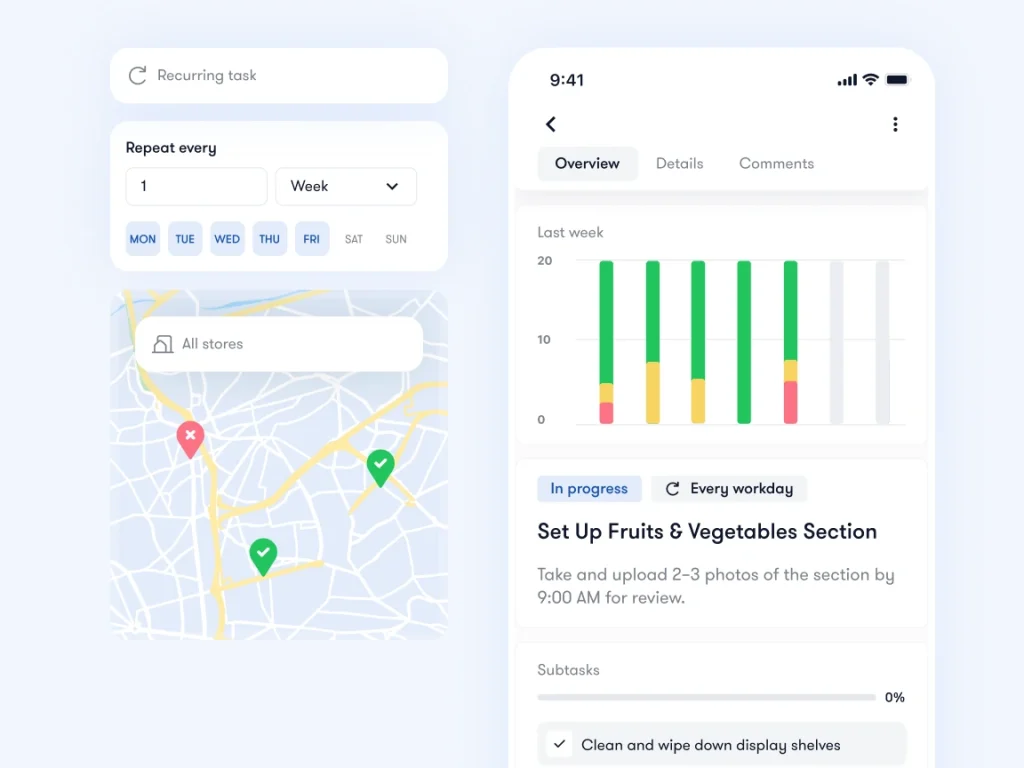
When choosing retail task management software, test this with a real store instruction. Check whether the person doing the work can find the brief, ask a question and provide the result without reconstructing the conversation.
When a store needs something from head office instead, such as supplies or help, a request form with an owner and a status keeps the question and the answer in one place: see Bitreport Requests.
A practical retail shift-handover example
Consider a garden store preparing a weekend planting display. The morning team has arranged the pots and compost, but the new seed assortment is arriving with the afternoon delivery. The display must be ready before the next morning’s opening. The following is an illustrative handover, with invented names and timings.
During a short shift conversation, staff can add context that would be awkward to write down. The task record preserves the commitment after that conversation ends. Nobody needs to search yesterday’s chat to discover whether the delayed stock was dealt with.
Adjust the fields to the work. A delivery issue may need a supplier reference; a repair needs the affected fixture and a description of the fault. Use enough detail for the next person to act, without asking them to complete a long form for every routine update.
Keep photo feedback beside the work
A photo shows what was done. Across many locations, the management challenge is connecting each photo to the right store, instruction, submission and correction.
When a reviewer asks for a change, explain it against the relevant image or task. “Move the left-hand display closer to the entrance” is easier to act on when the store can see which display the reviewer means. After the correction, keep the new submission with the earlier feedback so both sides can follow the outcome.
In its published Under Armour CEE case study, Bitreport describes a visual merchandising process where photos and feedback had been spread across channels. The team brought photo submissions and review together, allowing reviewers to annotate issues, give feedback and approve or reopen work. This example concerns the CEE operation described in the case study.
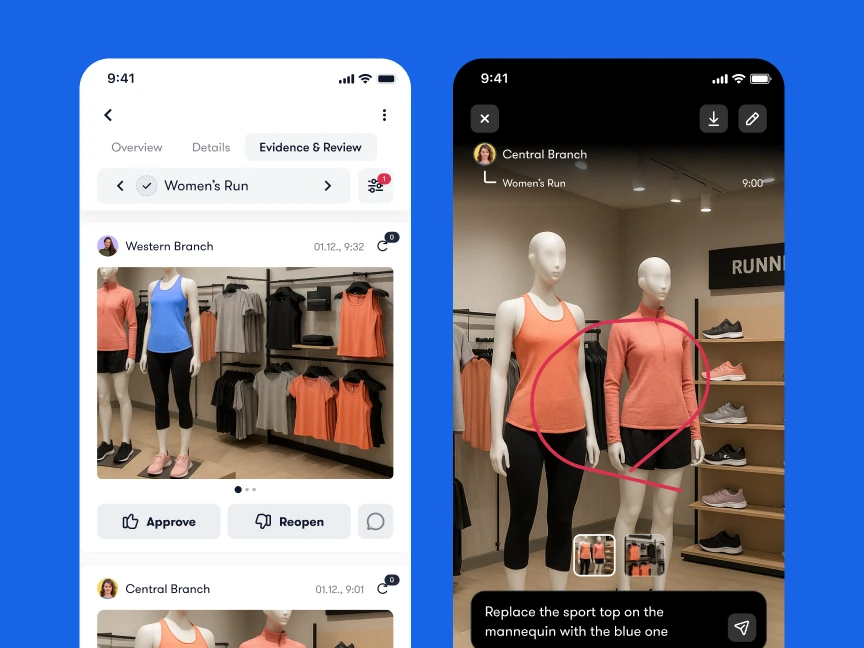
The review is carried out by people. A store associate submits the image, the VM reviewer evaluates it and the store responds to any requested changes. Assigning review responsibility matters as much as assigning the original task: a completed submission should not sit unreviewed because everyone expects someone else to check it.
Set a communication rhythm stores can sustain
Agree when routine information will arrive and how urgent exceptions are handled. This gives store teams a predictable way to check updates around customers, deliveries and shift changes.
A workable starting rhythm is a short opening review of the day’s priorities, a handover of unfinished work at shift change and a manager check of unresolved exceptions. Head office can group non-urgent updates instead of sending each small change as a separate interruption. Treat this as a starting proposal to test with your stores, rather than a universal timetable.
Prioritize messages that affect the current shift. A future procedure update can be available in advance without being presented as an immediate task. If everything is marked urgent, supervisors have to rebuild the priority order themselves.
Also agree on response expectations. A question about next month’s campaign can wait for the appropriate review time; a problem that prevents today’s work may need a direct call. Record the resulting decision where the task owner can see it, even when the decision happened on the phone.
Measure follow-through and unnecessary chasing
Start with a few questions that show whether the process helps stores complete work. The number of messages sent tells you little about whether an instruction was useful.
How many assigned actions reached their deadline with a recorded outcome?
How many submissions are waiting for review, and how long have they been waiting?
Which instructions repeatedly lead to clarification questions or rejected submissions?
How often does an incoming shift inherit open work without a named owner?
How much time do managers spend asking stores for updates that should already be visible?
Define each measure before comparing locations. For example, decide whether “completed” means submitted by the store or accepted by the reviewer. Those are different moments, and both can be useful to track.
Record the reason for an exception as well as its status. A late delivery, an unclear brief and an overlooked assignment call for different responses. Do not assume every delay is a communication failure or a store performance problem.
Use the findings in the area manager’s regular follow-up. Repeated questions may mean the instruction needs rewriting. Repeated waits for review may mean the reviewer needs a clearer schedule or additional support. Improve the process before adding another reminder.
Test the process before extending it to every store
Choose one recurring workflow, such as a weekly display update or shift handover, and a small group of stores with different operating conditions. Agree on the current problem and observe how they handle it now. A limited pilot makes it easier to find practical friction before asking the whole estate to change.
Map where the instruction, questions, evidence and final decision currently sit. Ask a store colleague to show you a recent example.
Agree on one task record and one route for urgent exceptions. Identify the store owner and the reviewer before work starts.
Run the workflow through several complete cycles, including at least one handover or correction. Watch for duplicate entry and missing context.
Ask associates and supervisors what was difficult to find or update. Compare the amount of chasing and unresolved work with the starting position.
Revise the brief and handover rules, then expand when the participating stores can follow them consistently.
Bring real examples into the software evaluation. In a 30-minute Bitreport demo, use one store task to walk through the instruction, photo submission, feedback and final follow-up. That gives your team a concrete basis for deciding how Bitreport would fit the way your stores work.