

The opening checklist is complete in the chat. The promotional display still has yesterday’s prices. The closing shift knows a fixture needs repairing, but nobody can find the original request.
Retail task management software gives that work a defined place: an assignment, an owner, a deadline, and a record of what happened. For a multi-store retailer, the buying decision is whether managers can identify the locations that need attention without asking every store for an update.
This guide compares five retail task management platforms: Bitreport, Zipline, YOOBIC, Connecteam, and StoreForce. It also includes a task brief you can adapt and a practical test for recurring work, evidence, and shift handovers.
Published by Bitreport, one of the providers included. We reviewed official product and support information on September 29, 2026. This is a selected comparison by workflow, not a numerical ranking or hands-on comparative test. Confirm the capabilities and configuration included in each proposed setup.
Retail task management software: comparison at a glance
The five platforms share some capabilities. The differences below identify useful starting points for a demonstration, not exclusive strengths or claims that other vendors lack a feature.
| Platform | Relevant buying situation | Documented task approach | Question to test in a demo |
|---|---|---|---|
| Bitreport | Store routines and corrective work need consistent follow-up | Assigned and recurring tasks, photo evidence, and audit-linked corrective actions | Can the manager follow one failed check through to a reviewed correction? |
| Zipline | Store instructions and daily assignments need to stay connected | Day Sheet, recurring work, priorities, task status, and photo approvals | Does a changed instruction reach the people completing today’s work? |
| YOOBIC | Task execution needs digital guidance and visual feedback | Missions, action plans, photo annotation, and execution approval | Can the reviewer explain a rejected display and follow the correction? |
| Connecteam | Teams need task coordination within a broader employee app | One-off and recurring Quick Tasks, subtasks, comments, and group tasks | Is completion required once for a group or separately for each assignee? |
| StoreForce | Task planning needs to account for schedules and capacity | Role/location assignments, priorities, templates, and schedule-connected work | Can a manager identify and address an overloaded store or shift? |
Start with the row closest to your problem, then compare shortlisted products against the same scenario. No single feature, such as a photo attachment or recurring deadline, proves that the whole workflow fits your stores.
What is retail task management software?
Retail task management software helps head office, regional managers, and store teams assign, prioritize, complete, and track work across retail locations. Tasks can cover daily routines, one-off requests, campaign changes, and corrections arising from inspections.
A useful task connects the instruction to the location, responsible person, due time, and completion requirement. The manager should be able to distinguish work that is waiting, overdue, blocked, or ready for review, using the statuses or workflow available in the chosen system.
For example, “check the front display” leaves room for interpretation. “Replace the front-table price labels before Friday opening and submit a photo showing the products and labels” gives the store a clear outcome and the reviewer something concrete to assess.
Task management is one part of retail operations. If you are deciding between POS, inventory, audit, and operational tools, start with our retail store management software buyer’s guide. This comparison focuses on work assigned to store teams.
Five platforms to evaluate
Bitreport: store routines and corrective task follow-up
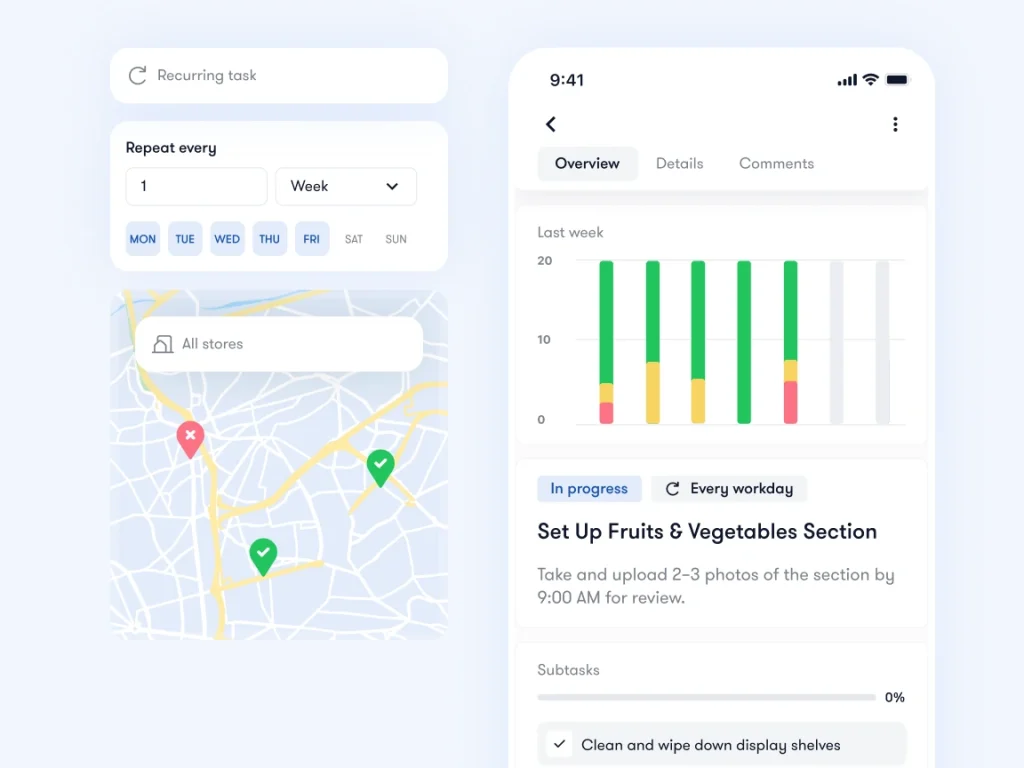
Bitreport’s task management connects assigned work, deadlines, recurring routines, and photo evidence across locations. Its audit and checklist workflow can turn failed checks into assigned corrective tasks, giving a store finding a follow-up process.
It is a relevant shortlist option when regional managers need to see which stores have completed their routines and which issues still need attention. The task may originate at head office, in a store visit, or in a recurring check; the useful comparison is how clearly that work reaches the store and returns to the manager.
Bitreport’s published Under Armour CEE case documents a regional visual merchandising workflow with photo submission, annotation, approval, and reopening. It provides a specific example to discuss in a demo rather than evidence that every task type has an identical review configuration.
Try this: Fail a price-label check, assign the correction, and submit an unclear photo. Ask the reviewer to send feedback and follow the corrected submission. Then check what the area manager can see across several stores.
Confirm the fit: Demonstrate your own recurring task and review requirements. Bitreport does not replace a POS, inventory ledger, payroll system, or full workforce scheduling suite; discuss any required data exchange separately.
Zipline: daily tasks connected to store communication
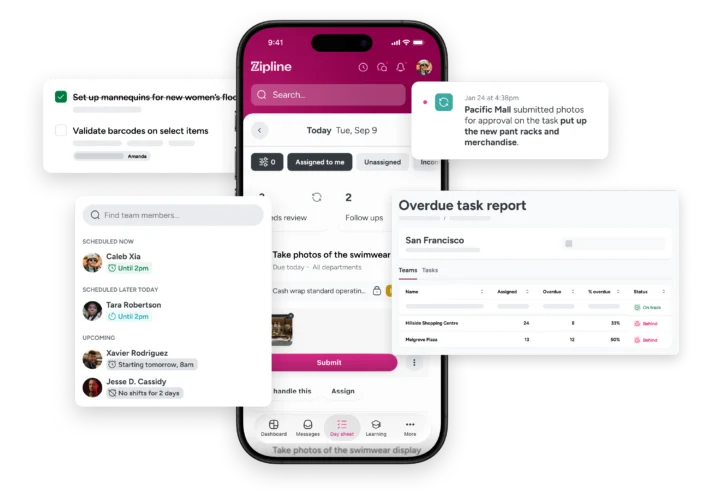
Zipline combines retail communication and task management. Its Day Sheet brings together messages, assignments, and statuses for store teams. Official product information also describes recurring tasks, priorities for targeted audiences, photo task approvals, and visibility for managers.
This is a relevant approach when the problem starts with the handover from instructions to action. A promotional message and the work needed to implement it should remain connected, including when the instruction changes after the original brief.
Try this: Send a promotion task to participating stores, then change the display instruction. Ask a store employee to identify the current instruction and show their remaining work. Have a regional manager locate a late store and review a submitted photo.
Confirm the fit: Check how assignments behave for different departments, locations, and shifts. Establish how a read message, an assigned task, and an approved result appear to each role. Avoid treating acknowledgement of the communication as proof that the physical work is complete.
YOOBIC: guided missions and visual review
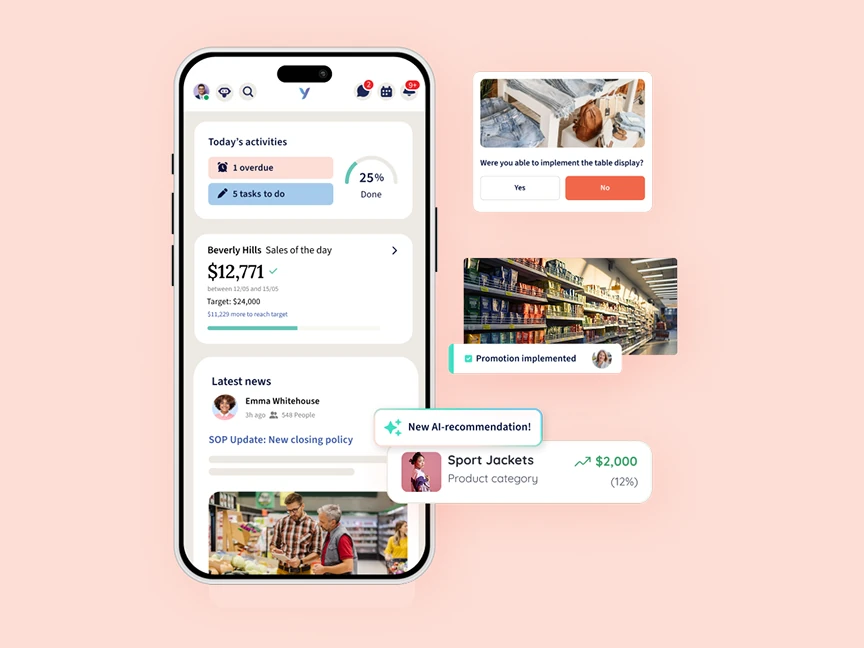
YOOBIC’s task management organizes store work through missions and digital guidance. Its product materials describe action plans and visual feedback, including photo annotation and execution approval, within a wider platform that also covers frontline communication and learning.
It is a relevant candidate when teams need instructions they can follow on the shop floor and reviewers need to explain what must change. The practical question is whether the instruction, submitted evidence, feedback, and corrected work remain easy to follow for both sides.
Try this: Give two store formats different display instructions. Submit a photo from one store with a visible placement error. Ask the manager to annotate the issue and demonstrate how the employee finds the feedback and completes the correction.
Confirm the fit: Check the mission setup, audience targeting, recurring-work requirements, and review responsibilities in the proposed configuration. If AI-assisted review is part of the demonstration, evaluate that capability separately from ordinary photo submission and human approval. The presence of both does not make them the same workflow.
Connecteam: recurring tasks and employee coordination
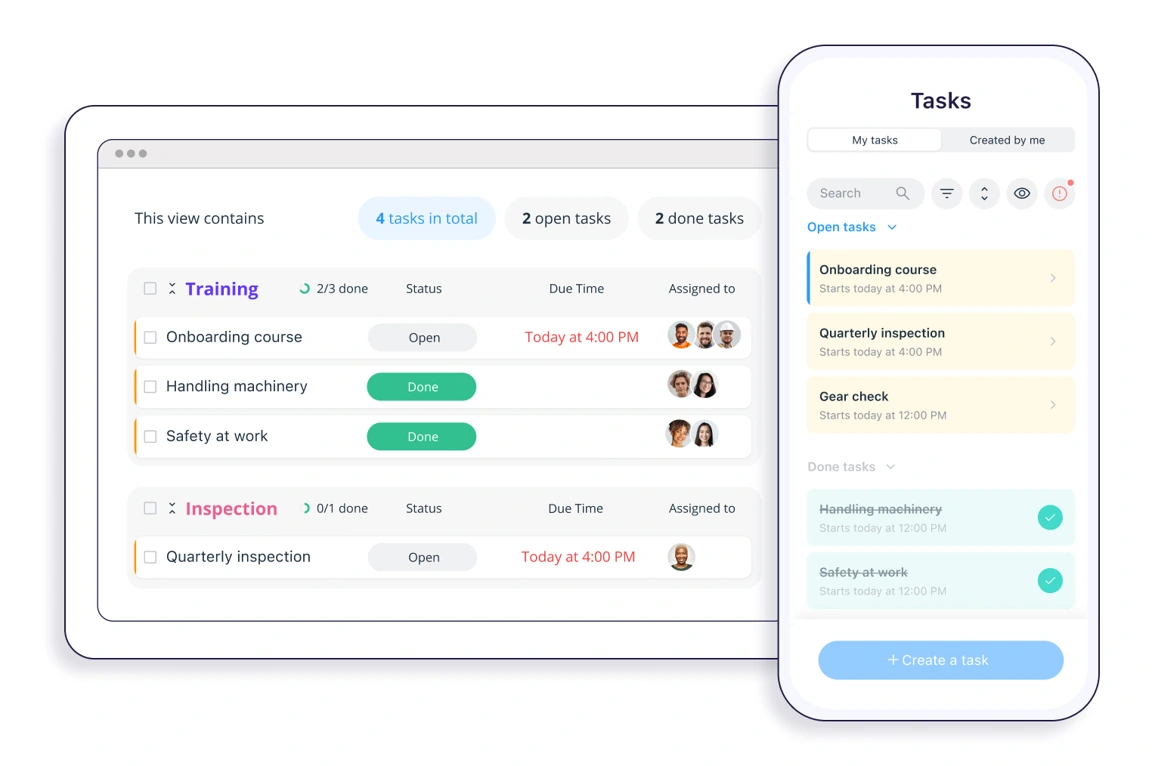
Connecteam’s task management app supports Quick Tasks with due dates, recurring schedules, subtasks, attachments, and comments. It sits within a broader employee platform, making it a candidate when store teams also need staff communication or coordination tools.
Its documentation makes an important distinction: with a group task, any assigned user can mark the task or its subtasks complete. That is useful for shared work, but it is different from requiring an independent completion from every store. Its task-creation guide also describes creating separate tasks for several users, subject to plan availability. Confirm how that maps to your store owners.
Try this: Assign one shared task to a store team, then configure the same check so each participating store or responsible assignee must complete it separately. Mark one complete and inspect the remaining obligations. Repeat with a recurring task so the next occurrence is also visible.
Confirm the fit: Review the recurring-task setup, mobile task-creation permissions, and how evidence and any required manager approval will work. Do not assume that a comment or attached image by itself creates an acceptance step.
StoreForce: tasks connected to schedules and capacity
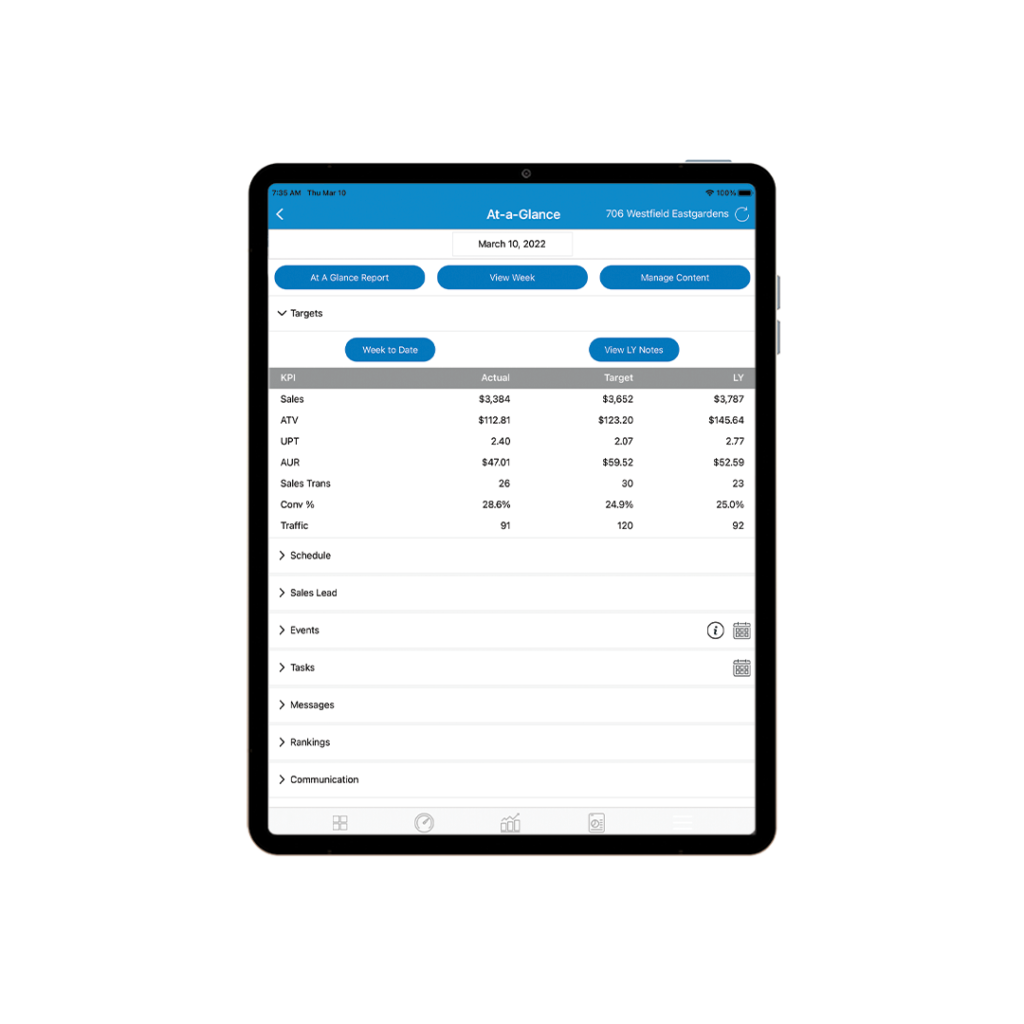
StoreForce’s task management and retail operations offering connects task planning with store schedules. Its product page describes role- and location-based assignments, priorities, task templates, attachments, subtasks, and visibility into progress across the network.
This is a relevant option when the buying problem includes the amount and timing of work sent to stores. A list may be perfectly documented while still asking a small team to complete too much during the busiest trading period.
Try this: Assign several tasks to one location during a busy shift, then introduce an urgent request. Ask the manager to show the planned work against available capacity and demonstrate how priorities or timing are adjusted. Check how the change appears to the employee expected to do the work.
Confirm the fit: Establish which task, scheduling, and reporting components are included in the proposed setup. Use your own store roles and trading pattern in the demonstration. A combined platform is useful only if the people responsible can interpret and act on the information.
What matters beyond a task checklist
Separate the audience from the accountable owner
A task can be visible to an entire store while one person remains responsible for getting it done. Equally, a request sent to twenty stores may require twenty separate results. Ask the vendor to demonstrate both models rather than relying on a label such as “group assignment.”
Test what happens when the responsible person leaves the shift, moves to another store, or is absent. The next employee needs the instruction and history; the manager needs to know who owns the remaining work. A task should not disappear from practical view because its original recipient is unavailable.
Inspect each recurring occurrence
A recurring task is more than a reminder that appears again tomorrow. Managers need to distinguish today’s obligation from yesterday’s missed work and review the record for the correct store and date.
Leave one opening task unfinished, then advance to the next occurrence in the demo. Ask what remains overdue, what is newly due, and how each affects reporting. Also test a closed day or a routine that does not apply to a particular store format. Establish how exclusions are recorded rather than quietly deleting inconvenient results.
Define evidence and acceptance
For a routine with a simple binary outcome, marking complete may be enough. For a display or corrective action, a photo and review may be appropriate. Define the evidence according to the consequence of getting the task wrong.
Submitted and accepted are different milestones. Establish whether the chosen system distinguishes them, how feedback reaches the store, and who decides when work is finished. Ask how an incorrect submission is corrected without losing the useful history. This is a workflow requirement to demonstrate, not a claim that every platform implements the same statuses.
Make exceptions visible without flooding the team
Managers need a way to find late, blocked, or rejected work, but not every routine task deserves the same urgency. Test priorities, reminders, filters, and escalation behavior against actual store responsibilities.
If five departments can send requests to a store, also decide who coordinates the workload. Software cannot resolve conflicting priorities unless the organization has agreed who can make that decision. For a wider platform comparison covering audits, communications, and other work, see our retail operations software guide.
A retail task brief you can use in a demo
Use a task that your stores recognize. The example below is illustrative, not a customer result or a claim about a particular product’s configuration.
Task: Replace the promotional price labels on the front display.
Audience and owner: Participating stores with this display; the store manager assigns the on-duty colleague responsible for completion.
Timing: Complete before Friday opening in each store’s local time. State who can approve a changed deadline.
Instructions: Attach the current promotion brief and reference photo; identify which labels must be removed and replaced.
Evidence and review: Submit a clear photo showing the display and readable labels. The designated reviewer checks the result against the brief.
Exception: If materials are missing, report the blocker against the task, name the person following up, and retain the original due time in the review record.
A useful demo can answer what happens when one store completes the work, another submits a poor photo, and a third cannot proceed. For campaign coordination and field-team scenarios beyond daily task management, see our retail execution software comparison.
How to test retail task management software before rollout
Give shortlisted vendors the same brief and ask an actual store user to run through it. Capture what was demonstrated, what required configuration, and what remains unanswered. A capability described in a sales presentation is not yet a tested fit for your stores.
Distribute the right work. Send the task to a relevant group of stores and exclude a location where it does not apply. Confirm whether each store owes a separate result and how the owner is identified.
Run a shift handover. Change the person responsible while the task is open. Ask the incoming employee to find the instructions, comments, and outstanding work without help from the original assignee.
Test the exception. Submit incomplete evidence from one store and leave another task overdue. Follow the feedback and correction, including who is notified and what managers can see.
Check the recurring record. Allow the next scheduled occurrence to appear while the earlier one remains unfinished. Verify that neither the outstanding obligation nor its history is obscured.
Review the manager’s next action. Ask the regional manager to identify which stores need intervention and why. Agree how the pilot will measure follow-up work, accepted completion, and unresolved tasks.
Use representative locations for the pilot: include a store with a different format or staffing pattern if that affects the task. Agree an observation period long enough to include several occurrences of the routine, and give users a clear route for questions.
Before a wider rollout, confirm device access, permissions, export needs, connectivity behavior, and the scope of any integration. If offline work is important, demonstrate the exact supported workflow and what happens when the device reconnects. Avoid assuming that every action works without a connection.
Also decide which old process will stop. If stores still have to send the same photos by email after uploading them, the pilot has added an obligation without fully replacing the earlier workflow.
What to measure in a task management pilot
Agree what counts as done before measuring completion. For tasks that require review, use accepted work for the outcome measure and track submissions separately. For tasks without a review step, document that completion definition instead.
| Measure | Definition | What it helps you investigate |
|---|---|---|
| On-time verified completion | Required task instances accepted by their deadline, divided by all required instances due in the period | Whether the agreed work reached the acceptance standard on time |
| Open overdue work | Task instances past their due time that have not reached the agreed completion state, measured at a fixed review time | Which stores or task types need follow-up |
| Review turnaround | Time from submission to the reviewer accepting it or requesting a correction; examine the median and slowest cases | Whether the review process is delaying closure |
| Manager follow-up time | Observed time spent checking status, requesting evidence, and chasing corrections for the chosen workflow | Whether the pilot reduces coordination work rather than moving it elsewhere |
On-time verified completion rate = (task instances accepted by their deadline ÷ required task instances due in the period) × 100
For example, if 100 required task instances were due and 82 were accepted by their deadlines, the rate is 82%. If 88 were submitted on time, that is an 88% submission rate, not an 88% verified completion rate. These are illustrative numbers, not a benchmark.
Count each store and recurring occurrence according to the agreed obligation. Document cancellations and genuine exclusions, and do not quietly move deadlines to improve the result. Where the platform does not provide a measure directly, agree a consistent export or observation method. These are evaluation measures, not a promise that all five products include an identical report.
Read the figures alongside the stores’ feedback. A higher completion rate may coexist with unclear instructions, excessive photo requests, or work carried out after the scheduled shift. Review the process that produced the number before expanding it.
Frequently asked questions
What is the best retail task management software?
The best fit depends on how your stores receive, complete, and verify work. Bitreport, Zipline, YOOBIC, Connecteam, and StoreForce are relevant options to evaluate. Compare them with the same task, including a missed deadline, a shift handover, and a correction, rather than selecting a winner from feature names alone.
Can a general project management app work for retail stores?
Yes, if it supports your assignment model and store teams can use it reliably. Test separate completion by location, recurring task history, evidence requirements, permissions, and regional reporting. A general task board may be sufficient for a simple setup; store-specific requirements should determine whether a specialist platform is needed.
Does every store need its own task completion record?
If every store must perform the work, each store needs an identifiable completion record for that obligation. A shared task that any one person can close may be suitable for collaborative work within a team, but it does not automatically prove that every location completed the request.
How is task management different from employee scheduling?
Scheduling establishes who is expected to work and when. Task management establishes what needs to be done, who is responsible, and how completion is recorded. Some platforms connect the two. Verify both the staffing requirement and the work itself rather than treating a scheduled shift as evidence of completed tasks.
Bring one recurring store task to a Bitreport demo
Choose a routine your team currently manages through messages or spreadsheets. Bring the instruction, deadline, expected evidence, and one recent exception.
Book a Bitreport demo to walk through assignment, store completion, and manager follow-up using that workflow. The useful outcome is a clear view of how your team would run the work across locations.