

A delivery arrives with the right number of cartons. Inside, one product is the wrong size and another carton contains fewer units than the packing slip shows. Counting the boxes would not catch either problem, but a retail goods receiving checklist would.
The checklist helps staff verify the delivery, record what actually arrived, separate exceptions and hand accepted goods over for storage. Use the eight checks below for general retail merchandise, then add the checks your products require. Food, medicines and other controlled goods need their own acceptance and handling procedures.
Before the delivery: know what you are checking against
Have the purchase order or authorized order reference available, along with the supplier’s delivery note or packing slip. The order tells you what the business agreed to buy. The delivery paperwork tells you what the supplier says is in this shipment. Neither replaces a physical check of the goods.
Confirm which store is receiving the shipment and who is responsible for checking it. Identify the person who can decide what to do with shortages, substitutions, damaged stock or deliveries that have no matching order. The receiver should not have to invent an approval process while the driver waits.
Prepare enough receiving space to keep unchecked goods apart from stock already cleared for sale. Have the appropriate handling equipment and trained staff available. Use the retailer’s unloading procedure; an inventory checklist does not replace site safety instructions.
The retail goods receiving checklist: eight checks at arrival
Work through these checks against the actual delivery. Record a result and an exception where needed, rather than marking the whole shipment “OK” after checking its outer cartons.
Match the store, supplier and delivery reference to the expected shipment.
Compare the delivered product identifiers and variants with the order and packing slip.
Count the quantities received, using the same units of measure as the order.
Confirm carton quantities and pack sizes before converting cases into individual units.
Inspect packaging and the goods according to the store’s procedure; record visible damage or other concerns.
Check required batch, date, serial or condition details for the product category.
Separate goods that need an acceptance decision and record the exact discrepancy.
Record who checked the delivery, when it was checked and what remains unresolved.
For a simple illustrative count, four cases containing six units each represent 24 units. If an employee enters “4” into a field that expects individual units, the record is wrong even though the cases were counted correctly. Confirm the unit before posting a receipt, especially when a supplier changes pack size.
Physical arrival, acceptance and the inventory receipt are related but distinct. A receipt in the stock system must reflect the retailer’s rules for accepted, held and rejected goods. Do not make damaged merchandise available for sale just because it is inside the building.
Check the merchandise, not only its packaging
A clean outer carton does not tell you whether the product, variant or quantity is correct. Follow the retailer’s inspection method and record what was checked. If that method uses sampling, follow its rules for extending the inspection when a problem is found; do not describe a sampled shipment as fully inspected.

Write observations that another person can verify. “Outer carton crushed at one corner; two retail packs split” is more useful than “damaged delivery.” Photograph the affected packaging and products when permitted, and keep the shipment reference with the evidence. A photograph supports the record; it does not establish the total quantity received or prove the condition of items outside the frame.
For dated products, record the relevant batch or expiration details and apply the retailer’s acceptance rules. Temperature-sensitive products require their approved checks, equipment and handling limits. The retail expiration date tracker guide explains how to carry dated-batch information into later store checks.
When the delivery does not match the order
Keep the discrepancy specific. Record the product, expected quantity, actual quantity, condition and location of any goods waiting for a decision. Name the person responsible for resolving it and the next action. Supplier or carrier notifications must follow the retailer’s agreed process and applicable deadlines; do not assume one claim deadline fits every delivery. Our guide to the return to vendor process shows how far vendor claim deadlines can differ.
Short or partial deliveries
Record the quantity that arrived and distinguish it from the quantity still expected. A planned split shipment and an unexplained shortage can look identical at the receiving bench, but they need different follow-up. Check the shipment reference and contact the authorized purchasing or inventory owner before closing the outstanding balance.
The inventory system’s workflow matters. For example, Lightspeed’s receiving documentation provides a partial-receipt process for tracking outstanding quantities. Use your own system’s supported process instead of marking an entire order received and hoping someone corrects it later.
Wrong products, extra units or damaged goods
Keep affected goods identifiable and separate from stock ready for sale while the authorized person decides what happens next. Record substitutions and extra units explicitly; do not silently change the ordered item or quantity to make the paperwork match the delivery.
Do not send goods back, discard them or release them for sale without the required approval. Record the decision and any return or replacement reference when it is made. Holding the goods is an interim state, not a completed resolution. Once goods are on hold, our guide to the retail damaged goods procedure shows how to record the case, decide the outcome and close it with proof.
No purchase order or unclear paperwork
Use the retailer’s exception process to establish who ordered the goods and whether the shipment belongs at this location. Keep it identifiable while that check happens. A familiar supplier name alone does not confirm that every item in the shipment was authorized.
Example: a receiving record that leaves no guesswork
This invented example shows one line from a delivery of water bottles. The order is for 24 units. The receiver counts 22, including two with cracked lids. The useful record separates those facts instead of writing “four missing.”
| Field | Example entry |
|---|---|
| Delivery reference | PO-1048 / shipment 02 |
| Item | Bottle B17, blue, 20 oz |
| Ordered / physically received | 24 units / 22 units |
| Condition | 20 undamaged; 2 cracked lids |
| Held goods | 2 units in hold bin H-02 |
| Follow-up owner | Maya, store manager |
| Next review | Oct 30, 2026, 2:00 PM EDT |
The two missing units and the two damaged units are separate exceptions. The manager still needs to confirm whether the missing units are due in another shipment and what to do with the damaged pair. Any inventory entry follows the store’s approved process; this example does not prescribe which software status to use.
When the decision arrives, add it to the same record. If the supplier agrees to replace the damaged units, record the replacement reference and track their arrival. Do not close the issue solely because someone sent an email asking for a replacement.
Finish with a put-away handoff
Receiving is not finished when the cartons leave the delivery door. Accepted goods need a known destination, held goods need an owner, and the stock-system entry needs to be completed by someone authorized to make it.
Confirm the accepted quantities and the person responsible for the inventory receipt.
Assign the storage or sales-floor destination for accepted goods.
Identify held goods, their location and the outstanding decision.
Hand over unfinished counts or put-away work with an owner and due time.
Confirm that the receiving area is ready for the next delivery.
An employee taking over the shift should be able to find both the goods and the record. “Delivery done except blue bottles” is not enough. Give the reference, location and next action so the incoming employee can continue without repeating the investigation.
The retail stockroom organization guide explains how receiving areas, hold locations and storage addresses fit together. For grocery teams, connect this handoff to the wider grocery store operations routine so goods do not wait unchecked while responsibility passes between departments.

Make receiving exceptions part of the daily follow-up
A signed checklist captures what happened at arrival. It does not, by itself, resolve a missing item or move an accepted carton to its shelf. Review open exceptions with the person who owns the next action. Keep the delivery reference, evidence, decision and completion record together.
Bitreport’s audits and checklists and task management support recording checks, assigning follow-up work and reviewing photo evidence. A team could use those capabilities to document a receiving exception and follow the corrective task through to completion. Purchase orders, stock balances and inventory receipts remain in the retailer’s inventory system.
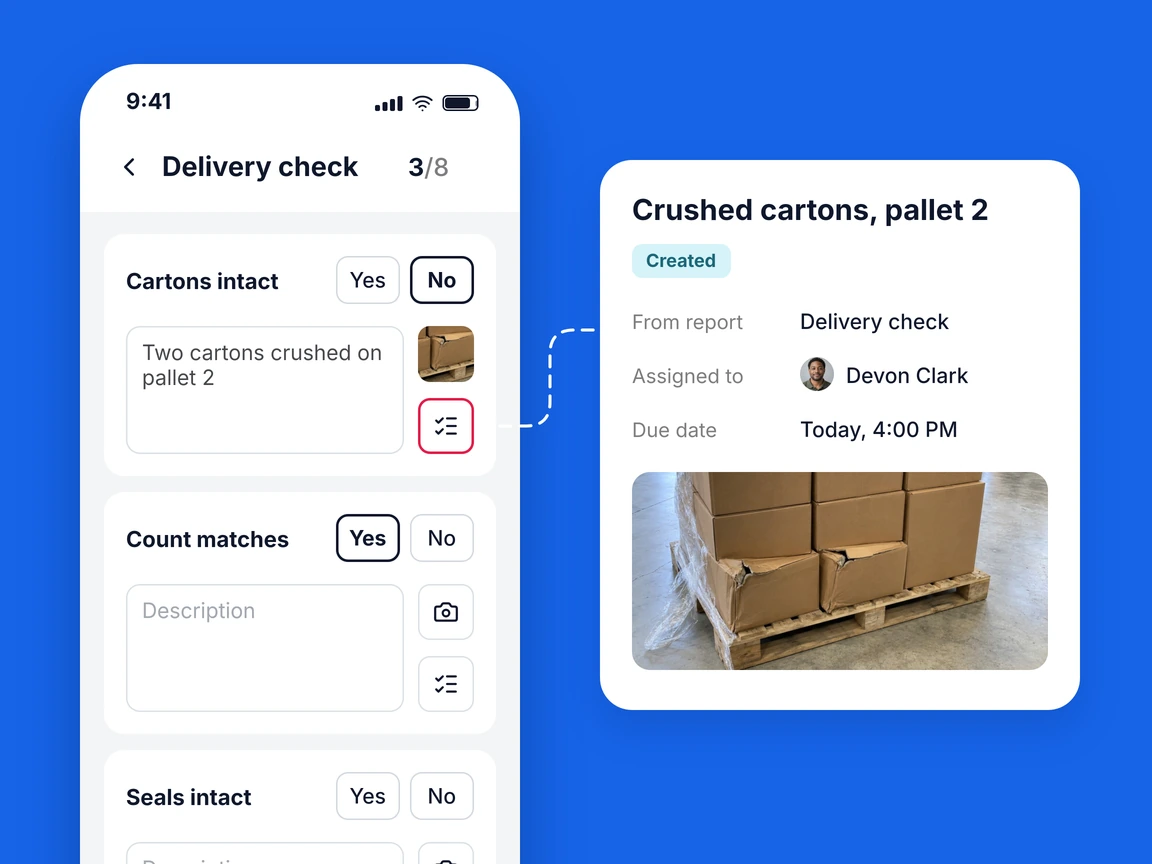
Across several stores, consistent exception categories make it easier to discuss repeated problems: wrong variant, shortage, damage, unidentified shipment or unfinished put-away. Review the underlying records before attributing a pattern to a supplier or a store. The same label can describe different causes.
Start with one delivery and check whether a colleague can understand the record without speaking to its author. Keep the checks that inform a decision, clarify vague fields and remove duplicate entries. Receiving then becomes a visible part of retail operations, with clear responsibility from delivery to shelf. If that follow-up is currently scattered across messages, a Bitreport demo can show how checks and assigned actions fit together.
Frequently asked questions
What should a retail goods receiving checklist include?
A retail goods receiving checklist helps staff verify the delivery, record what actually arrived, separate exceptions and hand accepted goods over for storage. Record the product, expected quantity, actual quantity, condition and location of any goods waiting for a decision. Name the person responsible for resolving it and the next action.
What should you do when a delivery is short?
Record the quantity that arrived and distinguish it from the quantity still expected. A planned split shipment and an unexplained shortage can look identical at the receiving bench, but they need different follow-up. Check the shipment reference and contact the authorized purchasing or inventory owner before closing the outstanding balance.
How should damaged goods be handled during receiving?
Keep affected goods identifiable and separate from stock ready for sale while the authorized person decides what happens next. Do not send goods back, discard them or release them for sale without the required approval. Record the decision and any return or replacement reference when it is made.
When is goods receiving complete?
Receiving is not finished when the cartons leave the delivery door. Accepted goods need a known destination, held goods need an owner, and the stock-system entry needs to be completed by someone authorized to make it.