

A retail expiration date tracker is a record of which dated products need attention, where they are and who has to act next. For each batch it holds the printed date, the store position, the quantity checked, an action deadline and a named owner.
Finding an expired product on a store walk rarely means nobody cares. More often the store tracks dates in a way that cannot survive a normal week: a spreadsheet that is out of date by Tuesday, or an instruction to “check dates when you restock” with no window and no owner.
This guide covers what to record, how to read the date label, which pull windows to start from, how to run the check from delivery to close, and when a spreadsheet stops being enough. The examples cover packaged grocery. Pharmacy products need their own specialist procedures.
Why store expiration trackers fail after week two
Most paper logs and shared sheets fail for one of four reasons:
Logging every delivery instead of the batches that matter. Typing dates for 400 routine ambient cases takes hours at receiving and creates thousands of rows that nobody updates when the stock sells at the register.
No action deadline. Writing down that 18 cartons of oat milk are dated October 24 prevents nothing. The record needs a markdown date and a pull date, both set before the printed date.
FIFO where FEFO is needed. First in, first out assumes the newest delivery carries the latest date. A distributor can ship an older lot on a newer pallet, and the shorter date ends up at the back of the shelf.
Checks tied to downtime. When date checking is a general shift duty and not a task for named bays, a busy store ticks the log without pulling anything forward from the back of the facing.
What a retail expiration date tracker should record
Start with a row that another colleague can use to find the stock without calling the person who wrote it. Keep it short enough to complete in about 30 seconds in the aisle. Leave out unit cost and vendor invoice numbers, which belong in the ERP or the shrink report.
| Field | What to enter, with an example |
|---|---|
| Store and position | Branch, aisle, bay and shelf, or the backroom location. Example: Store 08, dairy wall, bay 3, shelf 2 |
| Product | Name, pack size and SKU or GTIN. Example: Greek yogurt plain 500 g, SKU ending 4821 |
| Batch or lot | The code on the stock, where it exists. If it is missing or unreadable, record that instead of inventing one |
| Printed date and wording | The date plus the exact label term. Example: Use by 2026-10-18 |
| Quantity and check time | Units physically counted, with date and time. Example: 11 units, Oct 14, 7:40 AM |
| Action deadline | When the approved next step must happen. Example: markdown 2026-10-15, pull 2026-10-17 |
| Owner and status | A named person and one status: open, awaiting decision or verified complete |
| Outcome and evidence | What was done, how many units were affected, and a photo or sign-off |
Give a batch a row when it enters its action window, and always when a delivery arrives short-dated. Long-life stock does not need a row until its date gets close. Once a batch has a row, keep one row per batch and per position.
Keep the printed date and the action deadline in separate fields. The deadline can fall earlier than the label date, but it must never overwrite the manufacturer’s information.
Use one date format throughout, such as 2026-10-22, and keep the label wording as printed, because 10/11 reads differently in different countries. Treat an unclear date as something to confirm, not something for the sheet to guess. A count is only true at its check time, so recount before you record a final action if stock has moved.
Read the date label before you set a rule
“Expiration date” is the search term, but it is too broad to be your only field. What a date means depends on its wording, the product and the market.
In the US, the USDA Food Safety and Inspection Service describes the common phrases. A “Best if Used By” date shows when a product has its best flavor or quality, and it is not a safety date. A “Sell-By” date tells the store how long to display the product. A “Use-By” date is the last date recommended for peak quality, and it is not a safety date except on infant formula, where federal rules require a Use by date. The FDA supports “Best if Used By” as the standard quality phrase. In the UK, official guidance treats use-by as a safety date and best-before as a quality date.
Let the label wording select the store’s rule. A single policy, such as removing anything 24 to 48 hours before its printed date whatever the label says, spares part-time staff from deciding in the aisle. Ask the person responsible for food safety to define the permitted action for each category: who may review, isolate, remove, return or mark down, and who signs it off. Follow local requirements, manufacturer instructions and the retailer’s approved procedure, because state and local rules differ.
Date tracking does not show that food was stored safely. Damaged packaging, a recall or a temperature problem needs its own immediate procedure, even when the printed date is still in the future.
Track batches through every selling location
A product can sit on its regular shelf, a promotional endcap and a backroom pallet at the same time. Checking only the shelf says nothing about the other two.
For a first rollout, pick one category and list its real selling and storage positions, then decide who updates the record after a delivery or a display move. If the tracker covers only some categories, say so where the manager reads it.
Keep separate rows when the date, batch or position differs. Twenty cartons recorded under the later date hide the few with an earlier one.
The date routine belongs inside wider grocery store operations. Shelf position is a separate check: our grocery planogram compliance guide explains how to verify the approved layout and record exceptions. A shelf can match its planogram and still hold stock that needs date action.
FIFO and FEFO answer different questions
First in, first out (FIFO) orders stock by when it arrived. First expired, first out (FEFO) puts the earliest applicable date first among stock that is still eligible for sale. For dated products, arrival order is not enough, because a later delivery can carry an earlier date.
Make the rule physical: earlier-dated stock sits at the front, and no older unit is trapped behind a neighboring facing. At a reset, check the product position and the date sequence together, because putting the right SKU in place while burying the earlier batch only moves the problem. Rotation is not permission to sell past a safety limit, and it does not resolve an unknown date or a damaged pack.

Set pull windows and check frequency by category
Checking every aisle at the same rhythm wastes labor on long-life goods and leaves fresh bays exposed. Group the store into five shelf-life tiers and give each one a check rhythm, a markdown window and a pull point. The windows below are example starting points, not legal limits. Agree your own with the person responsible for food safety, and check them against local rules and supplier terms. Our guide to the retail return to vendor process shows how one distributor refuses credit for stock that expires in the store.
Build the routine from receiving to follow-up
A tracker stays useful when one process handles incoming stock, routine checks and open findings, with an owner at each point instead of “the store”.
Set check frequency and warning windows by product, shelf life and delivery pattern, because one universal reminder, such as seven days before the date, will not suit every category. Give each action deadline enough lead time for the step to be finished within the responsible shift, in local store time.
At handover, carry open records and missed checks forward separately. “No issues found” should mean that the assigned positions were checked, not that the form was left empty.
Worked example: one short-dated batch from receiving to close
A fictional store receives chilled hummus. The dates and thresholds illustrate recordkeeping, not recommended limits, customer results or disposal rules. This store marks chilled dips down 3 days before the printed date and pulls them 1 day before.
A markdown changes the price, not the printed date, and it does not show that the food is safe, so record the decision and its execution. Returns, donation and disposal need their own rules and records. If six tubs move from the cooler to the shelf, record the move, not six new receipts. The inventory system stays the source for stock transactions.

Use a spreadsheet without creating a second inventory ledger
A shared spreadsheet can support a bounded pilot when the team can keep it current. Use the eight fields above, dropdowns for label type and status, and a filtered view of open actions. Protect the formula columns and agree who owns each store’s updates.
Put the printed date in column D, the markdown window (days before the date) in column E, the pull cutoff (days before the date) in column F and the status in column G. Then use this formula in column H:
=IF(OR(D2="", G2="Closed"), "", IF(D2-TODAY()<=F2, "PULL", IF(D2-TODAY()<=E2, "MARKDOWN", "OK")))
With E2 set to 3 and F2 set to 1, as in the example store, a date that is one day away or already past shows PULL, a date two or three days away shows MARKDOWN, and anything later shows OK. Mark a row Closed when the stock has sold through or been pulled and recorded, and filter closed rows out of the daily view.
The formula expects D2 to hold a real spreadsheet date, and some locales use semicolons instead of commas. It flags work against the action deadline, not food safety against the printed date, and a colored cell does not send a notification by itself.
Keep closed rows in the history, and keep the reason and evidence whenever a date entry is corrected. The sheet is a log of dated observations. Unless sales, transfers, returns and waste flow into it, it cannot tell you the live quantity left in each batch.
Spreadsheet, inventory software or store tasks: which gap are you solving?
Start with the gap. Batch-level inventory software manages stock identity and movements. Store task management organizes checks, owners and follow-up. A retailer may need both, with a clear handoff between them. A spreadsheet suits one store or a bounded pilot.
Across 10, 25 or 80 stores a sheet breaks in three places. An area manager cannot see which stores skipped a morning check until an audit fails. Staff can type “OK” down a column without pulling back a single facing. And findings from a visit stay in an email with no task attached.
Test any option with real packaging and sample records:
Can it tell the same SKU apart across two batches, dates and store positions?
Does it keep the printed label wording separate from internal deadlines?
What happens when a date is missing, unreadable or entered wrongly?
Do reminders reach a named owner, and can another person see overdue work?
How do transfers, sales, returns and disposal show up in the quantity record?
Can a manager review evidence, changes and unresolved decisions by location?
A barcode scan does not automatically reveal the expiry date. GS1’s retail barcode guidance explains that EAN/UPC barcodes carry the product identifier, while other barcode types can carry batch or date data. Whether a system can use that data depends on what the package encodes and what the scanner and software support, so test that combination. If you need automated batch-level stock tracking, make it a specific requirement. A photo of a date label helps a human reviewer, but it is not automated date extraction.
How Bitreport keeps date checks and corrections visible
Bitreport’s task management covers the execution side of date control: recurring checks, named owners, deadlines and photo evidence. The task has to name the batch or the tracker row, so the store knows exactly which stock needs attention.
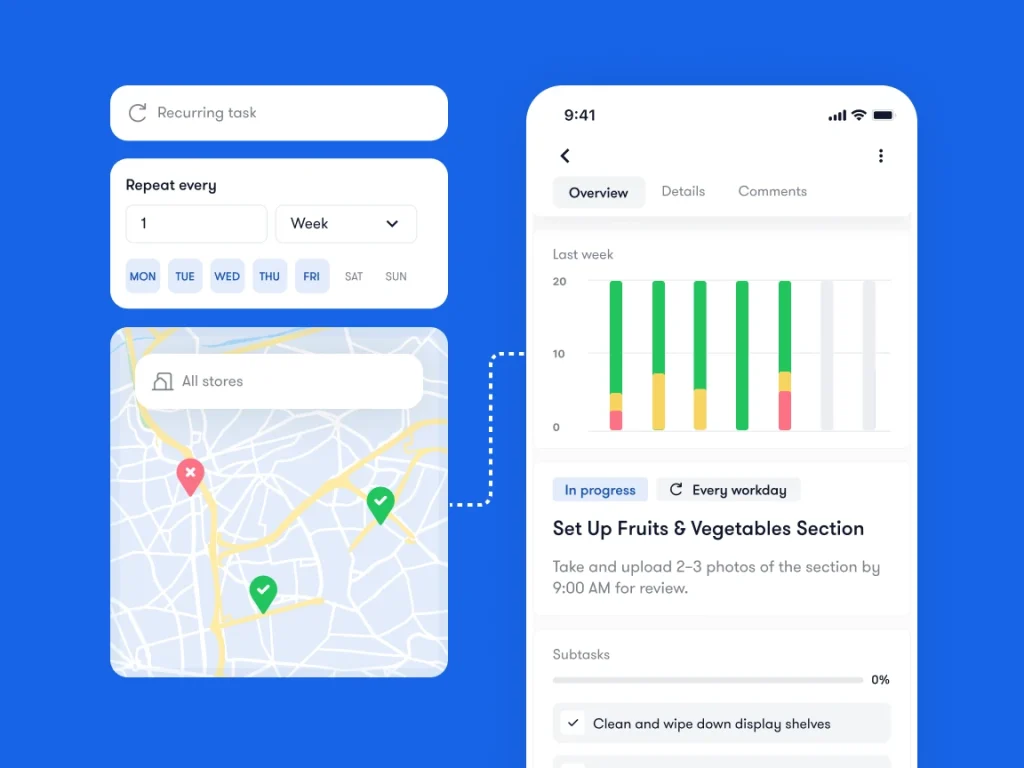
Recurring bay checks. On shift phones, schedule daily checks for chilled bays and a rotating weekly set for ambient aisles, so each shift sees only the bays due that day.
Photo evidence. Ask for a close photo when a date or lot must be read and a wider photo when shelf position matters. Neither shows the quantity left, so record the count and the time too. A tick says done. A photo shows it.
Follow-up from store visits. When an area manager finds expired or unrotated stock during an audit, a failed item creates a corrective task with an owner, a due date and a photo proof request.
Status by location. Area managers and head office can see which stores completed, missed or are late on a check, and who has to chase.
Bitreport does not replace your POS or inventory ledger, and it does not read dates off packaging or reconcile batch quantities. Keep stock records and specialist expiry rules in the systems that own them.
Three measures that show whether the routine works
Watch three numbers to see whether the routine reduces expired shelf stock or only produces paperwork.
1. Scheduled check completion rate
This shows whether stores finish their daily fresh checks and rotating ambient bay walks before the shift cutoff.
Check completion rate = (checks completed on time with the required evidence ÷ total scheduled checks) × 100
A store can report 100% completion and still fail spot checks if staff look only at the front unit of each facing.
2. Markdown sell-through rate
This shows how much near-date stock sells at a discount inside the window instead of reaching the waste crate at the pull point.
Markdown sell-through rate = (short-dated units sold on markdown ÷ short-dated units flagged in the tracker) × 100
A low rate usually means the label goes on too late, for example on the last day instead of 3 to 5 days out, or that discounted items sit buried in the regular facing.
3. Out-of-date audit hit rate
This shows how often an area manager or internal auditor finds at least one expired item on display during an unannounced retail audit.
Out-of-date audit hit rate = (store audits that found 1 or more expired items on the shelf ÷ total store audits) × 100
Pair this with your retail audit frequency rules. A store that fails two date spot checks in a row can move to a tighter visit schedule until its bay rotation settles.
A rise in recorded issues can reflect better checking, so do not present fewer reported findings as proof of lower waste. Measure write-offs from the stock records and compare like-for-like periods before you credit the process.
Frequently asked questions
How many days before the printed date should a store mark down or pull a product?
There is no universal number. It depends on the product’s shelf life, the label wording and your own policy. As an example, a store might mark chilled dairy down 3 to 5 days before the date and pull it 1 to 2 days before, while fresh prepared food is marked down on the last sell date. Infant formula should not be sold after its Use by date. Set your windows with whoever owns food-safety policy and check local rules.
What is the difference between “Best if Used By”, “Sell-By” and “Use-By”?
In the US, “Best if Used By” shows when a product has its best flavor or quality, “Sell-By” tells the store how long to display it, and “Use-By” is the last date recommended for peak quality. None of them is a safety date except “Use by” on infant formula. In the UK, use-by is a safety date and best-before is a quality date.
Can an expiration date tracker run in Excel or Google Sheets?
Yes, for one store or a bounded pilot, if rows are limited to batches inside the action window and a TODAY() formula flags the markdown and pull dates. Across many stores a sheet cannot show whether the back of the shelf was checked or whether a morning walk happened on time.
Does scanning a barcode show the expiry date?
Not by default. An EAN/UPC barcode carries the product identifier. Other barcode types can carry batch or date data, but only if the package encodes it and the scanner and software can read it.