

The customer at the till is holding up the line, and she is right: the shelf said $4.49, the register says $4.99. A retail price audit is how a store finds that gap itself, before a shopper does: it checks whether the price on the shelf, the approved price behind it and the price at checkout are the same price.
Printing a new label is not the end of that job. The promotion may not be live at the register. The endcap may still carry last week’s sign. The member price may be on display without its conditions. Each fault has a different owner, and each needs its own proof before anyone calls it fixed.
This guide walks store and area managers through an internal price check that another team can act on: what to compare, what to write down, who fixes what, and how to prove the fix. It sits inside a wider retail operations routine, and it is deliberately unglamorous. Price accuracy is a habit, not a campaign.
Three prices that have to agree
Every price in a store exists three times: the approved price or offer, the price displayed to shoppers, and the price checkout actually charges. An audit compares all three. Compare only two and you can miss the fault entirely: shelf and register can agree with each other and both be wrong against the campaign that started on Monday.
Keep product identity and offer conditions attached to every comparison. The same brand in a different pack size is a different item. A two-for-one offer cannot be tested by scanning one item and hoping. A member price tested without the membership proves nothing except that the scanner works.
A missing label and a wrong checkout price are different findings, with different owners and different fixes. A photo of a shelf label, however clear, says nothing about what the register charges. Keep them separate from the first minute.
One boundary worth stating: this is an internal operational check, not an official inspection. NIST describes its Examination Procedure for Price Verification as an inspection procedure, not a law, and pricing requirements vary by state. Follow the rules that apply to each store, and do not let an internal checklist become an excuse to leave a known error on sale.
How to run a retail price audit: pick the items first
Decide what this round is for before anyone picks up a scanner. A launch check asks one question: does the newly advertised offer work? A broader store check samples beyond the latest changes. A follow-up round retests earlier failures. Keep the three results apart: a short list of previously failed items, retested, is not the store’s accuracy score.
Point the round where faults like to hide: recent price changes, offers starting or ending this week, products displayed in more than one place, and anything customers have already complained about. Then add unchanged items from departments nobody has walked lately. A team that always checks the same shelf has excellent evidence about that shelf.
Write down how the items were chosen and what was not covered. An internal selection is not automatically a representative sample, and the report should not pretend otherwise. Where an official or certified inspection is required, use the prescribed procedure for that inspection.
Before the walk, confirm that the team has:
The current approved price or campaign reference, including effective dates and applicable stores.
Identifiers precise enough to distinguish product variants and pack sizes.
An approved way to test checkout without creating unintended sales or stock movements.
Named contacts for store labeling, pricing configuration and unresolved campaign decisions.
There is no sensible universal item count, and this guide will not invent one. A convenience store, a supermarket and a chainwide promotion launch are different amounts of work. Set the coverage the shift can actually finish, then record what was checked. A smaller finished round beats a heroic plan abandoned at aisle nine.
Test the price the customer actually pays
At the shelf, match the product identifier to the label and photograph enough of the display to show which item the price belongs to. Then check the item’s other homes: the endcap, the entrance sign, the promotional bay. The main aisle is often right. The secondary display is where yesterday’s offer goes to live on.
At checkout, test the same item under the conditions shown to the shopper, and record the item-level result and the discount applied. Do not compare a shelf price with a basket total full of unrelated products, taxes and deposits; that comparison can neither pass nor fail honestly. Where extra charges apply, record them separately and check the required display under local rules.
Promotions get their own test cases: the qualifying quantity, the eligible variant, the membership or code the offer demands. Shopify’s automatic-discount documentation spells out the same logic for its system: the cart must contain the eligible items and the customer must meet the conditions. Every till system has its own version of that configuration. An offer that works on the website is not evidence that the store’s checkout is set up correctly.
Watch for the manual override. A cashier keying in the right price rescues one customer and leaves the fault in place for the next two hundred. Record the override, then retest the normal checkout path once the responsible team has made the correction.
Keep the evidence clean: no customer names, no payment details, no unrelated receipt lines. Keep only what another person needs to reproduce the finding.
Record the mismatch so someone else can fix it
“Wrong price in aisle 4” sends the next person back to the shelf to investigate from zero. A record that earns its keep names the store, the exact item, where it is displayed, the approved reference, the shelf price seen, the checkout result and the time of the test, with the offer conditions and a photo or test reference attached.
Write down what you saw before you guess why it happened. “Shelf label shows $4.49; checkout shows $4.99 for one item” is evidence. “The overnight update failed” is a theory until the pricing team checks it. Theories in the notes have a way of hardening into facts by the second retelling.
These are the fields worth capturing for every item, whether it passes or fails:
| Check | Compare or record |
|---|---|
| Product identity | SKU or UPC, variant, pack size and quantity |
| Approved reference | Current price or offer, version and effective period |
| Shopper-facing display | Shelf label, endcap sign and other displays for that item |
| Checkout result | Item price and applicable discount under the tested conditions |
| Offer eligibility | Required quantity, membership, code, store and time window |
| Finding | Match, mismatch, missing label or unable to verify |
| Follow-up | Correction owner, deadline, evidence and retest result |
And keep an honest unable-to-verify status for the items you could not test: no reference, no working test path, no confident product match. Marking them as passes to finish the round makes the report prettier and the next audit harder. Give the gap an owner and keep it on the same list as the confirmed errors.
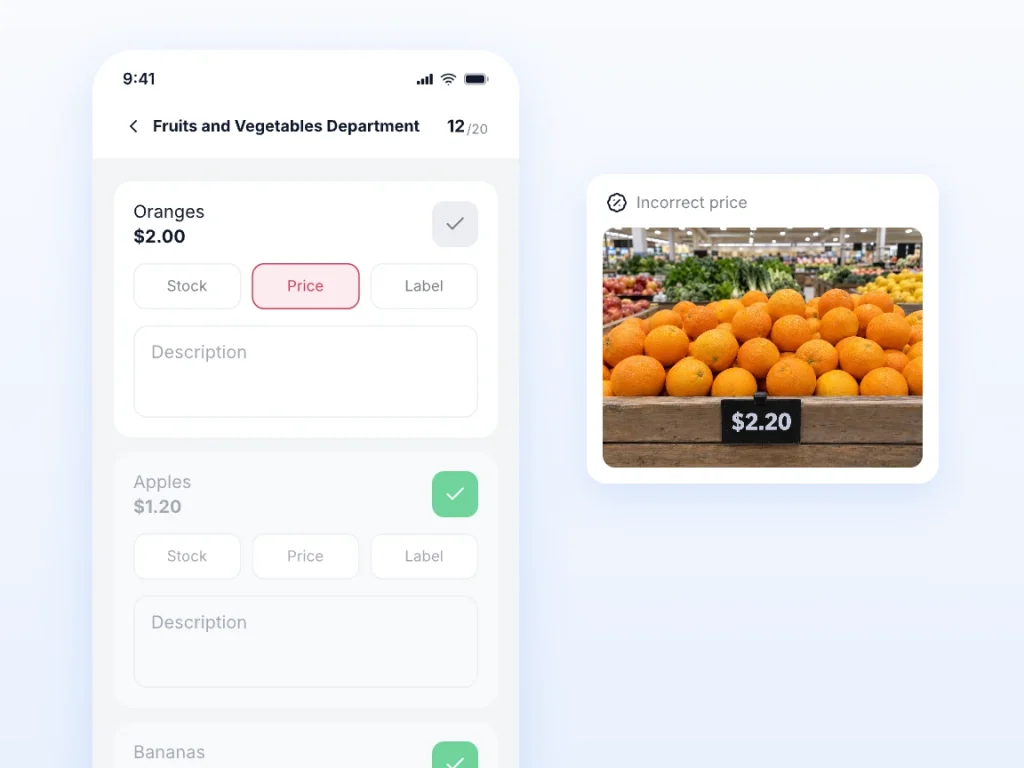
Bitreport’s price control workflow gives field teams a mobile checklist for recording price, label and availability issues, and lets store and commercial teams review findings by location, issue type or product. The record coordinates the correction; the price configuration and the checkout test still belong to the teams and systems that own them.
Fix it, then test it again
Route the finding to whoever owns the thing that is actually wrong. A tired label or expired promotional sign is store work. Wrong approved data or a broken discount configuration belongs to the pricing or POS owner. And when the approved reference itself is unclear, no store effort can produce a match: the commercial owner has to settle the reference first.
While the fault is open, the store manager follows the retailer’s approved customer-response and escalation procedure. This guide will not invent a refund rule or a promise to honor an offer that applies in every jurisdiction, and neither should a store.
Deadlines should follow customer impact, not inbox order. A live checkout mismatch on an item selling today is urgent. A missing reference with no complaint yet still needs investigating; it is how the next mismatch is already loading.
Correction and verification are two events, recorded separately. Note who changed what, and when. Then repeat the shelf and checkout checks. The photo of the new sign verifies the sign; a fresh checkout result verifies the charged price. The finding closes when both proofs exist, not when the task was marked done.
If the fault could exist in other stores, it probably does. Send those locations a targeted check for that item and keep them unverified until they answer. One fixed register proves one fixed register. Tying the follow-up to the original promotion execution work lets the campaign owner see every affected location at once.
Worked example: the shelf is right, the checkout is wrong
An invented example, with invented people and prices. It shows the workflow, not a customer result and not a promised response time.
9:15 AM EDT. Maya runs the round at Store 12 and the coffee fails: both shelf displays show the approved $4.49 weekly offer, the checkout test charges $4.99. She records the item, both display locations, the offer reference and the test result before she touches anything.
Same morning. The finding goes to Alex, the pricing owner, because that is where the fault lives. The store manager follows the company’s customer-response procedure in the meantime. Nobody reprints the labels: they were the one part that was right.
10:05 AM EDT. Alex has corrected the store’s price setting. Maya repeats the test under the same conditions and gets $4.49, then looks at both displays again. The record keeps the original failure, the correction and the successful retest. The other stores in the offer get a targeted check for this item and stay unverified until they report back.
Filled in, the record for that one item reads:
| Field | What Maya recorded |
|---|---|
| Item | 12 oz ground coffee, SKU recorded with pack size and variant |
| Store and displays | Store 12; weekly-offer shelf label and entrance display |
| Approved reference | Weekly offer, $4.49, effective this week |
| Shelf price seen | $4.49 on both displays |
| Checkout test | $4.99 for one item, tested at 9:15 AM EDT on Oct 25, 2026 |
| Finding | Mismatch: checkout price wrong, shelf displays correct |
| Correction | Pricing owner corrected the store’s price setting; labels left alone |
| Retest | 10:05 AM EDT, same conditions: $4.99 corrected to $4.49 at checkout |
Had the retest still shown $4.99, the finding would have stayed open, whatever the task list said. A completed configuration change is an activity. A correct price at the till is the result.
How often should you run a price audit?
Attach checks to the events that can break a price: a price update, a campaign launch, a promotion ending, a relabeling exercise, a checkout configuration change. Then add a slower, broader round that reaches the departments no campaign ever touches. The calendar follows the changes, not the other way round.
The two levels see different things. A store manager checks whether today’s changes reached the shelf. An area manager reads across stores: which findings stay open, which repeat, which stores keep failing the same item. There is no honest chainwide answer of “daily” or “weekly” that survives contact with different store sizes and change volumes, and this guide will not offer one.
Open findings belong in the handover, with their status, owner and next update time, so the next shift does not rediscover them from a customer. For planning recurring reviews more broadly, the retail audit frequency guide covers how to set the rhythm.
Two numbers worth tracking
Define the unit first: one item test is one identified product tested under one recorded set of offer conditions, and its first result is the one that counts. Retests belong to the correction record, not to a second chance at the score.
Calculate the share of completed initial tests with a match:
Initial tested-price accuracy = matching initial item tests ÷ all completed initial item tests × 100
Thirty-eight matches from forty completed tests is 95%. If five more tests were planned and could not be completed, report the five separately: they are not passes, and they are not nothing. And read the number for what it is: a result for the items tested, not a claim that 95% of every price in the store is right.
Track whether confirmed mismatches have been verified as corrected:
Verified correction rate = initial mismatches with a successful retest ÷ all initial mismatches × 100
Keep the period and the original group of findings fixed while you measure. Fixing both mismatches in a round gives a 100% verified correction rate for those two findings; it does not reach back and improve the 95% first-check result. Beside the two percentages, keep the list that actually drives the work: open findings, their age, and the causes that keep coming back: a missed label, promotion conditions nobody could test, a configuration fault that deserves fixing at the source.
Make the next price change easier to verify
Before the next price change lands, agree the boring parts in advance: the approved reference, the test conditions, the evidence each finding needs, and the owner for each kind of correction. Then rehearse with a real mismatch, end to end, including the moment the store cannot fix it alone. That is when the escalation path either exists or does not.
Bitreport’s audits and checklists support recording findings and following corrective work across locations. To see how that could fit your price-check routine, book a demo with one recent price-change example.
Frequently asked questions
Is a retail price audit the same as competitor price monitoring?
No. This type of audit checks whether your own approved, displayed and charged prices agree. Competitor price monitoring compares another retailer’s prices to inform commercial decisions. It does not establish that your own shelf labels or checkout offers are correct.
Can a barcode scan replace a checkout test?
Only if the test actually verifies the customer-facing checkout result under the relevant conditions. A scan that merely identifies the item or retrieves a reference price does not show whether quantity rules, discounts or eligibility will be applied correctly at checkout.
What should happen when a price mismatch cannot be fixed in the store?
Record the evidence, assign the finding to the responsible pricing or system owner, and keep a named store contact for the retest. Follow the approved customer-response procedure while the issue is open. Do not close it just because it has been sent to another team.