

Running one retail store is challenging enough – but when you’re responsible for five, fifty, or five hundred locations, maintaining consistent standards across every single one becomes a fundamentally different problem. In fact, the question of how to manage multiple stores effectively keeps district managers, operations directors, and retail executives up at night – and for good reason. Each new location introduces new variables: different teams, different customer demographics, different local challenges, and different ways that standards can quietly erode.
Because of that, the retailers who solve this problem don’t rely on heroic individual effort or constant travel between locations. Instead, they build systems. More specifically, they build structured retail audit processes that give them visibility, consistency, and control across their entire portfolio – without requiring them to be everywhere at once.
In fact, a well-designed retail audit framework is one of the most effective ways to maintain operational consistency at scale. It helps you standardize expectations, monitor execution, and quickly identify gaps across all your locations – before they turn into costly problems.
In this guide, we’ll break down exactly why multi-location retail operations are so difficult to manage, how to build an audit framework that scales, and how technology can transform your approach from reactive firefighting into proactive, data-driven leadership.
The Core Challenges of Managing Multiple Stores (And Why Traditional Methods Fail)
Before diving into solutions, it’s worth understanding why multi-store management is such a distinctly difficult problem – and why the approaches that work for a single location collapse when you apply them across a growing portfolio.
Why complexity grows exponentially, not linearly
Here’s a counterintuitive truth: going from one store to ten doesn’t make your job ten times harder. Instead, it makes it exponentially harder. That’s because you’re no longer just managing individual units – you’re managing the interactions between them. Inventory transfers, staff movement between locations, regional promotional variations, and the need to maintain a unified brand experience across diverse neighborhoods all create compounding complexity.
According to Deloitte’s 2026 Retail Industry Global Outlook, 96% of global retail executives expect industry revenues to grow, while 81% foresee margin expansion. However, achieving that growth depends heavily on operational discipline across locations. Expanding your store count without expanding your operational rigor is a recipe for margin erosion, not margin expansion.
The visibility gap: What you don’t know is hurting you
Most multi-store managers suffer from what we call the visibility gap – the dangerous space between what’s actually happening in your stores and what you think is happening. When you can’t physically be in every location every day, you rely on reports, phone calls, and the assumption that no news is good news.
Unfortunately, problems rarely announce themselves. A merchandising display stays set up incorrectly for two weeks. A closing team skips a safety protocol. A promotional campaign never gets properly executed at three of your fifteen locations. By the time these issues surface – through customer complaints, lost sales, or a compliance violation – the damage is already done.
As a result, this gap widens with every store you add. And without a systematic way to close it, you’re essentially managing blind.

Common pitfalls of spreadsheet-based and manual oversight
Many retail operators attempt to manage chain stores efficiently using tools they already have: spreadsheets, email chains, paper checklists, and periodic store visits. These methods work passably at small scale but break down predictably as you grow:
Spreadsheets become version-control nightmares. Which file is current? Who updated it last? Did the changes sync across everyone’s copies?
Email chains bury critical action items in threads that grow unwieldy within days. As a result, follow-up becomes a manual exercise in scrolling and searching.
Paper checklists generate data that sits in binders, never aggregated, never analyzed, and never compared across locations.
Periodic store visits provide snapshots, not trends. Stores can “perform” for a visit and revert to old habits the next day.
Without a systematic retail audit framework, standards naturally drift over time – a phenomenon sometimes called “standard decay.” Each location slowly develops its own interpretation of brand guidelines, its own shortcuts, and its own version of “good enough.” Ultimately, across fifty locations, you can end up with fifty different customer experiences – none of which match the one you intended.

Building a Retail Audit Framework for Multi-Store Consistency
The antidote to standard decay and the visibility gap is a structured, repeatable audit process designed specifically for multi-location retail operations. So, here’s how to build one that actually scales.
Defining what to audit: Prioritizing high-impact areas across locations
You can’t audit everything – and you shouldn’t try, especially at the start. Instead, the key is identifying the operational areas that most directly impact customer experience and revenue. For most retailers, these fall into five core categories:
Merchandising compliance – Are displays set up correctly? Are planograms being followed? Is pricing accurate and visible?
Cleanliness and store appearance – Does the store meet brand standards for cleanliness, organization, and visual presentation?
Safety and compliance – Are fire exits clear? Is equipment maintained? Are regulatory requirements being met?
Staff readiness – Are employees properly trained, uniformed, and present in the right numbers for the shift?
Promotional execution – Are current campaigns properly displayed, stocked, and communicated to staff?
These categories matter because they’re where inconsistencies have the most direct impact on your bottom line. For example, as Mood Media’s 2026 retail trends analysis notes, physical store locations invite customers to touch and feel products, add value through human connection, and offer upsell opportunities – but only when teams execute the in-store experience consistently. A poorly merchandised store doesn’t just lose one sale; it undermines the entire value proposition of physical retail.

Creating standardized audit checklists that scale
Standardized checklists are the backbone of multi-store consistency. They ensure every location is measured against the same criteria, eliminate subjective assessments, and enable true apples-to-apples comparison. For a deeper look at what to include, see the key elements every retail audit checklist must have.
Effective audit checklists share several characteristics:
Specific and observable – Each item describes a concrete, verifiable condition (e.g., “Promotional end-cap matches current planogram” rather than “Store looks good”).
Scored consistently – Use a clear rating system (pass/fail, 1-5 scale, or compliant/non-compliant) that leaves minimal room for interpretation.
Organized by category – Group items by operational area so auditors can work through them efficiently and results can be analyzed by category.
Photo-evidence enabled – Require photos for failed items to provide context and prevent disputes about findings.
To start, use a core checklist of 20-30 critical items rather than trying to audit everything at once. A focused checklist gets completed thoroughly and consistently. Then, you can expand it as the process matures and your team builds the audit habit. Tools like Bitreport’s audits and checklists module make it easy to create, distribute, and update standardized checklists across all your locations from a single platform – ensuring every store always works from the current version.

Setting audit frequency and scheduling across your store portfolio
Not every store needs the same level of audit attention. Therefore, a risk-based approach to scheduling ensures you allocate your limited audit resources where they’ll have the greatest impact:
Weekly audits for high-traffic flagship locations, newly opened stores, or locations with a recent history of compliance issues.
Bi-weekly audits for mid-tier locations or stores going through staffing transitions.
Monthly audits for stable, consistently high-performing locations.
This way, you prevent audit fatigue at your best stores while ensuring struggling locations get the attention – and support – they need. SaaS tools like Bitreport enable centralized scheduling that would be impossible to coordinate manually across dozens of locations, automatically assigning audits, sending reminders, and tracking completion rates across your entire portfolio.

Assigning roles and responsibilities for audit execution
Clarity about who conducts audits is just as important as deciding what gets audited. Most successful multi-store operators use a layered approach:
Store manager self-audits (weekly or bi-weekly) – Build daily accountability and self-awareness at the store level.
District manager audits (monthly or bi-monthly) – Provide an independent, cross-location perspective and create coaching opportunities.
Dedicated audit teams or mystery shoppers (quarterly) – Offer an unbiased assessment that neither store nor district managers can influence.
Each layer serves a different purpose, and together they create a comprehensive picture of operational health. Most importantly, the key is establishing clear accountability: everyone should know what they’re responsible for auditing, when it’s due, and what happens with the results.
Using Audit Data to Drive Multi-Store Performance
Collecting audit data is only the beginning. More importantly, the real value – and the real competitive advantage – comes from what you do with that data across your entire store portfolio.
Turning audit results into actionable insights across locations
Raw audit scores are just the starting point. A single store scoring 78% on a merchandising audit tells you something. However, when you can see that all your stores are scoring below 80% on the same three merchandising items, you’ve identified a systemic issue – perhaps unclear guidelines, inadequate training materials, or an unrealistic planogram that doesn’t account for varying fixture types.
In other words, this is the difference between managing individual problems and managing your business. Effective audit data analysis looks at:
Trends over time – Is a particular store improving or declining? Is a specific audit category getting better or worse across the portfolio?
Cross-location patterns – Are the same items failing at multiple locations, suggesting a systemic issue rather than a local one?
Category-level performance – Is your portfolio strong on safety but weak on promotional execution? That tells you exactly where to focus your improvement efforts.

Benchmarking stores against each other to identify best practices and problem areas
Cross-store benchmarking is one of the most powerful capabilities that multi-location retail operations have – and one of the most underutilized. When you can rank your stores by overall audit score or by specific categories, you unlock several opportunities:
Identify top performers and study what they’re doing differently. Can your team document their practices and share them?
Spot struggling locations early – before declining standards translate into declining revenue.
Allocate resources intelligently – send your best district manager to the store that needs the most help, not the one that’s closest.
Create healthy competition – when store managers can see how they rank relative to peers, intrinsic motivation kicks in.
As the National Retail Federation’s 2026 trends report highlights, technology innovation and operational efficiency are top priorities for retail leaders. Therefore, benchmarking turns your audit data into a strategic asset that drives both.
Closing the loop: Corrective actions, follow-ups, and accountability
This is where most audit programs fail – and where effective ones create lasting change. Every failed audit item should trigger a corrective action with three essential elements:
A clear owner – Who is responsible for fixing this specific issue?
A deadline – By when must it be resolved?
Follow-up verification – How will we confirm it was actually fixed?
This closed-loop process is what separates effective audits from checkbox exercises. Without it, audits become administrative theater – data gets collected, reports get filed, and nothing changes. By contrast, with platforms like Bitreport, audits and automatic corrective measures connect directly, so a failed item automatically generates a task with an assigned owner and deadline. The task management functionality ensures nothing falls through the cracks.

Creating a culture of continuous improvement, not punishment
How you frame audits matters enormously. If store teams perceive audits as surveillance – a “gotcha” exercise designed to catch them doing something wrong – they’ll game the system, hide problems, and disengage from the process.
On the other hand, the most effective multi-store operators frame audits as tools for support and improvement:
Share audit results transparently and use them as coaching conversations, not disciplinary events.
Celebrate improvements and high scores, not just flag failures.
Ask store teams for input on checklist items – they often know better than headquarters what teams should measure.
Use audit data to identify where stores need more resources, training, or support – and then actually provide them.
As a result, stores that see audits as helpful rather than punitive engage more honestly, report issues proactively, and improve faster. This cultural foundation is essential to the broader retail audit framework described in our complete guide – and it becomes even more critical as you scale across more locations.

Scaling Your Audit Process with Technology
At some point – usually sooner than most operators expect – manual audit processes hit a wall. Technology isn’t a luxury for multi-store management; it’s a necessity.
Why pen-and-paper audits cannot survive multi-store growth
As store count grows, manual processes create compounding bottlenecks:
Reports pile up faster than anyone can review them.
Data entry errors increase, undermining the reliability of your insights.
Consolidating findings across locations becomes a full-time job in itself.
Historical trend analysis is practically impossible when data lives in scattered documents and spreadsheets.
The time between identifying an issue and resolving it stretches from days to weeks.
These aren’t minor inconveniences – they’re structural limitations that prevent you from managing chain stores efficiently at scale.
Key features to look for in a retail audit platform
When evaluating retail audit software, multi-store operators should prioritize these essential capabilities:
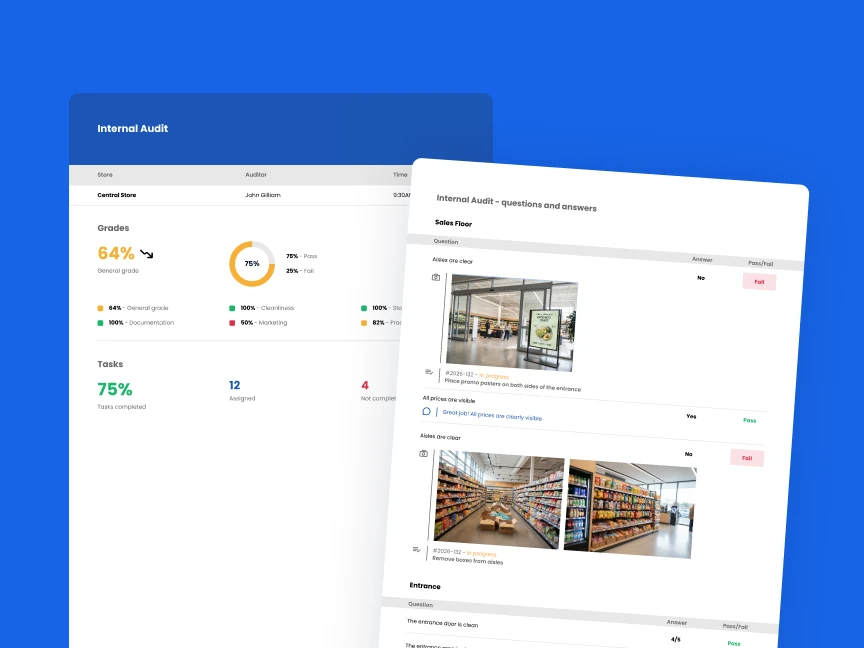
Centralized dashboard views – See the status of all locations at a glance without logging into separate systems or waiting for emailed reports.
Customizable checklists – Create and update audit templates centrally and distribute them instantly to all locations.
Photo evidence capture – Require visual documentation of issues to provide context and eliminate ambiguity.
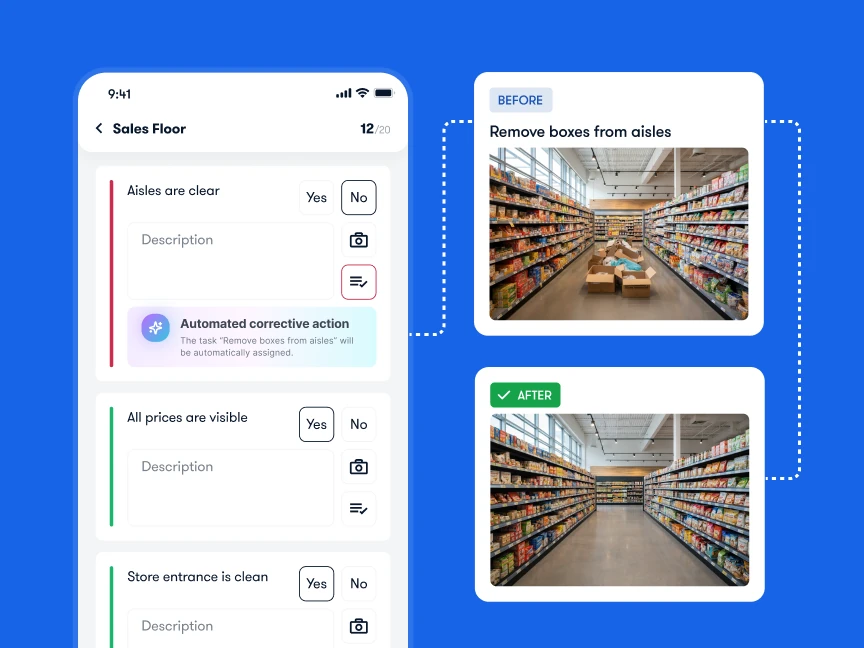
Automated corrective action workflows – Automatically generate tasks from failed items with assigned owners and deadlines.
Cross-location analytics – Compare performance across stores, regions, and time periods to identify trends and patterns.
Mobile-first design – Auditors need to work from the store floor, not from a desktop computer.
Real-time data synchronization – Results should be visible to managers the moment an audit is completed, not after a manual upload process.
How Bitreport simplifies multi-store audit management
Bitreport is purpose-built for exactly this challenge. It enables retail operations teams to create, distribute, and analyze audits across any number of locations from a single platform. Checklists are managed centrally and pushed to all relevant stores instantly. Completed audits sync in real time, populating dashboards that give operations leaders a single-pane-of-glass view of their entire portfolio.
When an audit item fails, Bitreport automatically triggers a corrective action workflow – assigning the task to the right person, setting a deadline, and tracking it through to verified resolution. As a result, you no longer need manual follow-up emails. Likewise, you no longer lose issues because someone forgot to check a spreadsheet.
Ready to bring structure and visibility to your multi-store operations?
Real-world impact: What changes when you digitize audits across locations
Consider this scenario: A district manager oversees 15 stores spread across a metropolitan area. With a manual process, reviewing audit results from all locations might take most of a day – assuming reports were submitted on time and in the correct format. Identifying which stores need immediate attention requires comparing multiple documents side by side.
With a digitized audit platform, that same district manager can review all 15 stores’ audit results in minutes. The dashboard immediately highlights the three locations that scored below threshold this week. She drills into the specific failed items, reviews the photo evidence, and assigns corrective actions – all without leaving her desk. By the time she plans her store visits for the week, she already knows exactly where to go and what to focus on.
Digitizing audits typically delivers measurable improvements:
30-50% reduction in audit completion time, freeing auditors to spend more time coaching and less time on paperwork.
Dramatically increased data accuracy, eliminating transcription errors and ensuring consistent scoring.
Compressed issue-to-resolution time – the most important metric of all, because faster resolution means less customer impact and less revenue loss.
Still, it’s important to emphasize: technology serves the process, not the other way around. Even the best software cannot fix a poorly designed audit framework. The foundational work of defining what to audit, creating effective checklists, and building a culture of continuous improvement – as described in our complete retail audit guide – is what makes the technology effective.
Conclusion: From Reactive Chaos to Proactive Control
Managing multiple stores successfully is ultimately about maintaining visibility and consistency at scale. It’s about knowing what’s happening across all your locations – not just the ones you visited this week – and having the systems in place to ensure that every customer, at every store, gets the experience your brand promises.
Retail audits provide the structured framework to achieve this. They transform multi-store management from reactive chaos – where you’re constantly putting out fires you didn’t see coming – into proactive, data-driven leadership where you anticipate issues, allocate resources strategically, and continuously raise the bar across your entire portfolio.
To move forward, the path is clear:
Define clear audit standards focused on the operational areas that matter most.
Execute them consistently across all locations with standardized checklists and risk-based scheduling.
Leverage the resulting data for cross-store benchmarking, trend analysis, and targeted improvement.
Scale the entire process with purpose-built technology that eliminates manual bottlenecks.
Retail operators who follow this approach can grow their store count without growing their problems. In other words, they can add locations with confidence, knowing that their audit framework will maintain the standards that define their brand.