

A single missed refrigerator temperature check can quickly turn into spoiled inventory. An overlooked out of stock shelf during peak hours quietly eats into your sales. A fire exit blocked by delivery pallets is not just a mistake, it is a serious safety risk. Yet despite these very real consequences, many store visits still rely on gut feeling, scribbled notes, and inconsistent follow ups. Without a structured process, even experienced teams can miss critical details. This is where a well designed store visit checklist makes all the difference. It transforms reactive walkthroughs into proactive, data driven inspections and helps you protect your brand, ensure compliance, and improve in store performance at scale.
To better understand the role of a retail audit in driving consistent results across locations, it is worth exploring the bigger picture. In this guide, we will show you how to build, customize, and continuously improve a checklist that delivers real results, whether you manage five locations or five hundred.

Why a Well-Designed Store Visit Checklist Matters
Unstructured store visits quietly reduce operational performance. When field managers walk a store without a clear framework, reports become subjective. In other words, they depend on what stands out that day, not what the business needs to evaluate. As a result, issues are missed, follow-up is inconsistent, and comparisons across locations become unreliable. Research shows that standardized checklists can reduce oversight errors by up to 30%. This happens because they remove guesswork from the process.
A retail store audit checklist ensures that every auditor evaluates the same criteria in the same way. Therefore, consistency improves across all locations. This consistency enables benchmarking, meaningful trend analysis, and fair performance scoring. Without it, comparing stores becomes unreliable every time.
At the same time, checklists do not stand alone. They are part of a broader retail audit guide framework. This framework includes scheduling, scoring methods, corrective actions, and long-term analysis. In short, mastering your store visit checklist is essential. It acts as the data engine that supports the entire audit process.

The Cost of Unstructured Store Visits
When visits lack structure, problems grow quickly. For example, field managers may focus on visible issues but miss critical compliance risks in back-of-house areas. In addition, inconsistent reporting makes it hard to detect recurring problems. A food safety issue might continue for months because different auditors check different things. The financial impact is real. It includes lost sales, regulatory fines, and higher shrinkage due to missed security gaps.
How Checklists Drive Consistency Across Locations
A well-designed store walkthrough checklist creates consistency. Whether a senior manager visits a flagship store or a new employee inspects a rural outlet, the criteria stay the same. As a result, you can compare scores, identify top and weak performers, and focus resources where they matter most. In addition, it provides a clear and auditable record of every inspection.
Linking Checklists to Your Broader Retail Audit Strategy
Your checklist is the starting point of your audit program. The data it collects feeds dashboards, triggers actions, and reveals trends. Moreover, as in store experiences become more intentional and easier to navigate, your checklist confirms whether those strategies are executed in practice.

Step-by-Step: Building Your Store Visit Checklist from Scratch
Creating an effective store inspection checklist template requires focus. It is not about listing everything. Instead, it is about capturing the right data in a clear format. This ensures anyone can use it consistently. Follow these five steps to build your checklist.
Step 1: Define Your Audit Objectives and Scope
First, define what each visit should achieve. Are you checking compliance, merchandising, or safety? Or all of them? Your goals shape the scope and duration of the visit. For example, a quick compliance audit differs from a full brand review. Therefore, define the visit type, expected time, and responsible person. Then, align the checklist with those needs.
Step 2: Identify Key Inspection Categories
Next, divide your checklist into clear categories. These should follow the natural flow of a store visit. Common categories include:
Store exterior: signage, parking lot, entrance condition
Interior cleanliness and maintenance: floors, lighting, restrooms
Product merchandising: planogram compliance, pricing accuracy, stock levels
Staff compliance: uniforms, customer interaction, training checks
Health and safety: fire exits, equipment condition, food safety
Customer experience: wait times, checkout speed, overall feel
This structure helps auditors move through the store step by step. As a result, fewer items are missed.

Step 3: Write Clear, Actionable Checklist Items
Clarity is essential for a reliable retail visit checklist template. Each item should be easy to understand. That way, all auditors interpret it the same way. Compare these examples:
Vague: “Displays look good”
Actionable: “All promotional end-cap displays match the current planogram Week 12 Spring Campaign”
The second version is clear and measurable. Therefore, use pass or fail options or simple scales. Add short notes when needed. For example, in grocery stores: “Cold chain temperature for dairy section is between 2°C and 4°C.” In fashion retail: “All mannequins display the current seasonal collection.”
Step 4: Assign Scoring Criteria and Weighting
Not all items are equally important. For instance, a blocked fire exit is far more serious than dust on a shelf. Therefore, use weighted scoring. Assign higher weight to critical risks like safety and compliance. For example, safety items can be 3x, operational items 2x, and visual items 1x. This approach ensures the final score reflects real priorities.
Step 5: Add Photo and Evidence Requirements
Finally, include photo evidence for key items. This creates a clear record and reduces disputes. It also speeds up corrective actions. Mark items that require photos, such as temperature checks or safety equipment. In fact, structured audit checklists that include evidence capture perform better than text-only reports.

Customizing and Digitizing Your Checklist for Maximum Impact
A generic checklist often misses important details. Different store types require different checks. Therefore, to improve your retail store evaluation form, focus on flexibility and the right tools.

Tailoring Checklists by Store Format, Region, or Season
Use modular templates. Start with a core checklist, then add sections based on store type or season. For example, grocery stores may include frozen goods only where needed. Fashion stores can activate seasonal displays in Q4. In addition, regional rules may require specific safety checks. This approach keeps your checklist relevant without creating too many versions.
Moving from Paper to Digital: Benefits and Best Practices
Paper and spreadsheets have clear limits. They create version issues, delays, and lost data. Moreover, they do not support photos or real-time alerts. As performance optimization research confirms, faster and more reliable data capture improves results. Digital tools solve these problems. They allow real-time input, automatic scoring, and cloud storage. To transition, start small, test with a pilot group, and improve before full rollout.
Solutions like Bitreport’s audits and checklists help teams build and manage checklists at scale. They also connect results to action workflows. With digital audits and automatic action plan, critical issues trigger tasks automatically. This ensures problems are not only recorded but also resolved.
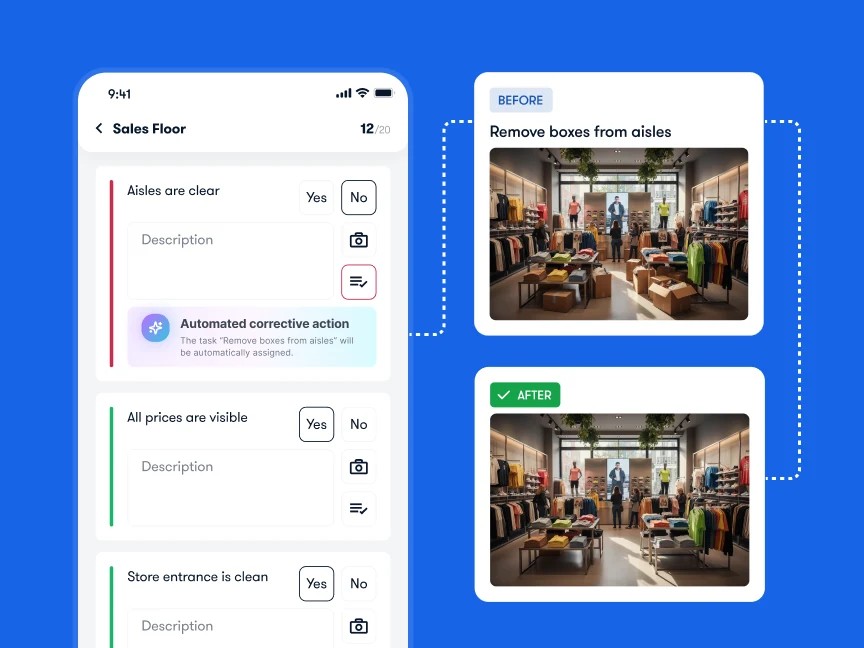
Using Software to Automate Scoring, Alerts, and Reporting
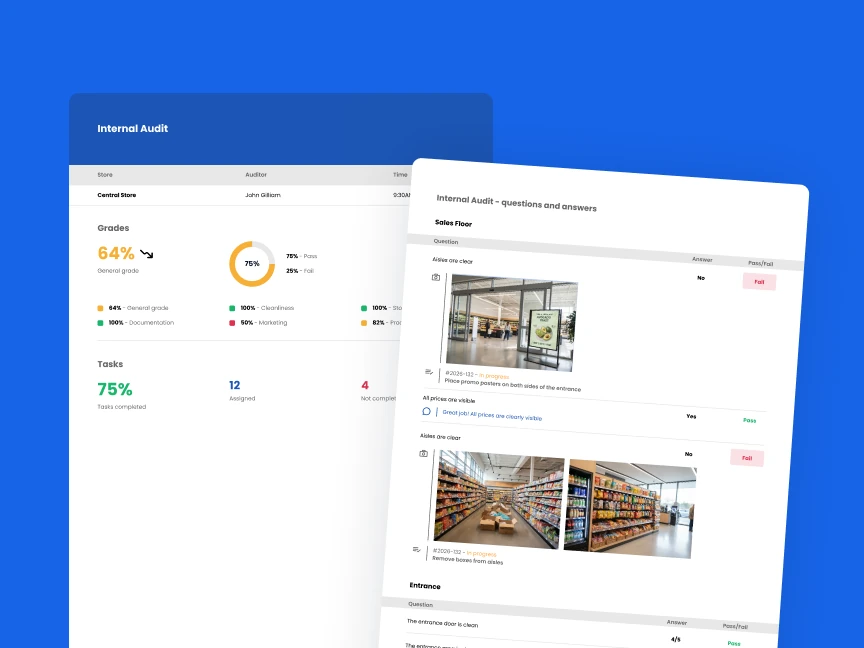
Digital tools offer features that manual methods cannot match. For example, scores are calculated instantly. This removes delays. In addition, alerts notify managers immediately when critical issues occur. As a result, action can be taken the same day. Dashboards also combine data from all stores, giving a full overview. Furthermore, integration with POS systems and sensors provides deeper insights.
Continuous Improvement: Reviewing and Refining Your Checklist
A store visit checklist should evolve over time. Successful retailers treat it as a living document. It adapts to business needs, regulations, and insights. With Bitreport, teams can turn data into meaningful improvements.
Take control of your operations, before chaos takes control of you.
Analyzing Checklist Data to Spot Trends
Review results across stores and time periods. Look for patterns. For example, if many stores fail the same item, the issue is likely systemic. It may involve poor processes or unclear instructions. Therefore, focus on fixing root causes rather than blaming stores.
Gathering Feedback from Field Teams
Your field teams provide valuable insights. Create a feedback process where they can report unclear or outdated items. In addition, they can suggest improvements based on real situations. This keeps your store walkthrough checklist practical and relevant.
Iterating on Your Checklist Quarterly
Set a quarterly review schedule. During each review, remove items that always score perfectly. Add new ones based on changes or new goals. Also, adjust weights if priorities shift. Over time, this process improves your checklist and overall audit quality.

Conclusion
A strong store visit checklist is more than a simple list. It is a strategic tool that standardizes inspections and supports better decisions. By setting clear goals, writing precise items, applying weights, digitizing processes, and improving regularly, you create a retail store audit checklist that drives results.
Ultimately, the difference between strong and weak retail execution often comes down to structure. A well-designed checklist, supported by the right tools, makes that difference. Whether you are building your first store inspection checklist template or improving an existing one, these steps will help you improve performance.